Best-Selling Items on Grab: Find Them, Then Build Your Menu Around Them
How to find the dishes that actually sell on your GrabFood menu, sort them by popularity and margin, and give them the position, photos and prices they need.
GrabFood publishes no list of best-selling dishes: your own best sellers are in the GrabMerchant Portal's Menu Insights, the items with the most orders and the ones customers order together, and this guide shows how to sort them by sales and margin and give them the position, photos and prices they need.
There is no public list of the dishes that sell best on GrabFood, and no list from someone else's restaurant would tell you much about yours. What sells depends on your cuisine, your zone and your customers. The useful work is to find your own best sellers in your data, then give them the position, the photos and the prices they deserve.
1. Start from your own data
The GrabMerchant Portal's Menu Insights shows the sales trend of each menu item and the items customers most often order together. The Portal also shows lost orders, peak hours and customer retention.
Do this: export the last 90 days and list every item with two numbers: how many times it sold, and what it leaves you per sale after commission and food cost. If you do not know the second number, the commission guide shows how to work it out.
2. Sort the menu into four groups
Menu engineering, a method restaurants have used since the 1980s, sorts every item on two questions: does it sell well compared with the rest of the menu, and does it leave a good margin?
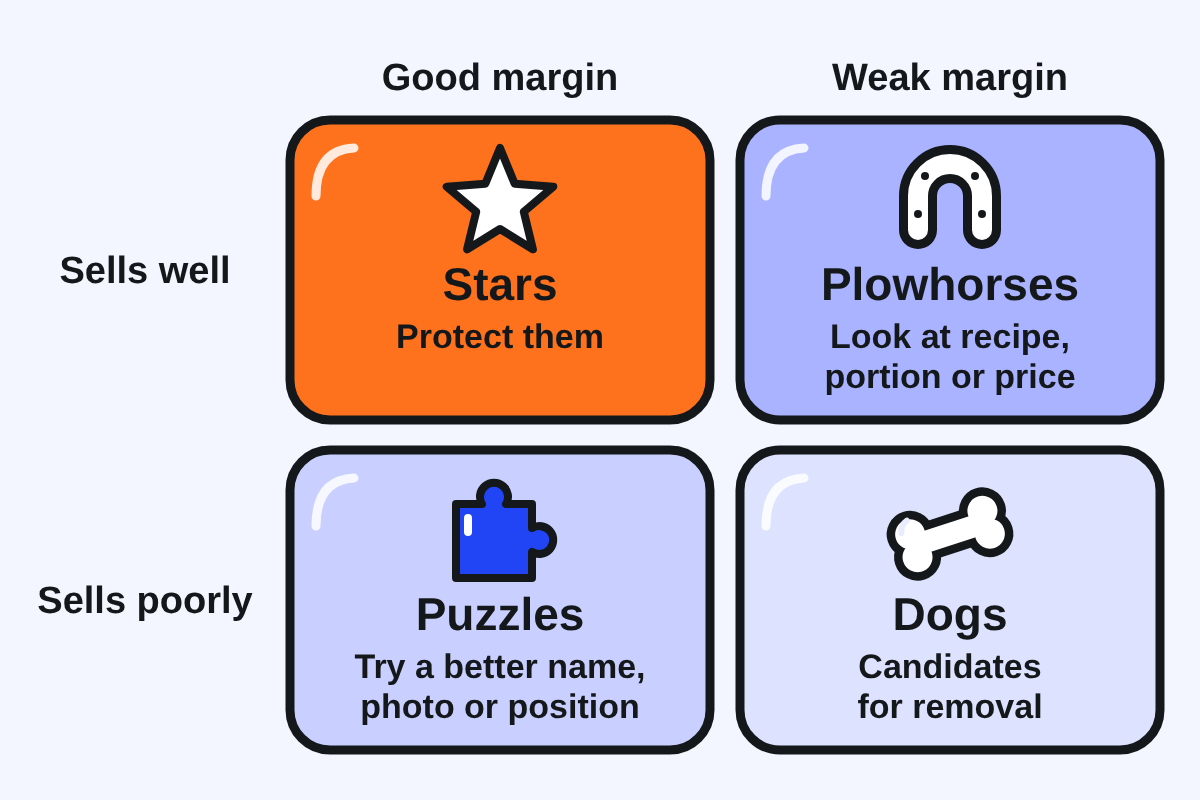
| Good margin | Weak margin | |
|---|---|---|
| Sells well | Stars. Protect them: top of the menu, best photos, never out of stock. | Plowhorses. Customers want them. Look at the recipe, the portion or the price before anything else. |
| Sells poorly | Puzzles. Worth selling, not being chosen. Try a better name, photo, description or position. | Dogs. Candidates for removal, unless they serve a purpose, such as a dietary option. |
This is a starting point, not a verdict. A dish that sells poorly may simply be hidden at the bottom of the menu.
3. Put your core dishes first
What customers see first changes what they choose. Two randomised trials on simulated food delivery platforms in the UK, with about 9,000 and 4,000 participants, found that changing the position of restaurants and dishes changed what people selected. A 2024 systematic review reached the same conclusion about positioning.
Do this: open the menu with your stars, in a category whose name says what is inside. Keep the first screen for the handful of dishes that make your restaurant worth ordering from. Do not spend it on drinks or extras.
4. Name, photograph and describe each one
Names. Grab's search matches what customers type against dish names. "Crispy Garlic Chicken Rice" is findable; "House Special No. 3" is not. Plain dish name first, then what makes yours different.
Photos. A 2025 study of more than 500,000 food delivery orders found that better dish images raised sales. Start with your stars and puzzles: a clear, well-lit phone photo of the dish alone, nothing distracting around it.
Descriptions. Platforms all report that described items sell better, though their figures differ widely: Grab Malaysia states that items with descriptions sell 60% better, and DoorDash reports uplifts from about 6% to 23% depending on the study. None of these figures is independently verified, but they all point the same way. Say what is in the dish, how it tastes or what its texture is, and how big the portion is.
5. Price for delivery without losing repeat customers
You can price higher on delivery than in store, and many restaurants do. But there is a cost to going too far. DoorDash reports that heavy markups were linked to up to 37% fewer sales and much lower reorder rates.
Do this: set each price from what the dish must leave you after commission, not from a fixed markup. Then compare it with what nearby restaurants charge for a similar dish. To test a price increase, raise one item by a small step, change nothing else, and compare its orders over the next few weeks.
6. Bundles and add-ons
Grab Malaysia states that combo meals and bundles increase how much customers spend per order, and Menu Insights shows which items are already ordered together. That is your bundle list, written by your customers.
- Bundles: build them from items that already sell together. Price them so the customer can see the saving, and check that the bundle still leaves you a margin after commission.
- Add-ons: attach a few relevant extras to your stars: a drink, a side, an extra portion of protein. Keep the choice short; a long list of options slows the order down.
7. Keep the menu short enough to read
Grab itself says long menus are harder for customers to read. Every dish you add competes for attention with your stars. Each quarter, review the dogs: remove what does not sell and serves no purpose, and keep what does.
8. Make sure it travels
A best seller in the dining room can disappoint after 30 minutes in a bag. Missing and incorrect items also count in Grab's quality programs. Use ventilated boxes for fried food, sealed containers for soups and sauces, and separate anything that should not touch. Read reviews for complaints about temperature, texture or spills; they point at the dish to fix.
9. Change one thing at a time
If you change the photo, the name and the price of a dish in the same week, you will not know which one worked. Change one thing, wait a few weeks, compare the item's sales with the weeks before, then move to the next.
A simple order of work:
- Sort the menu into the four groups.
- Move your stars to the top.
- Fix names, photos and descriptions on stars and puzzles.
- Build one bundle from items already ordered together.
- Review prices, one item at a time.
Questions people ask
What are the best-selling items on GrabFood?
There is no public data on which dishes sell best across GrabFood. Your best sellers are in your own Menu Insights: the items with the most orders, and the items customers most often order together.
Where should best sellers go on the menu?
At the top. Randomised trials on simulated delivery platforms found that position changes what customers choose.
Should I add more dishes to get more orders?
Usually not. Grab says long menus are harder to read, and every extra dish competes with your best sellers for attention.
Do descriptions really increase sales?
Platforms report that they do, with figures ranging from about 6% to 60% depending on the source. None is independently verified, but none points the other way.
Keep reading: Grab Commission Fees · How the GrabFood Algorithm Works · 10 GrabFood Mistakes
Sources
14 sources, each claim traceable to one
- Grab MY, GrabFood operation updates, Menu Insights (Oct 2020): www.grab.com/my/merchant-blog/grabfood-operationupdatesoct20
- 2nd Opinion PH, Grab Tech Insider (Portal insights, third-party): 2ndopinion.ph/grab-tech-insider-how-to-build-businesses-with-grab
- Grab PH, Why the GrabMerchant Portal is your best business partner: merchant.grab.com/en-ph/blog/why-the-grabmerchant-portal-is-your-best-business-partner
- PMC, Repositioning options on an experimental food delivery platform, RCT (May 2023): www.ncbi.nlm.nih.gov/pmc/articles/PMC10197857
- PMC, PNAS Nexus RCT on food delivery platform interventions (Sep 2024): www.ncbi.nlm.nih.gov/pmc/articles/PMC11450623
- BMC Medicine, systematic review on positioning (2024): link.springer.com/article/10.1186/s12916-024-03747-8
- Grab Engineering, Search architecture revamp (May 2022): engineering.grab.com/search-architecture-revamp
- Ma et al., Image aesthetics and food delivery sales, Journal of Electronic Commerce Research (2025): www.jecr.org/sites/default/files/2025vol26no2_Paper3.pdf
- Grab MY, Better menu, better sales in 4 steps (undated): merchant.grab.com/en-my/blog/better-menu-better-sales-in-just-4-steps
- DoorDash, Maximize your menu (given for comparison): merchants.doordash.com/en-us/learning-center/maximize-your-menu
- DoorDash, Restaurant industry trends (given for comparison): merchants.doordash.com/en-us/restaurant-industry-trends
- Johns, Edwards and Hartwell, Menu Choice: Satisfaction or Overload?, Journal of Culinary Science and Technology (2013): www.tandfonline.com/doi/full/10.1080/15428052.2013.798564
- Grab PH, About Quality Hero Program (missing and incorrect orders): merchant.grab.com/en-ph/guides/ensure-safety-quality/about-quality-hero-program
- Menu engineering framework: Kasavana and Smith, Menu Engineering (1982); general reference, not delivery-specific evidence.