Good menu descriptions on GrabFood tell a customer what they will receive before they order it. Grab's own advice fits in one line: include key ingredients, portion sizes, and any special notes1. Keep it brief, write it in sentence case, and know why it is worth the effort: Grab's help centre states that items with descriptions are more likely to be popular with customers2. The field is optional, which is why so many dishes go without one. Grab found that more than half of the menu items listed on GrabFood had no description3, in a post dated October 10, 20244. A dish with a clear description stands out from that half.
This guide covers every market where Grab runs food delivery. Grab's help centre gives the same line on descriptions in Singapore5, Malaysia6, Thailand2 and Vietnam, where it says that dishes with a specific description are more likely to be liked7. Grab Indonesia asks that every dish carry a clear description and photo, so customers can easily find and order what they want8. Grab Vietnam suggests changing an item's picture, its description and even its position to suit customers9.
Why do menu descriptions matter on GrabFood?
A customer ordering on a phone cannot ask the waiter. The description is where they find out. Grab puts it this way: descriptions provide essential details about a dish's ingredients, texture and flavour profile, and they can nudge customers from browsing to ordering10.
Grab also treats the description as part of a complete store. Its Singapore guide lists item photos and descriptions among the parts of a store profile, and says your items should carry appealing photos and descriptions11. The same guide states that a complete store profile attracts more consumers and contributes to your Top Service performance every month12.
Research on online menus points the same way. A 2021 study of online restaurant menus found a strong significant effect of menu informativeness on how convenient customers found it to order online13. A menu that answers the customer's questions is easier to order from.
What should a GrabFood menu description include?
Start from Grab's three parts: key ingredients, portion size, and any special notes1. Grab gives the reason in the same guide: this clarity can enhance customer satisfaction and reduce order errors14. A customer who knows what comes in the box is less likely to be surprised when it arrives.
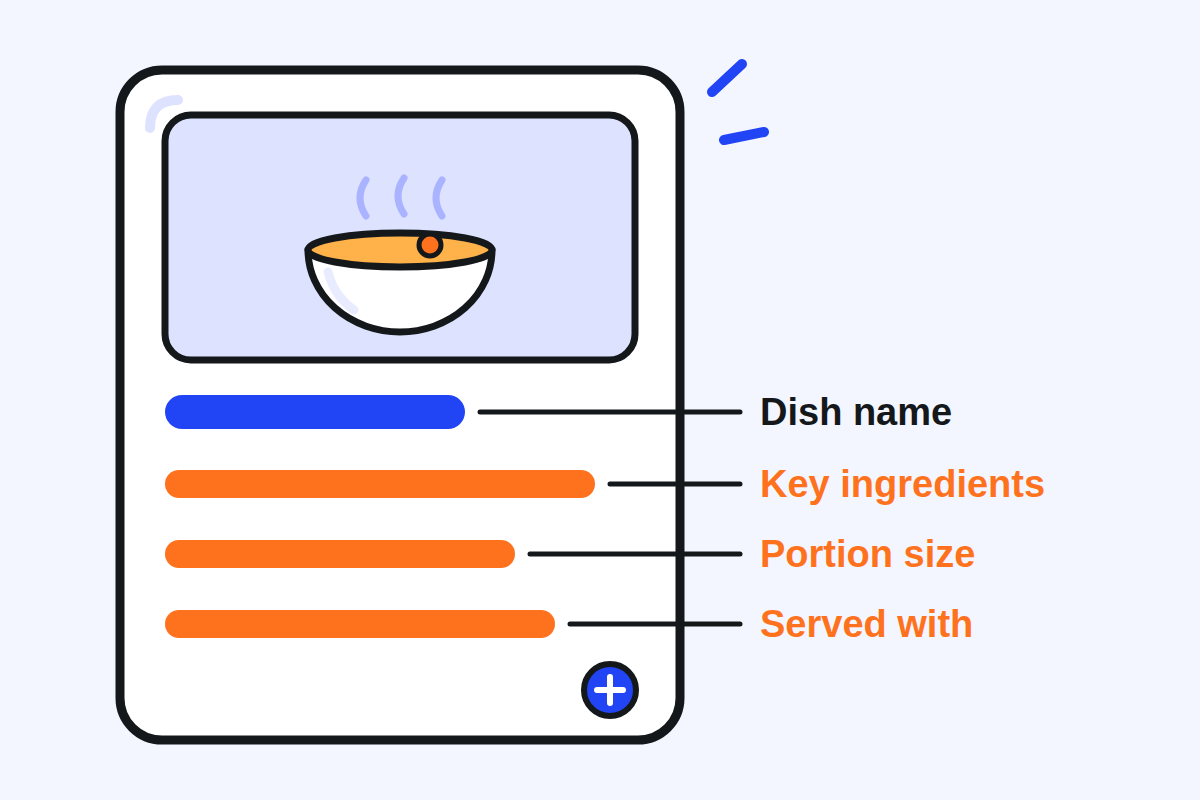
In practice, answer four questions in one or two sentences:
- What is it? The main ingredients, and how it is cooked if that matters to the choice.
- How much is it? One person or two, the number of pieces, the size of the drink.
- What comes with it? Grab's own example of a description is "Served with fries"2: the side, the sauce, the soup, the rice.
- Anything to know? Spice level, a strong ingredient, anything a customer may need to avoid.
Here is an example of the shape, for a dish called Chicken Rice: "Poached chicken on rice cooked in chicken stock, with ginger chilli sauce and a small bowl of soup. Serves one." Every word is a fact the customer can check when the bag is opened.
Customers ask for this kind of detail. In a study of the menus of Thai restaurants in the United Kingdom, respondents requested short and precise descriptions, with information on the ingredients to help them decide15.
Use the fields Grab gives you beside the description too. Dietary tags are a separate field: Grab says that tagging dietary information helps you meet diverse customer needs and promotes transparency16. In the Philippines, Grab adds a rule of its own: if an item's name includes a banned term such as shark meat but the dish does not use the banned ingredient, add a disclaimer in the description to avoid penalties17.
How long should a menu description be?
Brief. Grab's help centre asks for a brief description in sentence case2, and its Bulk Update template sets the limit: keep the description under 300 characters18. That is a ceiling, not a target. Two short sentences usually say everything a customer needs.
Write the name and the description differently. Grab asks for item names in title case, and for a name that is easy to understand19. The description is in sentence case, like an ordinary sentence. In Thai, Grab's tip is the same: write descriptions that are concise and interesting20.
No Grab page we hold says how much of a description the customer sees before opening the item. Put the most useful fact first, so the first words do the work if the rest is cut.
Do appealing words sell more than plain facts?
Not always. A 2025 Thai experiment with 424 respondents21 tested appealing descriptive wording on a dish the respondents did not know. The wording had no statistically significant effect, at the 0.05 level, on how familiar or appetising the dish seemed, or on whether they intended to buy it22. What did go with purchase intention was how familiar and appetising the dish felt23.
Words still shape the impression of the restaurant. In a study on dish names, customers saw a restaurant using sensory and nostalgic food names as offering warmer service than one using general names24.
The lesson for a GrabFood menu: facts first, then one true sensory word where it helps (crispy, slow cooked, smoky). A description that makes an unfamiliar dish feel familiar, by naming what is in it, does more than one that only praises it.
Should you use Grab's AI description tool?
Grab has built a tool that writes descriptions for you. It takes into account your store's name, its cuisine type, the dish name and even the dish images25. In its post of October 2024, Grab said the feature was available to merchants in Singapore, the Philippines, Thailand, Myanmar and Vietnam26, built into the merchant app so a description can be generated when you list a new item27. You can also give it keywords and phrases to include28.
In Vietnam, Grab goes further. Since 22 July 2024, the system automatically writes a description for any dish that has none29, using AI on the dish's image and name as they appear on your menu30. Grab says that some of these descriptions may not fit the dish, and that you can replace or delete them31.
Grab reports that, in early trials in Singapore, most merchants who used the tool saw an improvement in menu to checkout conversion rates32. It gives no figure.
Use it as a first draft. The tool sees a name, a cuisine and a photo. It does not know your portion, your side dish or your spice level, so read every generated description and correct what it cannot know. If you sell in Vietnam, open your menu and look for descriptions you did not write. If you run a store in Malaysia or Indonesia, the 2024 list did not name your market: look in your GrabMerchant app to see whether the option is there.
Who reads your description, and in which language?
Not only your regular customers. Grab automatically translates item names and descriptions into tourist-friendly languages33, and you can also provide your own translated content for your menu items34. Translation does not reach your images35, so anything written on a photo stays in its original language.
A plain sentence leaves a translation less to get wrong than wordplay. If your area has many visitors, read your menu in the translated version once, and add your own translation where the automatic one misses.
How do you know if a new description works?
Measure it. In Thailand, Menu Insights in the GrabMerchant app shows each item's units sold, sales and share of sales over up to 90 days36. Grab Vietnam described the same feature in a post of 22 July 202037 and suggested using it to change an item's picture, description or position9.
A simple method:
- Pick the dishes that sell least, or that customers often ask about.
- Rewrite one dish's description and write down the date.
- After two or three weeks, compare its units sold with the same number of weeks before the change.
- Keep what worked, and move on to the next dish.
Change one thing at a time. If you change the photo, the price and the description in the same week, you will not know which one made the difference.
What should you check on your menu this week?
- Every dish has a description. Start with your best sellers and the dishes that never sell.
- Each description names the key ingredients, the portion, and what the dish is served with.
- Descriptions are brief, under 300 characters, in sentence case; names are in title case.
- Dietary tags are set where they apply.
- Any description drafted by Grab's AI tool, or added by Grab on its own, has been read and corrected.
- The translated version of your menu reads correctly.
- You have noted the date of each change, to read it later in your item sales.
Kontimo helps people running restaurants on Grab read their menu each month, explained in plain language, so the next change starts with the dishes that need it most.