Articles Sign in

Kontimo helps restaurants perform on Grab. Your Grab figures explained, the other members, free.

Guides & newsArticles

Photos and the listing thumbnailArticle8 min read

GrabFood photo size, and the dish photos that sell

The GrabFood photo size for a menu item in each market, what Grab asks a dish photo to show, the angles it suggests, and how to shoot your dishes with a phone.

Singapore, Malaysia, Thailand, Philippines, Vietnam, Indonesia. By Kontimo

A plate of food, a camera with its flash and a square photo of the same plate: dish photos that sell on GrabFood

The GrabFood photo size for a menu item is a square, in a 1:1 ratio. In Singapore1, Thailand2, the Philippines3 and Vietnam4, Grab asks for at least 750x750 pixels. In Malaysia it asks for 500x500 to 700x700 pixels and a file of 100 kb to 200 kb5. The size gets a photo accepted. What sells the dish is what the photo shows: Grab tells restaurants to add photos to their menu items to improve sales conversion, because customers are more likely to choose dishes that are visually appealing, and lets you upload up to four photos for each item6.

This guide covers every market where Grab runs food delivery, with each rule cited for the market whose help centre states it, because the details differ from one country to the next.

What photo size does GrabFood ask for in each market?

Here is what Grab's help centres state for an item photo, the picture of a dish on your menu:

  • Singapore: 1:1, at least 750x750, and the file named after the menu item1.
  • Thailand: 1:1, at least 750x7502 (the Thai page says the same7), saved as JPG and no larger than 5 MB8. For the Bulk Update template, a 1:1 ratio is optimal9 and each file must be 2 MB at most10.
  • The Philippines: 750x750 for list and item photos3.
  • Vietnam: 750x750 for a dish photo4.
  • Malaysia: 1:1, 500x500 to 700x700 pixels, 100 kb to 200 kb5.
  • Indonesia: the help centre gives the size of the list photo, the main photo of your store on the home page and in search, at 1:1 and 500x50011. It does not state an item photo size in the pages we hold, and Grab Indonesia's menu guide asks that every dish carry a clear description and photo12.

Each item takes up to four photos in Thailand6 and in Vietnam13.

What to do: keep one square master photo of each dish, larger than your market's minimum, and export it at the size your market asks for. If Grab refuses an upload, check the ratio and the file weight first.

Why do dish photos matter so much on delivery?

Grab's in-house photographer puts it simply: photos matter even more for food delivery, where customers cannot smell the food or see people queuing for it, and the first impression comes from the photo14. He said it in a Grab story of May 18, 202315. Grab Vietnam's help centre gives the same reason for adding a photo to each dish: customers tend to choose dishes with appealing pictures16.

Research on another delivery app points the same way. A 2025 study of restaurants on Uber Eats found that texture difference and saturation in food photos raised sales17, while excessive brightness contrast lowered them18. Grab's advice draws the line on the other side: use proper lighting, and avoid overexposed, underexposed or overly saturated shots19. Colour that looks like food helps. A photo pushed past what the dish looks like does not.

What should a good dish photo show?

The whole dish, and nothing that competes with it. Grab Philippines asks you to show the full dish in the frame without cropping20, and to avoid close ups and leave ample space around the dish21.
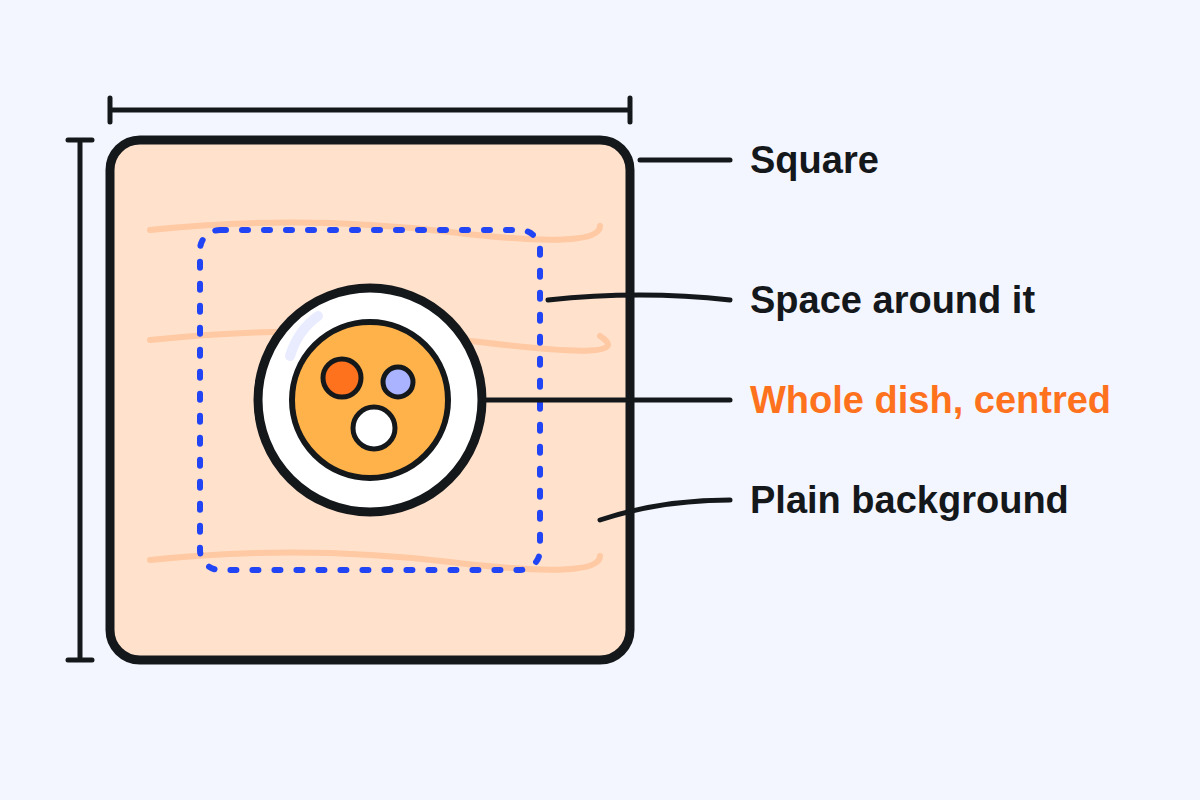
A square photo frame holding a whole plate in its centre, with space around it on a plain textured background
What Grab's guidelines ask of an item photo: square, the whole dish in the centre, space around it, a plain background

The background should help the food stand out. Grab Singapore recommends textured backgrounds such as wood, ceramic, kitchen linen or marble22. Grab Vietnam prefers a bright white background without much pattern23. Grab Philippines adds that the dish should not blend into the background: use contrasting colours24.

One dish per photo. Grab Vietnam asks you to photograph each dish on its own, never several dishes in one picture25. Grab Malaysia lists what to avoid: close ups, too many dishes, messy backgrounds, body parts, dark photos, collages and blurred shots26. Grab Singapore also rules out hands in the shot and overly artsy presentations27.

Keep text off the dish. Grab Singapore asks that images contain no text, emoticons or watermarks28. Where text is allowed, each market caps it: in Thailand, text or other images may take no more than 30% of the photo area, and grid photos are to be avoided29; in Malaysia, words, labels, logos and graphics may take no more than 25%30; Indonesia sets the same 25% for text, labels or logos31. Grab Thailand gives the reason: customers focus more on food images than on logos32.

Which angle should you use for each dish?

Grab names three angles. The overhead flat lay is a top-down view with the food in the centre of the frame33. The 45 degree shot places the main dish in the foreground with a blurred background for depth34. The straight-on shot, from the side, suits layered items such as burgers, sandwiches or cakes, because it shows the ingredients35.
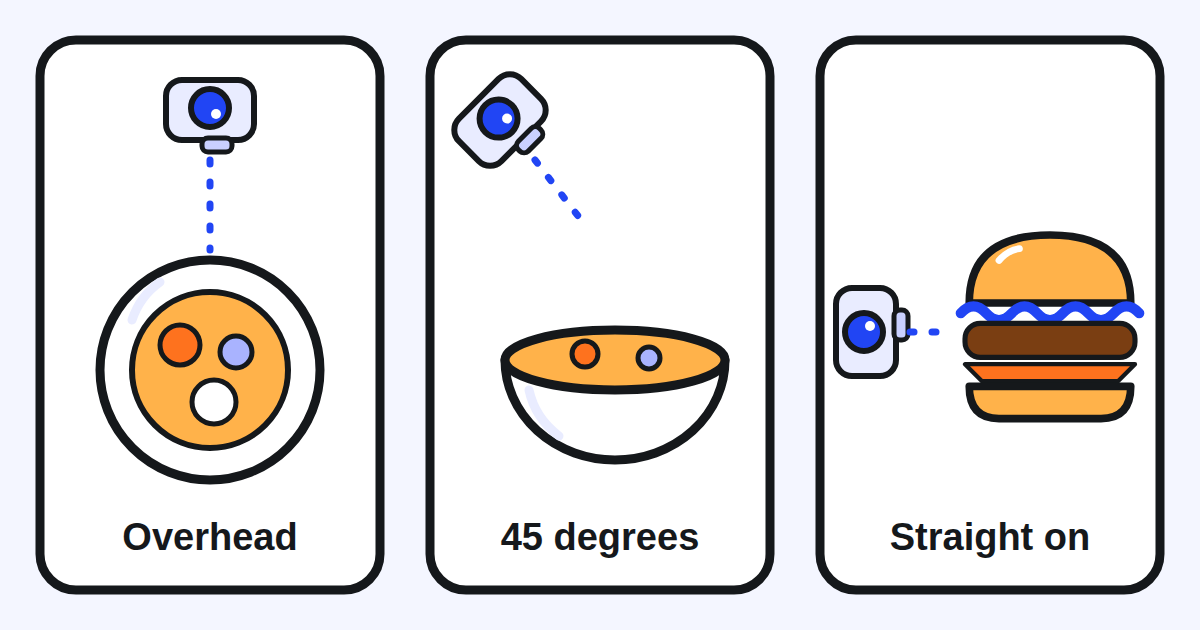
Three panels: a camera above a plate, a camera at an angle above a bowl, and a camera beside a burger, for the three angles of a dish photo
The three angles Grab suggests: overhead for flat dishes, 45 degrees for bowls and plates with depth, straight on for layered food

Grab's photographer gives the rule behind the choice: pick the angle that lets you see the details of the dish36. For a dish served with sauce on the side, such as chicken rice, he photographs the dish before adding the sauce37, so the ingredients stay readable.

Can you take good dish photos with a phone?

Yes. Grab Philippines notes that many sellers on Grab have found plenty of success shooting their products with a simple smartphone38, in a guide of July 6th, 202239. A tripod helps you keep the same orientation across all your photos40, which makes a menu look consistent.

Three habits matter more than the camera:

  • Shoot the dish fresh. Plate it well and shoot as soon as it is made, before its components look limp or soggy41.
  • Plate it neatly. Keep the plate clean, with no spills on the edges42.
  • Use good light. Well lit, neither too dark nor overexposed19.

One caution. Grab's photographer suggests action shots with your hands in the frame, but his tips cover both menus and social media43. Keep the hands tip44 for social media. For your GrabFood menu, follow the help centre: no hands in the shot27.

Should the photo show the dish exactly as you serve it?

Yes. Grab Vietnam asks you to use photos of your own store's dishes45, and Grab Singapore to use only photos you have the legal right to use46. Research on online menus adds the customer's side: photos should come from the restaurant's own food, and the food served should match the photo as closely as possible47.

A photo that promises more than the box delivers sets an expectation the order cannot meet. Shoot the portion you really serve, with the sides that really come with it.

How do you upload photos, and how long does it take?

You add a photo when you create or edit an item in the GrabMerchant app or portal, up to four per item6. To change many dishes at once, the Bulk Update template takes up to four photos per item name48.

Photos are checked before they go live. Grab Thailand says that all menu update requests require internal review and approval by Grab49, and Grab Malaysia that all photo update requests are subject to its internal review50. Plan new photos a few days before you need them, not the evening before a campaign.

How do you know whether a new photo works?

Read the dish's sales before and after. In Thailand, Menu Insights shows each item's units sold, sales and share of sales over up to 90 days51. Grab Vietnam described the same feature and suggested using it to change a dish's picture, description or position52, in a post of 22 July 202053.

Change one dish at a time and note the date. After two or three weeks, compare the units sold with the same number of weeks before. Start with the dishes that sell least: a dish with no photo, or a poor one, has the most to gain.

What should you check on your menu this week?

  • Every dish has a photo, square, at your market's size.
  • Each photo shows the whole dish, centred, with space around it.
  • The background is plain and contrasts with the food.
  • One dish per photo: no collage, no grid, no hands.
  • No text, logo or watermark beyond what your market allows.
  • The photo shows the portion and the sides you really serve.
  • Your best sellers have a second or third photo, from another angle.
  • You have noted the date of each new photo, to read it later in your item sales.

Kontimo helps people running restaurants on Grab read their menu each month, explained in plain language, so the next photo goes to the dish that needs it most.
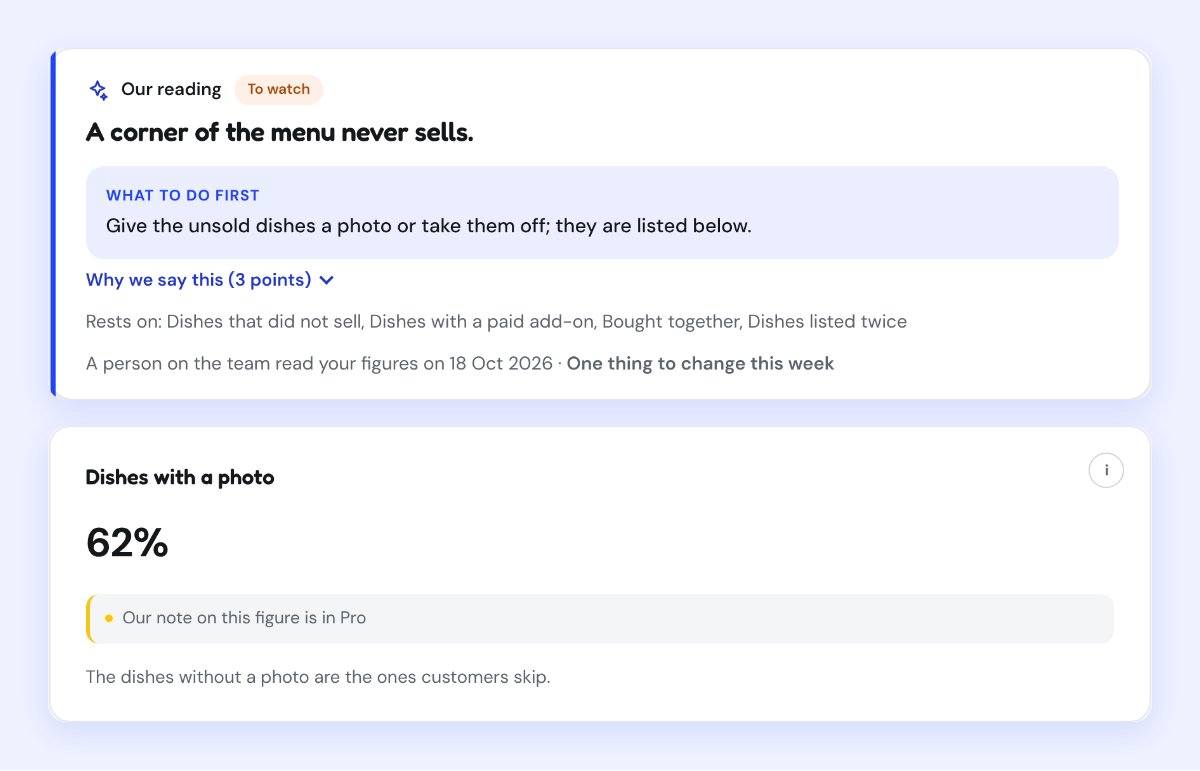
A Kontimo screen reading that a corner of the menu never sells, with the share of dishes that have a photo
In Kontimo's demo account, with invented figures: the share of dishes with a photo, and the corner of the menu that never sells.
Sources 53 documents, every figure traceable to one
  1. Getting the best photos for my store (Grab merchant help centre, Singapore), text of the article (read on 2026-10-21)Menu/catalogue photo 1:1 aspect ratio Resolution of at least 750x750 File name should match the menu item name
  2. I want to update my menu or pricing, with the guidelines and requirements for menu photos (Grab merchant help centre, Thailand, article 360027910451), text of the article (read on 2026-10-21)Menu/Catalogue photo This will appear as your menu/catalogue item photo. 1:1 aspect ratio Minimum Resolution: 750x750 File Name: Use the menu/catalogue item name.
  3. Updating the cover photo and menu item photos, tips for better photos (Grab merchant help centre, the Philippines, article 360027910411), text of the article (read on 2026-10-21)750x750 for list and item photos
  4. Cập nhật thực đơn món ăn, with the requirements for dish photos (Grab merchant help centre, Vietnam, article 360027910451), text of the article (read on 2026-10-21)Độ phân giải 750x750 cho ảnh món ăn.
  5. Updating menu item, list and banner photos, with the standard photo guidelines (Grab merchant help centre, Malaysia, article 360027910411), text of the article (read on 2026-10-21)Ensure the photo size for logo, list and item photos are in square mode 1:1 aspect ratio with a pixel resolution of 500×500 - 700x700 and a size range of 100kb - 200kb.
  6. Manage items and categories in your menu (Grab merchant help centre, Thailand), text of the article (read on 2026-10-21)Photos: Add photos to your menu item to improve sales conversion. Customers are more likely to choose dishes that are visually appealing. You can upload up to 4 photos for each menu item.
  7. ต้องการแก้ไขชื่อเมนู รูป หรือราคาอาหาร (Grab merchant help centre, Thailand, in Thai, article 360027910451), text of the article (read on 2026-10-21)อัตราส่วน 1:1 ความละเอียดขั้นต่ำ: 750x750
  8. I want to update my menu or pricing, with the guidelines and requirements for menu photos (Grab merchant help centre, Thailand, article 360027910451), text of the article (read on 2026-10-21)Save the photo in JPG format with a resolution of 750x750 pixels. Ensure the file size does not exceed 5MB.
  9. Using Bulk Update to manage multiple items on GrabFood menu (Grab merchant help centre, Thailand), text of the article (read on 2026-10-21)1:1 width and height ratio is optimal
  10. Using Bulk Update to manage multiple items on GrabFood menu (Grab merchant help centre, Thailand), text of the article (read on 2026-10-21)Max file size limit of <=2MB per image file
  11. Ganti foto banner/list (Grab merchant help centre, Indonesia), text of the article (read on 2026-10-21)List (rasio 1:1) Muncul di halaman depan atau pencarian GrabFood/GrabMart sebagai foto utama toko Anda. Ukuran file: 500x500px
  12. Panduan Membuat Menu (Item, Kategori, dan Foto) di Aplikasi GrabMerchant (GrabMerchant guide, Indonesia), text of the page (read on 2026-10-21)Pastikan setiap hidangan dilengkapi dengan deskripsi dan foto yang jelas
  13. Cập nhật thực đơn món ăn, with the requirements for dish photos (Grab merchant help centre, Vietnam, article 360027910451), text of the article (read on 2026-10-21)Lưu ý: Đối tác có thể tải lên tối đa 4 ảnh cho mỗi món ăn.
  14. Take better food photos: Tips from our in-house photographer (Inside Grab, 18 May 2023), text of the page (read on 2026-10-21)This is even more important for food delivery where consumers don’t get to smell the food or see people queuing up for it. The first impression comes from the photo,
  15. Take better food photos: Tips from our in-house photographer (Inside Grab, 18 May 2023), text of the page (read on 2026-10-21)May 18, 2023
  16. Cập nhật thực đơn món ăn, with the requirements for dish photos (Grab merchant help centre, Vietnam, article 360027910451), text of the article (read on 2026-10-21)chúng tôi khuyến khích Đối tác thêm hình ảnh cho món ăn vì người dùng có xu hướng lựa chọn món ăn có hình ảnh hấp dẫn
  17. Feast Your Eyes: How Image Features Serves Up Sales on UberEats (read on 2026-09-02)Our findings reveal that texture difference and Saturation positively influence sales
  18. Feast Your Eyes: How Image Features Serves Up Sales on UberEats (read on 2026-09-02)Conversely, excessive Brightness Contrast has a negative impact
  19. Updating the cover photo and menu item photos, tips for better photos (Grab merchant help centre, the Philippines, article 360027910411), text of the article (read on 2026-10-21)Use proper lighting to enhance appetite appeal. Avoid overexposed, underexposed, or overly saturated shots.
  20. Updating the cover photo and menu item photos, tips for better photos (Grab merchant help centre, the Philippines, article 360027910411), text of the article (read on 2026-10-21)Show the full dish in the frame; avoid cropping.
  21. Updating the cover photo and menu item photos, tips for better photos (Grab merchant help centre, the Philippines, article 360027910411), text of the article (read on 2026-10-21)Avoid close-up shots; leave ample space around the dish.
  22. Getting the best photos for my store (Grab merchant help centre, Singapore), text of the article (read on 2026-10-21)Textured backgrounds are recommended. For example: wood, ceramic, kitchen linen, marble texture etc.
  23. Cập nhật thực đơn món ăn, with the requirements for dish photos (Grab merchant help centre, Vietnam, article 360027910451), text of the article (read on 2026-10-21)Phông nền nên là màu trắng sáng và không có nhiều hoạ tiết.
  24. Updating the cover photo and menu item photos, tips for better photos (Grab merchant help centre, the Philippines, article 360027910411), text of the article (read on 2026-10-21)Ensure the dish doesn’t blend into the background; use contrasting colours.
  25. Cập nhật thực đơn món ăn, with the requirements for dish photos (Grab merchant help centre, Vietnam, article 360027910451), text of the article (read on 2026-10-21)Chụp từng món riêng biệt, không chụp chung nhiều món ăn trong cùng một hình.
  26. Updating menu item, list and banner photos, with the standard photo guidelines (Grab merchant help centre, Malaysia, article 360027910411), text of the article (read on 2026-10-21)Avoid close up, too many dishes, messy backgrounds, the appearance of body parts, dark, collage photos, and blurred shots.
  27. Getting the best photos for my store (Grab merchant help centre, Singapore), text of the article (read on 2026-10-21)Don’t: Avoid close-ups, messy backgrounds, hands in the shot, or overly artsy presentations.
  28. Getting the best photos for my store (Grab merchant help centre, Singapore), text of the article (read on 2026-10-21)Ensure images don’t contain text, emoticons, or watermarks.
  29. I want to update my menu or pricing, with the guidelines and requirements for menu photos (Grab merchant help centre, Thailand, article 360027910451), text of the article (read on 2026-10-21)If text or other images are included, they should not occupy more than 30% of the photo area. Avoid grid format photos.
  30. Updating menu item, list and banner photos, with the standard photo guidelines (Grab merchant help centre, Malaysia, article 360027910411), text of the article (read on 2026-10-21)Words, label, logo, graphic, must not take up more than 25% of the entire photo.
  31. Ganti foto banner/list (Grab merchant help centre, Indonesia), text of the article (read on 2026-10-21)Maksimal pakai 25% dari luas gambar untuk teks, label, atau logo.
  32. I want to update my menu or pricing, with the guidelines and requirements for menu photos (Grab merchant help centre, Thailand, article 360027910451), text of the article (read on 2026-10-21)Use food-related photos only, as consumers focus more on food images than logos.
  33. Getting the best photos for my store (Grab merchant help centre, Singapore), text of the article (read on 2026-10-21)Overhead flat lay shot: Capture a top-down view with the food centred in the frame.
  34. Getting the best photos for my store (Grab merchant help centre, Singapore), text of the article (read on 2026-10-21)45-degree shot: Place the main dish in the foreground with a blurred background for depth.
  35. Getting the best photos for my store (Grab merchant help centre, Singapore), text of the article (read on 2026-10-21)Straight-on shot (side view): Ideal for layered items like burgers, sandwiches, or cakes to showcase ingredients.
  36. Take better food photos: Tips from our in-house photographer (Inside Grab, 18 May 2023), text of the page (read on 2026-10-21)When it comes to deciding the best angle, it boils down to making sure you can see details of the dish, said Ravin.
  37. Take better food photos: Tips from our in-house photographer (Inside Grab, 18 May 2023), text of the page (read on 2026-10-21)for dishes such as chicken rice that come with sauce on the side, he recommended taking photos of the dish before adding the sauce.
  38. Photos That Sell: A Guide to Taking Good Product Photos (Grab Philippines merchant community, 6 July 2022), text of the page (read on 2026-10-21)many online sellers right on the Grab platform have found plenty of success shooting their products with a simple smartphone.
  39. Photos That Sell: A Guide to Taking Good Product Photos (Grab Philippines merchant community, 6 July 2022), text of the page (read on 2026-10-21)Wednesday July 6th, 2022
  40. Photos That Sell: A Guide to Taking Good Product Photos (Grab Philippines merchant community, 6 July 2022), text of the page (read on 2026-10-21)A tripod can help you achieve a consistent, standardized orientation across all the product photos you take
  41. Photos That Sell: A Guide to Taking Good Product Photos (Grab Philippines merchant community, 6 July 2022), text of the page (read on 2026-10-21)If you’re photographing food, make sure to plate it well and to shoot immediately when the food is freshly made so that its components don’t look limp or soggy.
  42. Updating the cover photo and menu item photos, tips for better photos (Grab merchant help centre, the Philippines, article 360027910411), text of the article (read on 2026-10-21)Keep plating neat and clean (e.g., no spillages on the plate edges).
  43. Take better food photos: Tips from our in-house photographer (Inside Grab, 18 May 2023), text of the page (read on 2026-10-21)Whether it’s for your menu or social media channel
  44. Take better food photos: Tips from our in-house photographer (Inside Grab, 18 May 2023), text of the page (read on 2026-10-21)You can do this through action shots by including your hands in the frame when you’re plating, serving or preparing to dig into a meal.
  45. Cập nhật thực đơn món ăn, with the requirements for dish photos (Grab merchant help centre, Vietnam, article 360027910451), text of the article (read on 2026-10-21)Sử dụng hình ảnh chụp món ăn của chính cửa hàng của mình.
  46. Getting the best photos for my store (Grab merchant help centre, Singapore), text of the article (read on 2026-10-21)Only use photos you have the legal right to use.
  47. The effect of online restaurant menus on consumers' purchase intentions during the COVID-19 pandemic (read on 2026-09-02)Photos that represent the menu items should be appropriated from the restaurant’s own food, and the food served should align with the photo as equivalently as possible.
  48. Using Bulk Update to manage multiple items on GrabFood menu (Grab merchant help centre, Thailand), text of the article (read on 2026-10-21)Up to a maximum of 4 photos per item name.
  49. I want to update my menu or pricing, with the guidelines and requirements for menu photos (Grab merchant help centre, Thailand, article 360027910451), text of the article (read on 2026-10-21)Please understand that all menu/catalogue update requests require internal review and approval by Grab.
  50. Updating menu item, list and banner photos, with the standard photo guidelines (Grab merchant help centre, Malaysia, article 360027910411), text of the article (read on 2026-10-21)All photo update requests are subjected to Grab's internal review and approval.
  51. Menu Insights new features explained (Thailand), text of the article (read on 2026-10-17)Menu item performance: Get visibility into your top-performing menu items based on units sold, sales generated, and percentage sales contribution (up to 90 days).
  52. [GrabFood] Tính năng phân tích số liệu thực đơn sẽ giúp Đối tác tối ưu hóa kinh doanh như thế nào? (GrabFood merchant blog, Vietnam, 22 July 2020), text of the page (read on 2026-10-21)Từ đó có thể tối ưu thực đơn bằng cách thay hình ảnh, miêu tả thậm chí vị trí của các món sao cho phù hợp với Người dùng.
  53. [GrabFood] Tính năng phân tích số liệu thực đơn sẽ giúp Đối tác tối ưu hóa kinh doanh như thế nào? (GrabFood merchant blog, Vietnam, 22 July 2020), text of the page (read on 2026-10-21)Thứ Tư Tháng Bảy 22nd, 2020

Every figure above comes from one of these documents, as it stood on the date given. Your own contract and statements are the figures that count for your restaurant.

Open your free space

Three questions. Your space opens at once.

This is how you sign in. There is no password to choose.

Is it already on Grab?

Already have a space? Sign in

Get the week on Grab by email

Three questions: your free space opens, and the letter comes every Monday. No card.

This is how you sign in. There is no password to choose.

Is it already on Grab?

Already have a space? Sign in