Low Orders on Grab? Find the Cause Before You Fix It
Why GrabFood orders drop, how to find the real cause in your own GrabMerchant data, and the fixes that match each cause.
Low orders on GrabFood almost always come from one of five causes: a store that is offline, a menu customers cannot find in search, a listing they see but do not choose, orders lost to cancellations, or promotions and ads running in the background; check them in that order in your own GrabMerchant data.
When orders drop, the reflex is to do something: launch a discount, change the photos, pay for an ad. Sometimes it works. Often it adds a second problem on top of the first, because the fix did not match the cause. Low orders almost always come from one of five places. Check them in order, with your own numbers, and you will usually find which one it is.
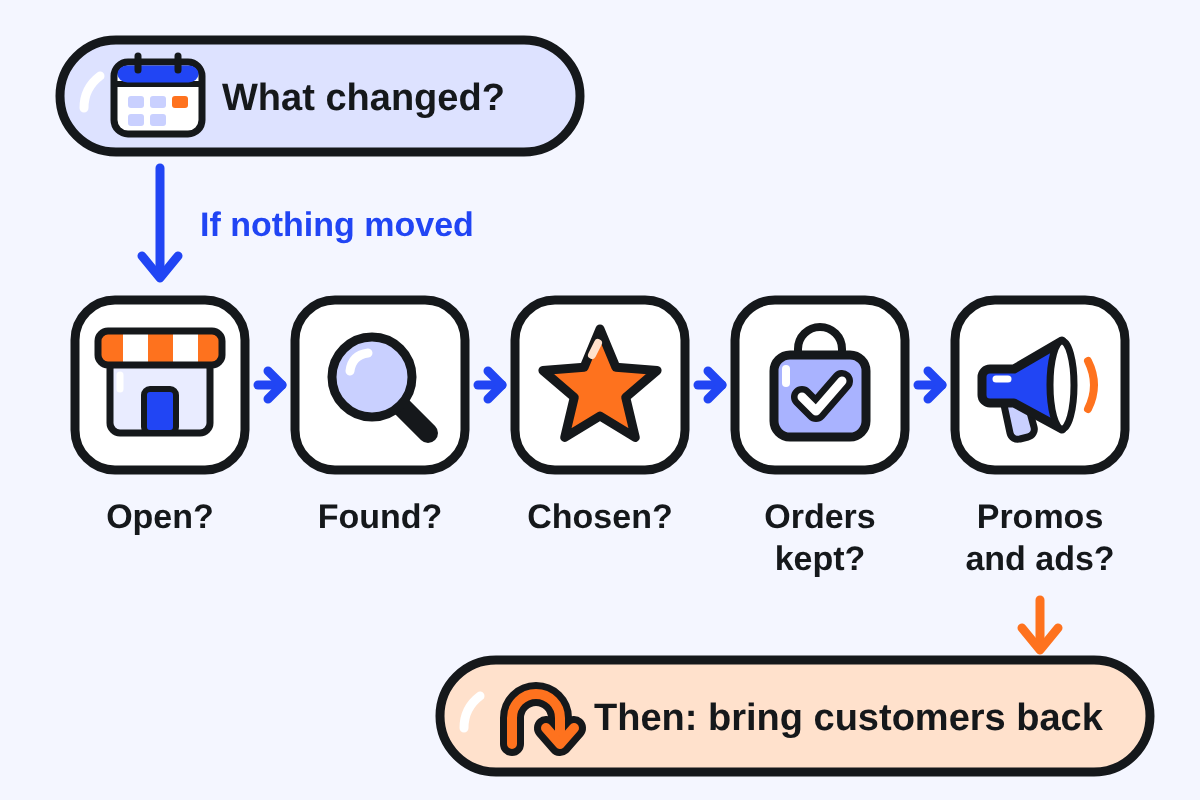
Step 1: Look at what changed, not at what is low
Start with your own history, not with competitors. In the GrabMerchant Portal you can export up to 90 days of data. Put the weeks side by side and ask:
- Did orders per trading day fall, or did you trade fewer days or hours?
- Did a promotion or a Grab-led campaign end?
- Did you start or stop an ad?
- Did your rating, cancellations or offline time move?
- Did you lose a quality badge? Badges are reassessed month by month, and Grab presents them as a source of visibility.
If one of these moved at the same time as your orders, start there. If nothing moved, go through the five checks below.
Check 1: Are you actually open?
Orders cannot come in while the store is offline. Grab expects your listed hours to match your real hours, and in the Philippines caps pausing or busy mode at 1% of weekly operating hours. Its quality program asks for an offline rate of 5% or less.
What to check: your offline rate in the quality program screen of the app, and your own peak hours in the Insights tab of the Portal.
Fix: set hours you can hold, cover your own peak hours, and stop pausing during service unless there is no alternative.
Check 2: Can customers find you?
Grab's search matches what customers type against dish names, and personalises results on each user's history. A menu full of house names is hard to find. So is a store whose cuisine label does not match its food.
What to check: search for your two or three best dishes by their plain name, from a phone that has never ordered from you. Check how your store is labelled in the customer app.
Fix: rename dishes the way customers search ("Pad Kra Pao Chicken with Fried Egg", not "Chef's Favourite"), and correct the cuisine label if it is wrong.
Check 3: Do they choose you once they see you?
Being seen is not enough. Your rating and number of ratings appear on your store thumbnail, and Grab reports that sessions where customers read reviews convert 7 percentage points higher. Inside the menu, photos and descriptions do the selling: research on food delivery found that better dish images raise sales, and Grab Malaysia states that described items sell better.
What to check: your rating and rating count; how many best sellers have no photo; how many items have no description.
Fix: photos on every best seller first, a short description on every item, best sellers at the top of the menu.
Check 4: Are you losing the orders you get?
A store can receive orders and still lose them. Every avoidable cancellation is a lost order now and a worse score later. Grab counts item unavailability as an avoidable cancellation and sets a target below 1% in its Philippine quality program.
What to check: avoidable cancellations, missing and incorrect orders, and order delays in the app.
Fix: switch items off the moment they run out, keep the device attended, use automatic acceptance where available, and set a realistic preparation time.
Check 5: What is running in the background?
Promotions and ads keep running whether they work or not. A promotion with no end date slowly turns into your normal price. An ad judged on clicks can spend for months without bringing orders. Grab's own Portal guide warns that clicks do not necessarily relate to sales.
What to check: every active promotion (redemption rate, share of new customers) and every active ad (orders and return, not clicks), in the Portal.
Fix: change or stop what does not bring orders, set end dates on the rest, and only then decide whether a new campaign is needed. The campaign checklist walks through the decision.
Then: bring customers back
Once the leaks are fixed, the cheapest orders are the second ones. Because Grab personalises results on each user's history, a customer who has ordered from you before is more likely to see you again. The Portal shows new, existing and returning customers, and weekly retention.
What to check: the share of returning customers over the last few months.
Fix: consistent food and packaging, a short thank-you note in the bag, and a reason to reorder, such as a new dish or a bundle for two.
Questions people ask
Why did my Grab orders drop when I changed nothing?
Often something did change, just not on purpose: a campaign ended, a badge was not renewed for the month, offline time crept up, or an item kept running out. Compare your last few weeks side by side in the Portal before changing anything.
Should I run a promotion to get orders back?
Not before checking what is already running. If the cause is offline time, cancellations or a menu nobody can find, a discount pays to bring customers into the same problem.
What is the first thing to check when orders are low?
Whether you are open and reliable: offline rate, cancellations and delays. They are visible in the app, quick to fix, and they also decide your quality badges.
Keep reading: How the GrabFood Algorithm Works · 10 GrabFood Mistakes · Campaign checklist: keep, adjust or stop
Sources
12 sources, each claim traceable to one
- Grab MY, Portal User Guide, Business Insights (Dec 2021): assets.grab.com/wp-content/uploads/sites/8/2021/12/10153355/MY-GrabMerchant-Portal-User-Guide-BUSINESS-INSIGHTS-compressed.pdf
- Grab PH, Maximize business data from GrabMerchant Portal: merchant.grab.com/en-ph/blog/stay-on-top-of-your-business-maximize-business-data-from-grabmerchant-portal
- Grab PH, Why the GrabMerchant Portal is your best business partner: merchant.grab.com/en-ph/blog/why-the-grabmerchant-portal-is-your-best-business-partner
- Grab PH, Code of Conduct: Merchant (updated 14 Jul 2026): www.grab.com/ph/terms-policies/code-of-conduct-merchant
- Grab PH, About Quality Hero Program (404 in Oct 2026; criteria from earlier capture): merchant.grab.com/en-ph/guides/ensure-safety-quality/about-quality-hero-program
- Grab SG, Learn how to become a Quality Hero: merchant.grab.com/en-sg/blog/quality-hero-programme
- Grab Engineering, Search architecture revamp (May 2022): engineering.grab.com/search-architecture-revamp
- Inside Grab, Personalising food recommendations on GrabFood: www.grab.com/inside-grab/stories/personalising-food-recommendations-on-grabfood
- Inside Grab, Merchants are reading reviews to get feedback (Aug 2023, updated Feb 2025): www.grab.com/inside-grab/stories/grab-food-delivery-reviews-ratings
- Grab MY, Better menu, better sales in 4 steps (undated): merchant.grab.com/en-my/blog/better-menu-better-sales-in-just-4-steps
- Ma et al., Image aesthetics and food delivery sales, Journal of Electronic Commerce Research (2025): www.jecr.org/sites/default/files/2025vol26no2_Paper3.pdf
- Grab ID, Merchant General Terms and Conditions: www.grab.com/id/en/merchant/food/merchant-terms