GrabFood cancellation rate: what counts and how to cut it
What Grab counts in your GrabFood cancellation rate, what a high rate costs, the limits on cancelling, and the settings that stop a cancellation early.
Singapore, Malaysia, Thailand, Philippines, Vietnam, Indonesia. Published , by Kontimo

Your GrabFood cancellation rate, where Grab defines it, is the share of your orders that end cancelled because your store or an item was not available. In the Philippines, Grab's quality score tracks the percentage of orders cancelled due to store or item unavailability1, including cancellations made by you, the driver-partner, or the customer2, over the past 30 days3. So the rate is not only the orders you press cancel on. A customer who gives up because a dish ran out counts too. Almost every one of these cancellations starts before the order arrives: a closed kitchen still open on the app, a sold out dish still on the menu, a rush the kitchen cannot absorb. This article explains what Grab counts in each market, where you read your rate, what a high rate costs, and the settings that stop a cancellation before it happens.
What counts as a cancellation against your store?
Grab names it differently in each market, but the idea is the same: a cancellation the store could have prevented.
- The Philippines. The cancellations metric of the Merchant Quality Score counts orders cancelled due to store or item unavailability1, whoever cancels them2, over a rolling 30 days3.
- Thailand. The Safety and Quality report shows a Lost Order Rate: the % of orders that were cancelled by your store, as a result of items being out of stock or your shop details, such as location or opening times, being incorrect, compared to last month's rate4.
- Thailand's Insights. The app's Insights screen shows an avoidable cancellation rate, which represents the percentage of cancellations that could have been avoided5.
Each of these definitions is about the store: an order lost because the store was closed, an item was missing or the store's details were wrong14. Grab does not publish one definition for all six markets, and the Singapore, Malaysia, Indonesia and Vietnam pages we hold do not define the rate at all. Read the definition in your own app before you compare yourself with another market.
Where do you see your cancellation rate?
In Thailand, in the GrabMerchant app, under Insights. Its avoidable cancellation section lists contributing reasons, the main factors that have led to cancellations that could have been avoided by your business6, and recommendations designed to help you lower your avoidable cancellation rate7. The contributing reasons are the useful part: they tell you whether your cancellations come from closed hours, out of stock dishes or rushes, which decides what you change.
In the Philippines, it is one of the metrics of the Merchant Quality Score1. In Thailand, the Lost Order Rate also appears in the Safety and Quality report4, compared with last month, so you can see whether you are improving.
What does a high cancellation rate cost you?
Three things, depending on the market.
Your quality score. In the Philippines, for every 1% of orders affected, 1 point will be deducted from your MQS8. Grab adds that cancellations carry less weight compared to safety incidents, which are considered more critical9. Ten percent of orders cancelled therefore costs ten points out of a hundred.
A paused store. Singapore lists the reasons a store can be temporarily paused, and one of them is that all orders were not fulfilled due to merchant avoidable cancellations10. You are notified immediately when a pause is triggered11, and until you reopen, customers cannot order from you.
Your tier. Each market's quality programme sets a bar for avoidable cancellations. The Philippine Quality Hero criteria, for example, ask for an avoidable cancellation rate less than 1%12. The bars of every market are in our articles on Grab's quality programme and on food delivery benchmarks; what matters here is how low the bar is: at 1%, one avoidable cancellation in a hundred orders already reaches it.
What are the most common avoidable cancellations?
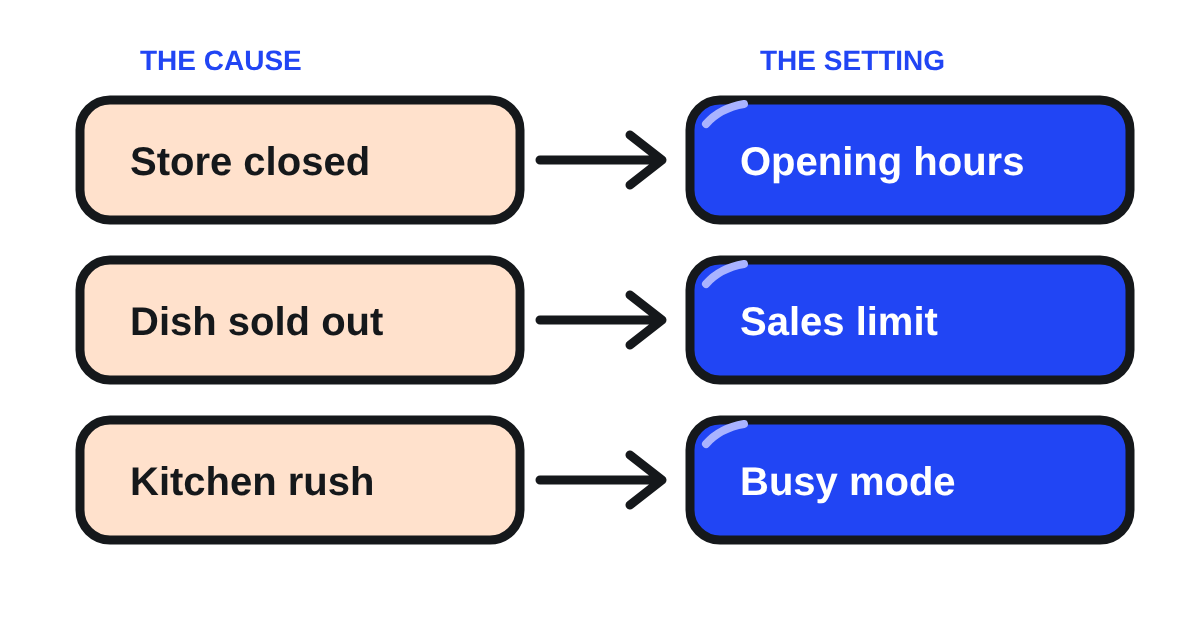
Grab's Philippine guide names three.
- The store is closed, or about to close. Grab calls it one of the most common and easily avoidable reasons for cancellations13: customers place an order and find the store closed, or about to close.
- An item is out of stock. Another common reason for order cancellations is when an item is out of stock14.
- The kitchen is overwhelmed. One common reason for order cancellations is when a store becomes too busy to fulfill orders promptly15.
How do you stop a cancellation before it happens?
Each cause has its own setting, and all of them are in the GrabMerchant app.
Hours that match the kitchen. Keep your operating hours accurate by updating your business hours regularly16, and close your store if you are unavailable for the day17. A holiday, a staff shortage or an early close should be on the app before the first order arrives, not after.
A sales limit on dishes that run out. Setting a sales limit for an item can help prevent overselling when stock runs out18. If you prepare a fixed number of portions each day, set a recurring limit: enable the Reset stock level automatically toggle and enter the quantity you want19. The dish disappears from the menu when the last portion is sold, and comes back the next day by itself.
Availability switched off at once. When a dish runs out without a limit set, Grab's advice is to update item availability immediately if the item is out of stock, or temporarily pause your store if the kitchen is too busy20.
Busy mode for a rush. Busy means your store is open and receiving orders, but requires longer preparation time21. It gives the kitchen time instead of forcing a cancellation. Note that Busy mode is switched back to Normal mode after two hours22, so set it again if the rush lasts. If even that is not enough, pause new orders: when you activate this pause function, your store will show up on the app as temporarily closed23. A short pause costs you a few orders; a string of cancellations costs your score.
Edit instead of cancelling. In Thailand, when one item of an order is missing, the store can edit the order instead of cancelling it, once per order24, after calling the customer to agree on a replacement. A customer who gets a similar dish has an order delivered, not a cancellation.
What are the limits on cancelling an order in the app?
Grab limits how many orders a store can cancel, and when. Thailand states its numbers: a store cannot cancel an order after 25 minutes have passed since receiving it25, and can cancel at most 50 times a day26, 100 times a week37 and 300 times a month38. Past those limits, or past the 25 minutes, the store has to go through Grab's call centre to cancel39.
The other markets say that a limit exists without stating it. In Singapore, if you've reached your daily, weekly, or monthly cancellation limit, in-app cancellation will be restricted27, and if a driver has been assigned for a certain duration, in-app cancellation is disabled28. In Indonesia, self pick-up and scheduled GrabFood orders cannot be cancelled from the app at all29. Everywhere, the customer's contact details are only for this: Grab reminds you that contact information of eaters should only be used for confirming the proposed cancellation30.
So the limit is not a target. It is the point where Grab stops letting you cancel by yourself. A store that comes close to it has a problem with its hours or its menu, not with the button.
Does Grab pay you for an order cancelled after you cooked it?
Sometimes, and the rules differ by market. Singapore's Cancellation Protection compensates an order when it is cancelled after order preparation has started (confirmed by accurate MOR updates)31, and when the cancellation was not due to merchant-related issues like store closures or excessive delays32. How much depends on the Ready button: 100% compensation if you achieve 80% or higher MOR usage in the last 7 days33, and 60% compensation if your MOR usage is below 80%34. Tapping Ready the moment an order is packed is therefore worth money in Singapore, not only a figure on a screen.
In Vietnam, a store asks for compensation through a form within 24 hours of the cancellation35, and requests through the help centre are capped at two a month per store36. In the other markets, read your own help centre's page on cancelled orders before you count on a payment. And in Singapore at least, a cancellation the store caused is not compensated32, which is one more reason to stop it upstream.
What should you check each week?
- Your avoidable cancellation rate in Insights, and its contributing reasons: hours, stock or rush.
- The days and hours your cancellations happened, against your opening hours on the app.
- The dishes that ran out, and whether each has a sales limit that resets daily.
- Whether your staff know where Busy mode and Pause are, and use them before cancelling.
- In Singapore, your Ready button usage over the last 7 days, against the 80% that unlocks full compensation.
- How close you came to your market's tier bar for avoidable cancellations.
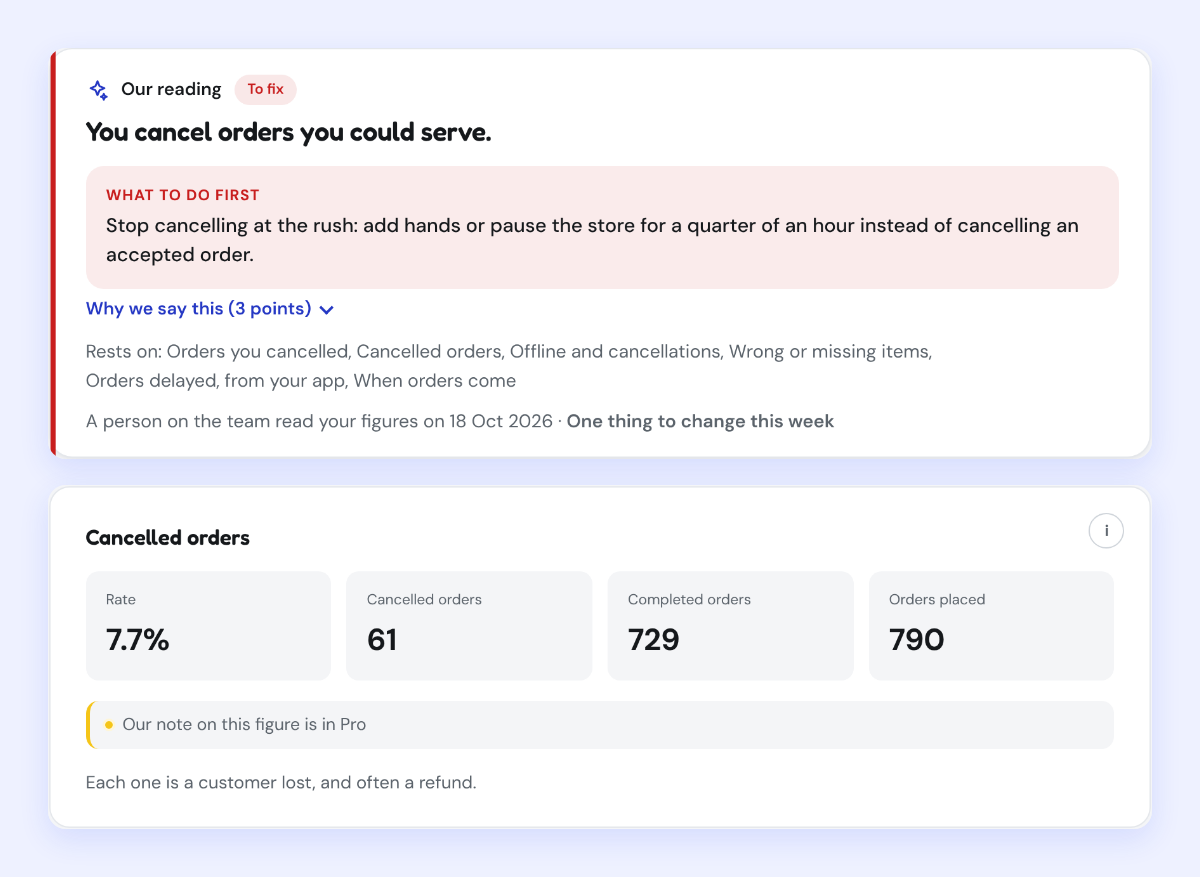
Kontimo helps people running restaurants on Grab read their operations, menu and reviews each month, in plain language, so the cancellations that cost a store its score are seen while there is still time to stop them.
Sources 39 documents, every figure traceable to one
- What is the cancellations metric in MQS (Grab merchant help centre, the Philippines), text of the article (read on 2026-11-03)
The cancellations metric in your Merchant Quality Score (MQS) tracks the percentage of orders cancelled due to store or item unavailability.
- What is the cancellations metric in MQS (Grab merchant help centre, the Philippines), text of the article (read on 2026-11-03)
This includes cancellations made by you, the driver-partner, or the customer.
- What is the cancellations metric in MQS (Grab merchant help centre, the Philippines), text of the article (read on 2026-11-03)
The metric is calculated as a percentage of orders over the past 30 days.
- Understanding the Safety & Quality report (Thailand), text of the article (read on 2026-10-09)
The % of orders that were cancelled by your store, as a result of items being out of stock or your shop details, such as location or opening times, being incorrect, compared to last month's rate.
- Quick guide to GrabMerchant Insights (Grab merchant help centre, Thailand), text of the article (read on 2026-10-26)
This metric represents the percentage of cancellations that could have been avoided.
- Quick guide to GrabMerchant Insights (Grab merchant help centre, Thailand), text of the article (read on 2026-10-26)
Contributing reasons: This part lists the main factors that have led to cancellations that could have been avoided by your business.
- Quick guide to GrabMerchant Insights (Grab merchant help centre, Thailand), text of the article (read on 2026-10-26)
Recommendations: These suggestions are designed to help you lower your avoidable cancellation rate
- What is the cancellations metric in MQS (Grab merchant help centre, the Philippines), text of the article (read on 2026-11-03)
For every 1% of orders affected, 1 point will be deducted from your MQS.
- What is the cancellations metric in MQS (Grab merchant help centre, the Philippines), text of the article (read on 2026-11-03)
While cancellations impact your score, they carry less weight compared to safety incidents, which are considered more critical.
- Why is my store temporarily paused (Grab merchant help centre, Singapore), text of the article (read on 2026-11-03)
All orders were not fulfilled due to merchant avoidable cancellations
- Why is my store temporarily paused (Grab merchant help centre, Singapore), text of the article (read on 2026-11-03)
You’ll be notified immediately when a pause is triggered through:
- How to become a Quality Hero merchant (Grab merchant help centre, the Philippines), text of the article (read on 2026-10-21)
Avoidable cancellation rate less than 1%
- Top 3 Avoidable Cancellation Reasons and How You Can Prevent Them (GrabMerchant Philippines guide) (read on 2026-10-04)
One of the most common and easily avoidable reasons for cancellations is when customers place orders only to find that the
- Top 3 Avoidable Cancellation Reasons and How You Can Prevent Them (GrabMerchant Philippines guide) (read on 2026-10-04)
Another common reason for order cancellations is when an item is out of stock
- Top 3 Avoidable Cancellation Reasons and How You Can Prevent Them (GrabMerchant Philippines guide) (read on 2026-10-04)
One common reason for order cancellations is when a store becomes too busy to fulfill orders promptly
- Why is my store temporarily paused (Grab merchant help centre, Singapore), text of the article (read on 2026-11-03)
Keep your operating hours accurate by updating your business hours regularly
- Why is my store temporarily paused (Grab merchant help centre, Singapore), text of the article (read on 2026-11-03)
Close your store if you are unavailable for the day
- Set up GrabFood sales limit (Grab merchant help centre, Malaysia), text of the article (read on 2026-11-03)
Setting a sales limit for an item can help prevent overselling when stock runs out.
- Set up GrabFood sales limit (Grab merchant help centre, Malaysia), text of the article (read on 2026-11-03)
Enable the Reset stock level automatically toggle and enter the quantity you want.
- How to cancel a GrabFood order (Grab merchant help centre, Singapore), text of the article (read on 2026-11-03)
update item availability immediately if the item is out of stock, or temporarily pause your store if the kitchen is too busy.
- Activate Busy or Temporary Pause for my restaurant (Grab merchant help centre, Singapore), text of the article (read on 2026-11-03)
Busy Your store is open and receiving orders, but requires longer preparation time.
- Activate Busy or Temporary Pause for my restaurant (Grab merchant help centre, Singapore), text of the article (read on 2026-11-03)
Note: The Busy mode will be automatically switched back to Normal mode after two hours.
- Activate Busy or Temporary Pause for my restaurant (Grab merchant help centre, Singapore), text of the article (read on 2026-11-03)
When you activate this pause function, your store will show up on the app as temporarily closed.
- การแก้ไขและยกเลิกคำสั่งซื้อ (read on 2026-08-28)
คุณสามารถแก้ไขคำสั่งซื้อได้เพียง 1 ครั้ง/คำสั่งซื้อ
- การแก้ไขและยกเลิกคำสั่งซื้อ (read on 2026-08-28)
ร้านค้าไม่สามารถยกเลิกคำสั่งซื้อหลังจากที่ได้รับคำสั่งซื้อมาแล้วเป็นเวลา 25 นาที
- การแก้ไขและยกเลิกคำสั่งซื้อ (read on 2026-08-28)
**จำนวนการยกเลิกต่อวัน:** 50 ครั้ง
- How to cancel a GrabFood order (Grab merchant help centre, Singapore), text of the article (read on 2026-11-03)
If you’ve reached your daily, weekly, or monthly cancellation limit, in-app cancellation will be restricted
- How to cancel a GrabFood order (Grab merchant help centre, Singapore), text of the article (read on 2026-11-03)
If a driver has been assigned for a certain duration, in-app cancellation is disabled
- Cara batalkan pesanan GrabFood (Grab merchant help centre, Indonesia), text of the article (read on 2026-11-03)
Pembatalan tidak berlaku untuk layanan GrabFood Ambil Sendiri dan GrabFood Terjadwal.
- How to cancel a GrabFood order (Grab merchant help centre, Singapore), text of the article (read on 2026-11-03)
Note: Contact information of eaters should only be used for confirming the proposed cancellation.
- Compensation for cancelled orders (Grab merchant help centre, Singapore), text of the article (read on 2026-11-03)
The order is cancelled after order preparation has started (confirmed by accurate MOR updates).
- Compensation for cancelled orders (Grab merchant help centre, Singapore), text of the article (read on 2026-11-03)
The cancellation was not due to merchant-related issues like store closures or excessive delays.
- Compensation for cancelled orders (Grab merchant help centre, Singapore), text of the article (read on 2026-11-03)
100% Compensation: Achieve 80% or higher MOR usage in the last 7 days to get fully reimbursed for eligible cancellations.
- Compensation for cancelled orders (Grab merchant help centre, Singapore), text of the article (read on 2026-11-03)
60% Compensation: If your MOR usage is below 80%, you will receive 60% compensation by default
- Yêu cầu bồi hoàn cho đơn hàng GrabFood bị hủy (Grab merchant help centre, Vietnam), text of the article (read on 2026-11-03)
trong vòng 24 giờ kể từ thời điểm đơn hàng bị hủy
- Yêu cầu bồi hoàn cho đơn hàng GrabFood bị hủy (Grab merchant help centre, Vietnam), text of the article (read on 2026-11-03)
Tối đa 02 lần/tháng/cửa hàng đối với các yêu cầu gửi qua Trung tâm trợ giúp.
- การแก้ไขและยกเลิกคำสั่งซื้อ (read on 2026-08-28)
**จำนวนการยกเลิกต่อสัปดาห์:** 100 ครั้ง
- การแก้ไขและยกเลิกคำสั่งซื้อ (read on 2026-08-28)
**จำนวนการยกเลิกต่อเดือน:** 300 ครั้ง
- การแก้ไขและยกเลิกคำสั่งซื้อ (read on 2026-08-28)
กรุณาติดต่อคอลเซ็นเตอร์เพื่อยกเลิกคำสั่งซื้อ
Every figure above comes from one of these documents, as it stood on the date given. Your own contract and statements are the figures that count for your restaurant.