Reduce Cancellations on Grab: Causes, Rules and Fixes
What counts as an avoidable cancellation on GrabFood, the targets and rules Grab publishes, and how to fix the causes in your kitchen and on your menu.
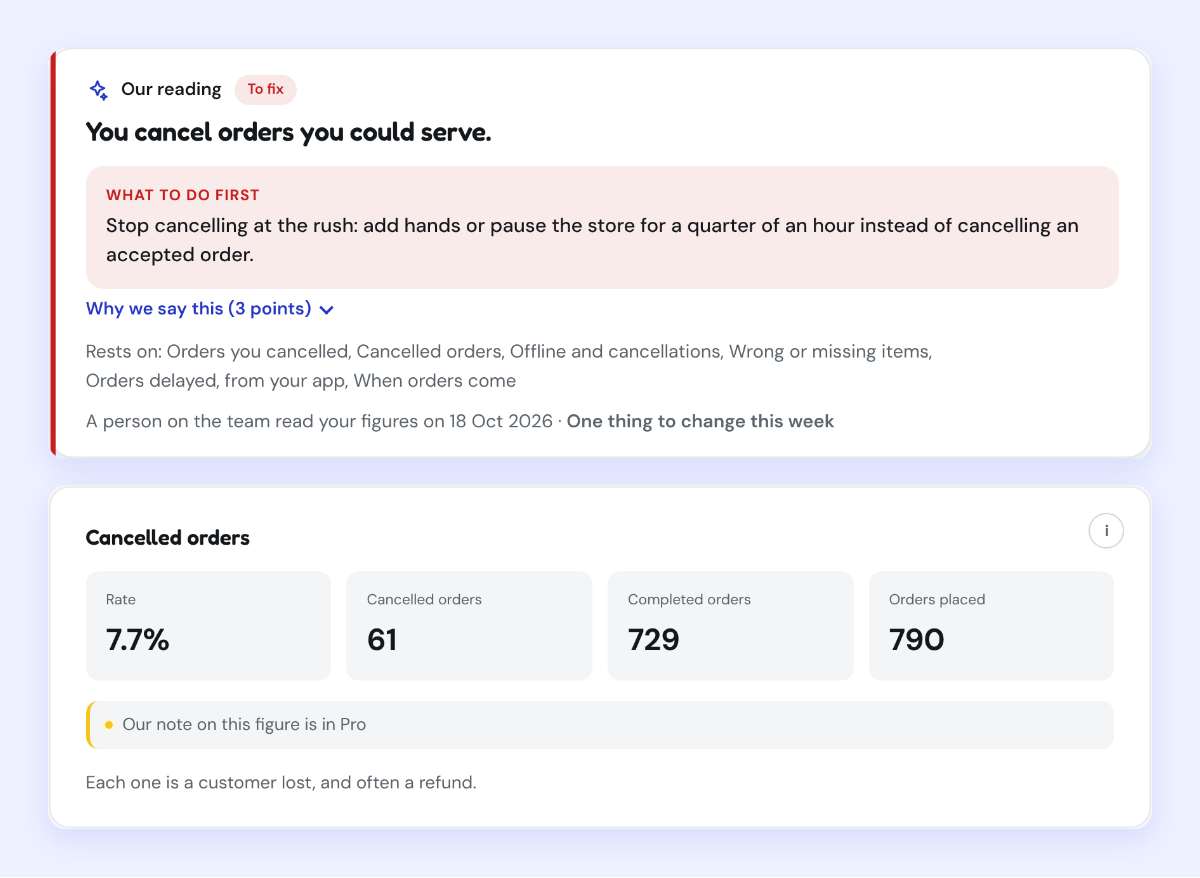
On GrabFood a cancellation counts against your store when Grab judges it avoidable, such as an item that ran out; Grab's Philippine quality program set the target below 1%, and most come from four causes you control: unavailable items, a kitchen behind, not telling Grab in time, and orders nobody saw.
A cancelled order is lost twice: the sale you did not make, and the customer who may not come back. On GrabFood it also counts against your store. Most cancellations are not bad luck. They come from a few causes you control, and Grab is clear about which ones it holds you responsible for.
Not all cancellations count the same
Grab separates cancellations you could have avoided from those you could not. A customer changing their mind is not the same as an item you ran out of. Grab treats item unavailability, among other merchant-side reasons, as an avoidable cancellation.
That distinction matters because Grab's targets are set on avoidable cancellations. In the Philippines, its Quality Hero program required avoidable cancellations below 1%, alongside missing and incorrect orders below 1%. Your app shows your own figure and your own target on the Home section, so read yours rather than a general rule.
What happens when cancellations stay high
- You miss the quality badges. Grab's quality programs, which bring a badge and visibility, are built on these numbers.
- You can be moved to manual acceptance. Grab's Indonesia terms allow it to switch a merchant from automatic to manual order acceptance based on cancellation and acceptance rates. In manual mode, orders not accepted in time count as rejected.
- Penalties can apply. Grab's Philippine Code of Conduct lists penalties for breaches that can reach up to 10% of sales value or a suspension of up to 30 days. Grab Singapore states that it has quality thresholds and that missing them may lead to suspension.
The four causes, and the fix for each
1. Items that are not actually available
The most common avoidable cancellation: a customer orders something you no longer have.
Fix: switch items off in the app the moment they run out, not at the end of service. Check availability at opening, and again before each peak. If an item runs out often, either prepare more of it or take it off for the busy service.
2. A kitchen that falls behind
When an order takes much longer than promised, the customer or the system gives up. Grab assigns riders based on the preparation time it predicts for your order, so an unrealistic prep time causes problems at both ends.
Fix: set your preparation time to what your kitchen really does at peak, not on a quiet afternoon. Prepare components of your best sellers before the rush. During the busiest service, consider a shorter menu so the kitchen is not juggling dishes that slow everything down.
3. Not telling Grab in time
Many orders are lost not because they were late, but because nobody said so. In the Philippines, merchants are expected to request more time within 2 minutes using "Extend", and to flag an order they cannot fulfil within 5 minutes.
Fix: keep the device attended during service and make one person responsible for it. If an item is missing, contact the customer through the app and offer a swap rather than cancelling outright.
4. Orders nobody saw
An order that is never accepted is lost. Where automatic acceptance is available, it removes this cause entirely.
Fix: use automatic acceptance if your market offers it, keep the device charged, connected and loud, and never leave the store online when nobody is watching orders.
Track it day by day, not month by month
A monthly cancellation rate hides where the problem is. One overloaded Saturday looks the same in a monthly average as a kitchen that is slow every day, but the fixes are completely different: staffing and prep for one service, or the menu and recipes for every service.
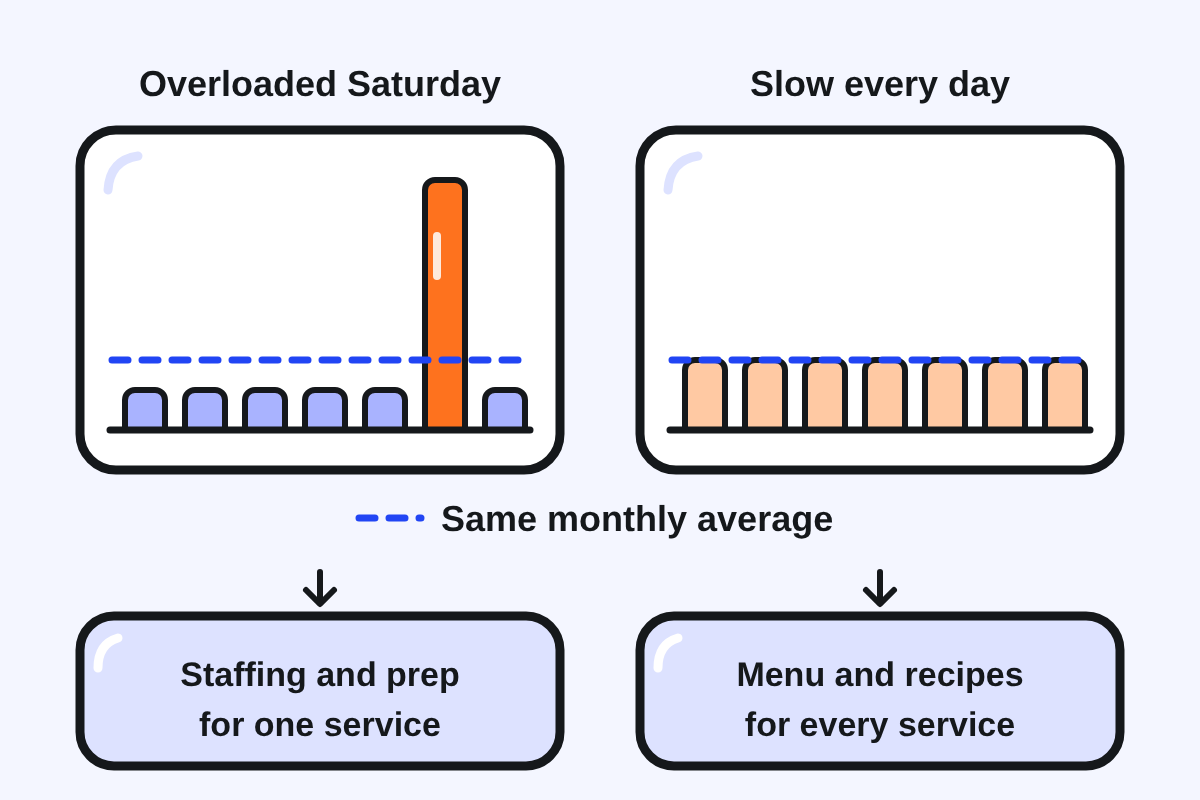
Do this: each week, look at cancellations and late orders day by day and service by service in the GrabMerchant Portal. Note the reason Grab records for each lost order. Fix the most frequent reason first, change one thing at a time, and check again the following week.
When something goes wrong after the order
Some problems only appear once the food arrives: a missing item, a wrong dish. Respond fast, because the windows are short. In Singapore, customers can chat with the merchant about missing or wrong items, and the merchant has 3 hours to act before the case goes to Grab Support. In the Philippines, reimbursement claims for cancelled orders must be filed within 48 hours of the transaction. Grab does not publish a general appeal window for refunds on GrabFood, so check refunds every week rather than every month.
Questions people ask
What is a good cancellation rate on Grab?
Grab's published target is on avoidable cancellations: below 1% in its Philippine quality program. Your app shows your own figure and target.
What counts as an avoidable cancellation?
Cancellations caused on the merchant side, such as an item that was not available. Cancellations caused by the customer are treated differently.
Can Grab suspend my store for cancellations?
Yes, in some cases. Grab's codes of conduct describe quality thresholds and penalties, up to suspension, for merchants who repeatedly miss them.
How do I dispute a refund on GrabFood?
Act quickly. Known windows include 3 hours to resolve an order issue with the customer in Singapore and 48 hours to claim for a cancelled order in the Philippines. Check your refunds weekly.
Keep reading: How to Get Grab Reviews · 10 GrabFood Mistakes · Low Orders on Grab
Sources
10 sources, each claim traceable to one
- Grab PH, Code of Conduct: Merchant (updated 14 Jul 2026): www.grab.com/ph/terms-policies/code-of-conduct-merchant
- Grab SG, Code of Conduct: Merchant (updated 11 May 2026): www.grab.com/sg/terms-policies/code-of-conduct-merchant
- Grab ID, Merchant General Terms and Conditions: www.grab.com/id/en/merchant/food/merchant-terms
- Grab PH, About Quality Hero Program (404 in Oct 2026; criteria from earlier capture): merchant.grab.com/en-ph/guides/ensure-safety-quality/about-quality-hero-program
- Grab SG, Managing orders efficiently, preparation time: merchant.grab.com/en-sg/guides/tool-tips-and-tutorials/managing-orders-efficiently-update-order-preparation-time-and-mark-order-ready
- Inside Grab, Cutting down the time delivery partners wait at food outlets (2022 data): www.grab.com/inside-grab/stories/cutting-down-wait-times-delivery-drivers
- Grab PH, GrabAcademy Merchant: www.grab.com/ph/merchant-grabacademy
- Grab PH, Why the GrabMerchant Portal is your best business partner: merchant.grab.com/en-ph/blog/why-the-grabmerchant-portal-is-your-best-business-partner
- Grab SG, Resolve order issues directly with your consumers: merchant.grab.com/en-sg/blog/resolve-order-issues-directly-with-your-consumers
- Grab PH, Simplified reimbursement process for cancelled orders (from Sept 2024): www.grab.com/ph/simplified-reimbursement-process