วิธีใช้แอป GrabMerchant (แกร็บ) ดูแลร้านของคุณ
วิธีใช้แอป GrabMerchant (แกร็บ) วันต่อวัน: แต่ละแท็บทำอะไร ใครในทีมได้บทบาทไหน ออเดอร์ ปุ่ม Ready เมนูที่หมด และแชทกับลูกค้า
ประเทศ: สิงคโปร์, มาเลเซีย, ไทย, ฟิลิปปินส์, เวียดนาม, อินโดนีเซีย เผยแพร่ โดย Kontimo
แอป GrabMerchant คือที่ที่คุณดูแลร้าน GrabFood ของคุณ บน GrabFood (แกร็บ) แอปส่งอาหารที่ลูกค้าของคุณสั่ง หกแท็บทำงานประจำวัน: Orders เพื่อดูแต่ละออเดอร์และติดตามพาร์ทเนอร์คนขับ1 History สำหรับออเดอร์รายวันของคุณในช่วง 30 วันที่ผ่านมา2 Scheduled สำหรับออเดอร์ล่วงหน้า3 Menu เพื่อปิดสิ่งที่หมด4 Inbox สำหรับข่าวสารของ Grab5 และ More สำหรับเวลาเปิด ความพร้อมให้บริการ และศูนย์ช่วยเหลือ6 การใช้แอป GrabMerchant ให้ดีส่วนใหญ่เป็นเรื่องนิสัย: บทบาทที่ถูกต้องสำหรับทีมของคุณ การแจ้งเตือนที่ดัง ปุ่ม Ready ที่กดในจังหวะที่ถูก และเมนูที่หมดถูกปิดก่อนลูกค้าสั่ง นิสัยแต่ละอย่างเปลี่ยนตัวเลขที่ Grab อ่านเกี่ยวกับร้านของคุณ คู่มือนี้ไล่ตามลำดับที่การให้บริการดำเนินไป โดยอ้างอิงศูนย์ช่วยเหลือของ Grab เอง ส่วนใหญ่ของสิงคโปร์ ซึ่งบทความอธิบายแอปเดียวกัน
แต่ละแท็บของแอป GrabMerchant ทำอะไร?
- Orders: ทุกออเดอร์ที่เข้ามา รายละเอียด และพาร์ทเนอร์คนขับอยู่ที่ไหน1
- History: ประวัติออเดอร์รายวันของคุณในช่วง 30 วันที่ผ่านมา2
- Scheduled: ออเดอร์ที่สั่งล่วงหน้า ระหว่าง 60 นาทีถึง 2 วันล่วงหน้า เพื่อให้ครัวไม่ถูกจับได้ในนาทีสุดท้าย3
- Menu: รายการของคุณ และสวิตช์ที่ทำให้รายการหนึ่งไม่พร้อมจำหน่ายเมื่อคุณหมดสต็อก4
- Inbox: ข่าวสารของ Grab5 และ ในสิงคโปร์ แชทของลูกค้าของคุณ26
- More: ความพร้อมให้บริการและเวลาเปิดของสาขา และศูนย์ช่วยเหลือ6
GrabMerchant Portal บนคอมพิวเตอร์ เพิ่มสิ่งที่เคาน์เตอร์ไม่ต้องการ: การอัปเดตเมนูแบบเรียลไทม์35 รายงานของคุณ อินไซต์ของคุณ ใช้แอปที่เคาน์เตอร์และพอร์ทัลสำหรับการทบทวนรายสัปดาห์
ใครในทีมของคุณควรได้บทบาทไหน?
Grab ให้สามบทบาท Owner เข้าถึงพอร์ทัลและแอปได้เต็มที่ และเพิ่มพนักงานกับกำหนดว่าแต่ละคนเห็นอะไร7 Cashier เข้าถึงได้จำกัด หลักๆ สำหรับจัดการออเดอร์และยอดขายรายวัน8 และสร้างโฆษณาหรือโปรโมชันไม่ได้10 ค่าเริ่มต้นหนึ่งอย่างควรเปลี่ยน: โดยค่าเริ่มต้น Cashier แก้เมนูร้านบนแอปได้9 ถ้าพนักงานที่เคาน์เตอร์ควรแค่เปิดปิดเมนู ตั้งการแก้เมนูไว้หลัง PIN เพื่อให้ราคาและคำอธิบายถูกเปลี่ยนโดยเจ้าของหรือผู้จัดการร้านเท่านั้น
ทำให้แน่ใจได้อย่างไรว่าไม่มีออเดอร์ถูกมองข้าม?
ออเดอร์ที่ดังช้าถูกเตรียมช้า และออเดอร์ที่ไม่ดังเลยจบลงด้วยการยกเลิกได้ บน Android ตรวจว่าการแจ้งเตือน GrabMerchant เปิดอยู่และความสำคัญตั้งเป็น High ขึ้นไป11 โทรศัพท์ Huawei และ Xiaomi มีบริการปิดแอปอัตโนมัติที่อาจรบกวนการแจ้งเตือน12 เพิ่ม GrabMerchant ในแอปที่อนุญาตในการตั้งค่าความปลอดภัยของโทรศัพท์ ให้ออเดอร์แต่ละประเภทมีเสียงของตัวเอง เพื่อให้ครัวได้ยินว่าออเดอร์ใหม่ ล่วงหน้า หรือยกเลิก13 และอย่าให้โทรศัพท์เคาน์เตอร์อยู่ในโหมดเงียบ: เสียงแจ้งเตือนไม่ทำงานถ้าอุปกรณ์ของคุณอยู่ในโหมด Silent14
ควรทำอะไรเมื่อออเดอร์มาถึง?
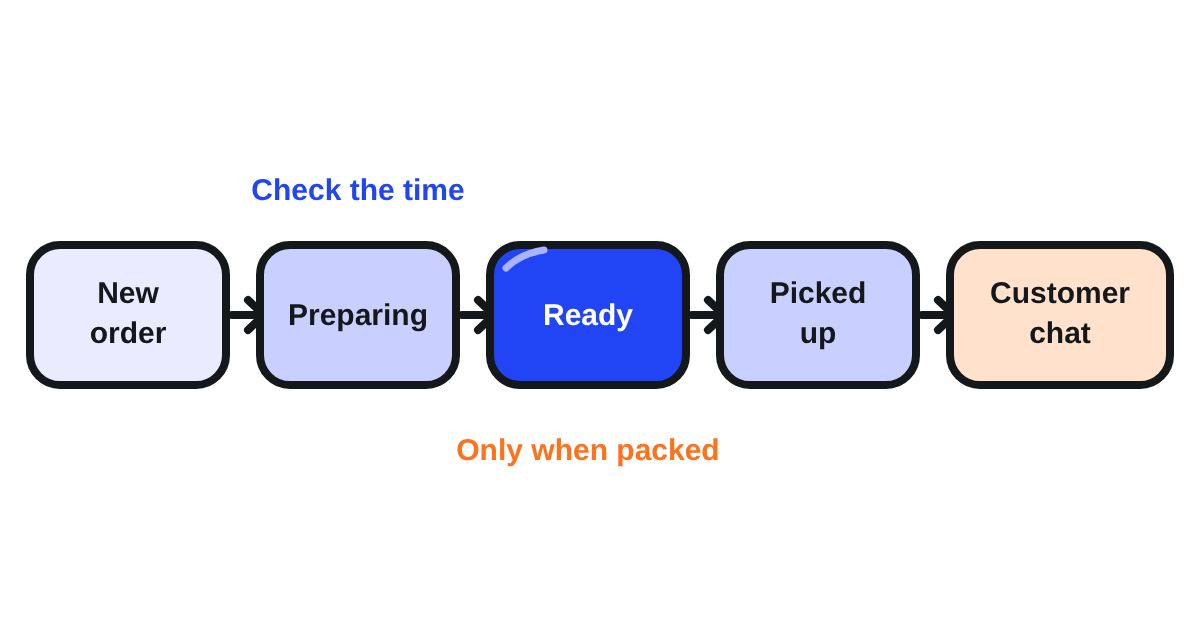
ดูเวลาเตรียมโดยประมาณทันที คุณแก้ได้ภายในสามนาทีแรกหลังรับออเดอร์15 และควรแก้เมื่อครัวยุ่งกว่าปกติ: เวลาที่แม่นยำพาคนขับมาเมื่ออาหารพร้อม ไม่ก่อนและไม่หลัง Grab สิงคโปร์แนะนำให้เตรียมออเดอร์ภายใน 15 นาที16
ทำไมปุ่ม Ready ถึงสำคัญมาก?
เพราะ Grab เรียนรู้จากมัน แตะ Ready เฉพาะเมื่อออเดอร์เตรียมและบรรจุเสร็จสมบูรณ์พร้อมรับ17 ใช้ถูกต้อง มันช่วยให้ระบบของ Grab ปรับเวลาเตรียมโดยประมาณสำหรับออเดอร์ในอนาคตของคุณ20 กดเร็วเกินไป มันเพิ่มอัตราออเดอร์ล่าช้าและลดคะแนนคุณภาพของคุณได้18 กระทบอันดับและการมองเห็นของคุณบนแพลตฟอร์ม19
สิงคโปร์บอกว่าอะไรเป็นเดิมพัน ร้านที่ทำตามเวลาเตรียมโดยประมาณอาจได้การมองเห็นในแอปที่ดีขึ้นพร้อมแถบเลื่อนเฉพาะและรัศมีที่เหมาะสม21 ร้านที่อัตราเตรียมตรงเวลาต่ำมากอาจเจอข้อจำกัดในการเข้าร่วมแคมเปญและรัศมีลดลงเล็กน้อย22 ปุ่มเสียแค่หนึ่งแตะ นิสัยตัดสินว่าลูกค้าไกลแค่ไหนยังหาคุณเจอ
ทำอะไรเมื่อเมนูหมดหรือครัวเต็ม?
จัดการในแอปก่อนออเดอร์ถัดไป ไม่ใช่หลังจากนั้น ในแท็บ Menu ทำให้รายการไม่พร้อมจำหน่าย4 ถ้าคุณทำจำนวนส่วนที่แน่นอน ขีดจำกัดยอดขายช่วยป้องกันการขายเกินเมื่อสต็อกหมด23 เมื่อครัวเต็ม สลับเป็น Busy: ร้านของคุณยังเปิดและรับออเดอร์ แต่มีเวลาเตรียมนานขึ้น24 แต่ละอย่างหยุดการยกเลิกที่ไม่เช่นนั้นจะนับกับร้านของคุณ
ตอบลูกค้าหลังออเดอร์อย่างไร?
ในสิงคโปร์ ลูกค้าเริ่มแชทกับคุณได้นานถึง 3 ชั่วโมงหลังออเดอร์เสร็จสิ้น25 และคุณพบแชทใน Inbox ใต้ Chats26 ใช้แชทสำหรับสิ่งที่คุณแก้ได้: การชี้แจง เครื่องเคียงที่หาย การส่งใหม่หรือทดแทนด้วยค่าใช้จ่ายของคุณเอง36 สำหรับร้านที่เปิดการแก้ปัญหาผ่านแชทโดยตรง ซึ่ง Grab บอกว่ามีให้เฉพาะร้านค้าที่เลือกไว้28 ความเร็วสำคัญ: ถ้าคุณไม่ตอบภายใน 30 นาทีหลังข้อความแรกของลูกค้า ระบบบอกให้เขาติดต่อฝ่ายสนับสนุน27 คำตอบที่รวดเร็วและสุภาพป้องกันข้อร้องเรียนไม่ให้กลายเป็นคะแนนต่ำได้
อ่านว่าร้านของคุณเป็นอย่างไรได้ที่ไหน?
สองที่ แท็บ History แสดงออเดอร์ของคุณ และติดป้าย "Ads" บนแต่ละออเดอร์ที่โฆษณามีอิทธิพล29 ในสิงคโปร์ ออเดอร์นับให้โฆษณาถ้าสั่งภายใน 24 ชั่วโมงหลังคลิกโฆษณา30 หรือ 1 ชั่วโมงหลังเห็นโฆษณา31: ป้ายนั้นบอกคุณว่างบโฆษณานำออเดอร์ไหนมาจริง
Insights ในแอปและพอร์ทัล แสดงยอดขาย ลูกค้า และการดำเนินงานของคุณ อัตราออฟไลน์แสดงว่าร้านของคุณถูกหยุดชั่วคราวบ่อยแค่ไหนในเวลาเปิดที่กำหนด32 ในพอร์ทัลคุณเทียบร้านเดียวหรือหลายร้านในช่วงวันใดก็ได้ภายใน 90 วันที่ผ่านมา33
ควรออกจากระบบแอป GrabMerchant ไหม?
เฉพาะเมื่อจำเป็น Grab เตือนว่าหลังคุณออกจากระบบ ร้านของคุณจะยังแสดงว่าพร้อมให้บริการแก่ลูกค้า แต่พวกเขาจะสั่งไม่ได้34 ลูกค้าที่พบว่าคุณเปิดแต่สั่งไม่ได้ไปร้านถัดไป ถ้าจะปิดร้านประจำวัน ตั้งเวลาเปิดหรือความพร้อมให้บริการในแท็บ More แทน6
ควรตรวจอะไรทุกวัน?
- โทรศัพท์เคาน์เตอร์: การแจ้งเตือนเปิด ความสำคัญสูง ไม่อยู่ในโหมดเงียบ GrabMerchant ได้รับอนุญาตให้ทำงานเบื้องหลัง
- เวลาเตรียมของแต่ละออเดอร์ใหม่ในสามนาทีแรก
- แตะ Ready เมื่อถุงปิดแล้ว ไม่ก่อนหน้านั้น
- เมนูที่หมดปิดแล้ว และขีดจำกัดยอดขายบนเมนูที่คุณทำเป็นชุด
- โหมด Busy ในช่วงเร่งด่วน กลับเป็นปกติหลังจากนั้น
- แชทลูกค้าใน Inbox ตอบภายในครึ่งชั่วโมง
- สัปดาห์ละครั้ง: ป้าย Ads ใน History และอัตราออฟไลน์ของคุณใน Insights
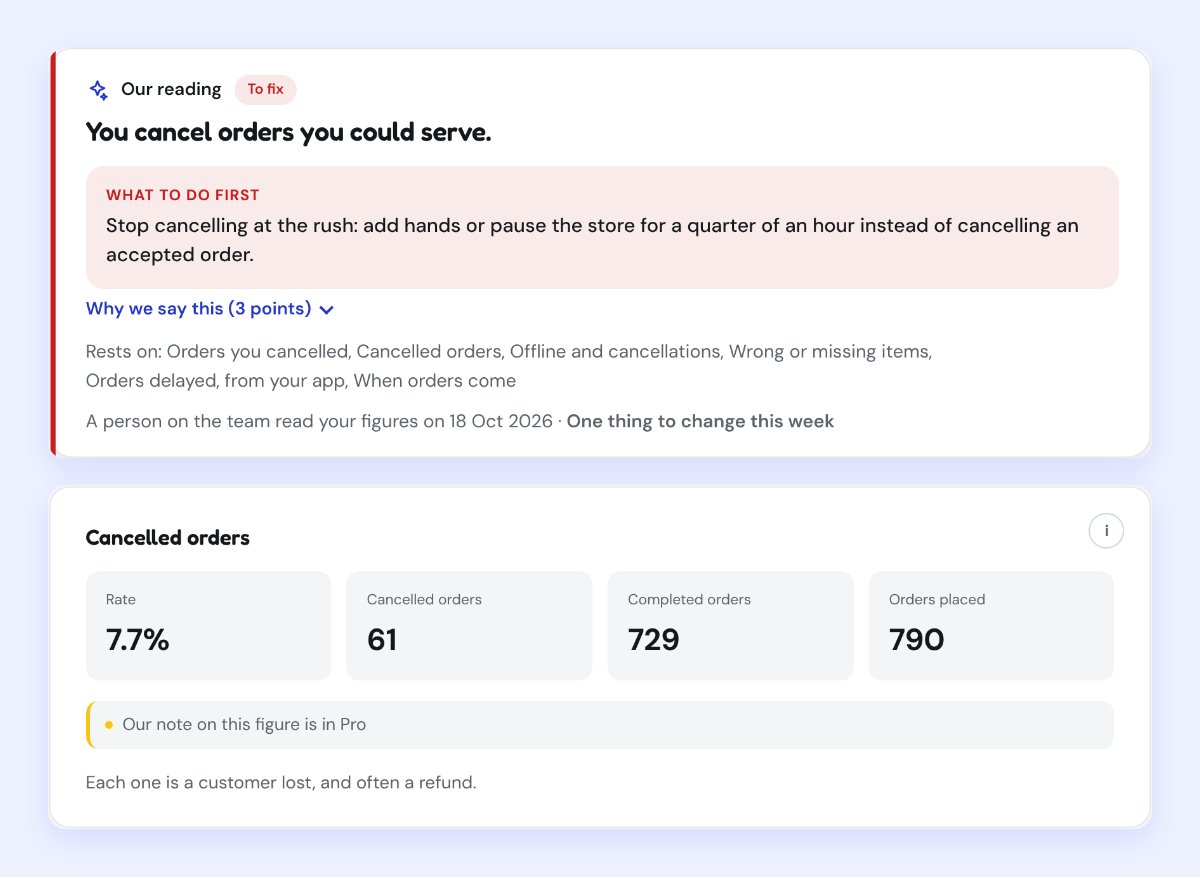
Kontimo อ่านตัวเลข GrabMerchant ของคุณทุกเดือนและบอก ด้วยภาษาง่ายๆ ว่านิสัยไหนในแอปทำให้ร้านของคุณเสียออเดอร์ เพื่อให้สิ่งถัดไปที่เปลี่ยนคือสิ่งที่สำคัญ
แหล่งข้อมูล 36 เอกสาร ตัวเลขทุกตัวตรวจย้อนกลับได้
- How to use the GrabFood Merchant app (Grab merchant help centre, Singapore), text of the article (อ่านเมื่อ 2026-11-05)
Orders: View your order details and track your assigned delivery partner’s progress.
- How to use the GrabFood Merchant app (Grab merchant help centre, Singapore), text of the article (อ่านเมื่อ 2026-11-05)
History: View your daily order history for the past 30 days.
- How to use the GrabFood Merchant app (Grab merchant help centre, Singapore), text of the article (อ่านเมื่อ 2026-11-05)
Scheduled: View advanced orders so you will not have to prepare at the last minute ( 60 mins minimum, 2 days maximum).
- How to use the GrabFood Merchant app (Grab merchant help centre, Singapore), text of the article (อ่านเมื่อ 2026-11-05)
Menu: Review your menu and manage inventory by making items unavailable when you run out of stock.
- How to use the GrabFood Merchant app (Grab merchant help centre, Singapore), text of the article (อ่านเมื่อ 2026-11-05)
Inbox: Check for any Grab updates here
- How to use the GrabFood Merchant app (Grab merchant help centre, Singapore), text of the article (อ่านเมื่อ 2026-11-05)
More: Access the Grab Merchant HelpCentre and manage your outlet’s availability and hours here.
- Merchant roles & accesses (Grab merchant help centre, Singapore), text of the article (อ่านเมื่อ 2026-11-05)
Owner: You have full access to both the portal and app. You can add employees, assign roles, and customise access levels to protect sensitive information.
- Merchant roles & accesses (Grab merchant help centre, Singapore), text of the article (อ่านเมื่อ 2026-11-05)
Cashier: You have limited access to the GrabMerchant app, primarily for managing orders and daily sales.
- Merchant roles & accesses (Grab merchant help centre, Singapore), text of the article (อ่านเมื่อ 2026-11-05)
*By default, Cashiers can edit the store menu on the app.
- Merchant roles & accesses (Grab merchant help centre, Singapore), text of the article (อ่านเมื่อ 2026-11-05)
Create ads and promos ✔️ ✔️ ❌
- Fix GrabMerchant notification issues (Grab merchant help centre, Singapore), text of the article (อ่านเมื่อ 2026-11-05)
Ensure notifications are ‘ON’ and Importance is set to ‘High’ or greater.
- Fix GrabMerchant notification issues (Grab merchant help centre, Singapore), text of the article (อ่านเมื่อ 2026-11-05)
Note: Huawei and Xiaomi devices have task killer services that may interfere with notifications.
- How do I change notification sound for orders (Grab merchant help centre, Singapore), text of the article (อ่านเมื่อ 2026-11-05)
Customising your notification sounds can help you easily identify the status of your orders
- How do I change notification sound for orders (Grab merchant help centre, Singapore), text of the article (อ่านเมื่อ 2026-11-05)
Note: Notification sounds won’t work if your device is on Silent mode.
- How to edit your Order Preparation Time (OPT) (Grab merchant help centre, Singapore), text of the article (อ่านเมื่อ 2026-11-04)
You can edit the OPT within the first three minutes of receiving an order.
- Order FAQs (Grab merchant help centre, Singapore), text of the article (อ่านเมื่อ 2026-11-05)
We recommend preparing orders within 15 minutes to ensure prompt delivery to your customers.
- How to use the Ready button in my app (Grab merchant help centre, Singapore), text of the article (อ่านเมื่อ 2026-11-05)
Timeliness: Ensure you only mark an order as ready when it is completely prepared and packaged for pickup.
- How to use the Ready button in my app (Grab merchant help centre, Singapore), text of the article (อ่านเมื่อ 2026-11-05)
MOR abuse can increase your ODR, negatively impacting your Merchant Quality Program (MQP) score.
- How to use the Ready button in my app (Grab merchant help centre, Singapore), text of the article (อ่านเมื่อ 2026-11-05)
affecting your ranking and visibility on the platform.
- How to use the Ready button in my app (Grab merchant help centre, Singapore), text of the article (อ่านเมื่อ 2026-11-05)
When MOR is used correctly, it helps our system learn and adjust the estimated preparation time for your future orders.
- Why should I improve my preparation time (Grab merchant help centre, Singapore), text of the article (อ่านเมื่อ 2026-11-04)
Top merchant-partners who meet their estimated preparation times may enjoy improved in-app visibility with a dedicated carousel and optimised radius.
- Why should I improve my preparation time (Grab merchant help centre, Singapore), text of the article (อ่านเมื่อ 2026-11-04)
merchant-partners with a significant low on-time preparation rate* may face limitations in campaign participation and a slight reduction in radius
- Set up GrabFood sales limit (Grab merchant help centre, Malaysia), text of the article (อ่านเมื่อ 2026-11-03)
Setting a sales limit for an item can help prevent overselling when stock runs out.
- Activate Busy or Temporary Pause for my restaurant (Grab merchant help centre, Singapore), text of the article (อ่านเมื่อ 2026-11-03)
Busy Your store is open and receiving orders, but requires longer preparation time.
- What is customer-initiated chat (Grab merchant help centre, Singapore), text of the article (อ่านเมื่อ 2026-11-05)
Customers can start a chat with you for up to 3 hours after their order is completed.
- What is customer-initiated chat (Grab merchant help centre, Singapore), text of the article (อ่านเมื่อ 2026-11-05)
You can also find new and ongoing chats in the Inbox page under Chats within your GrabMerchant app.
- What is customer-initiated chat (Grab merchant help centre, Singapore), text of the article (อ่านเมื่อ 2026-11-05)
If you don't reply within 30 minutes of a customer's first message, the system notifies them to immediately escalate the case to support.
- What is customer-initiated chat (Grab merchant help centre, Singapore), text of the article (อ่านเมื่อ 2026-11-05)
Note: This feature is currently available to only select merchants.
- Viewing daily order history (Grab merchant help centre, Singapore), text of the article (อ่านเมื่อ 2026-11-05)
If an order was influenced by a simplified or à la carte ad, an “Ads” label will appear next to the order number.
- Viewing daily order history (Grab merchant help centre, Singapore), text of the article (อ่านเมื่อ 2026-11-05)
24 hours of an ad click, or
- Viewing daily order history (Grab merchant help centre, Singapore), text of the article (อ่านเมื่อ 2026-11-05)
1 hour of an ad view.
- Quick guide to GrabMerchant Insights (Grab merchant help centre, Thailand), text of the article (อ่านเมื่อ 2026-10-26)
The offline rate shows how often your store was paused during the scheduled opening hours.
- How to view insights for one or multiple stores (Grab merchant help centre, Singapore), text of the article (อ่านเมื่อ 2026-11-05)
You can choose dates within the past 90 days.
- How to use the GrabFood Merchant app (Grab merchant help centre, Singapore), text of the article (อ่านเมื่อ 2026-11-05)
Important: Please note that after you’ve logged out of the app, your restaurant will still appear as available to customers, but they will not be able to order.
- GrabMerchant portal overview (Grab merchant help centre, Singapore), text of the article (อ่านเมื่อ 2026-11-05)
Edit your menu or catalogue: Make real-time updates to your menu (GrabFood) or catalogue (GrabMart).
- What is customer-initiated chat (Grab merchant help centre, Singapore), text of the article (อ่านเมื่อ 2026-11-05)
Use chat for issues you can reasonably fix, such as simple clarifications, minor mistakes (like a missing side dish), or if you can offer a redelivery or replacement at your own cost.
ตัวเลขทุกตัวข้างต้นมาจากเอกสารเหล่านี้ ตามที่เป็นอยู่ในวันที่ระบุ ตัวเลขที่ใช้กับร้านของคุณจริงคือสัญญาและรายงานยอดของร้านคุณเอง