วารสารบทความติดอันดับและถูกค้นเจอ
ขนาดรูปเมนู GrabFood (แกร็บ) และรูปอาหารที่ขายได้
ขนาดรูปเมนู GrabFood (แกร็บ) ในแต่ละตลาด Grab ขอให้รูปอาหารแสดงอะไร มุมที่แนะนำ และวิธีถ่ายรูปเมนูด้วยโทรศัพท์
ประเทศ: สิงคโปร์, มาเลเซีย, ไทย, ฟิลิปปินส์, เวียดนาม, อินโดนีเซีย เผยแพร่ โดย Kontimo
ขนาดรูป GrabFood สำหรับรายการเมนูคือสี่เหลี่ยมจัตุรัส อัตราส่วน 1:1 บน GrabFood (แกร็บ) แอปส่งอาหาร ในสิงคโปร์1 ไทย2 ฟิลิปปินส์3 และเวียดนาม4 Grab ขอขนาดอย่างน้อย 750x750 พิกเซล ในมาเลเซียขอ 500x500 ถึง 700x700 พิกเซล และไฟล์ขนาด 100 kb ถึง 200 kb5 ขนาดทำให้รูปผ่านการตรวจ แต่สิ่งที่ขายเมนูได้คือสิ่งที่รูปแสดง: Grab บอกให้ร้านเพิ่มรูปให้รายการเมนูเพื่อเพิ่มอัตราการแปลงเป็นยอดขาย เพราะลูกค้ามีแนวโน้มเลือกเมนูที่ดูน่ากินมากกว่า และให้อัปโหลดได้สูงสุดสี่รูปต่อรายการ6
บทความนี้ครอบคลุมทุกตลาดที่ Grab ให้บริการส่งอาหาร โดยอ้างอิงแต่ละกฎจากศูนย์ช่วยเหลือของตลาดที่ระบุไว้ เพราะรายละเอียดต่างกันไปในแต่ละประเทศ
GrabFood ขอขนาดรูปเท่าไรในแต่ละตลาด?
นี่คือสิ่งที่ศูนย์ช่วยเหลือของ Grab ระบุสำหรับรูปรายการ คือรูปของเมนูในเมนูของคุณ:
- สิงคโปร์: 1:1 อย่างน้อย 750x750 และตั้งชื่อไฟล์ตามชื่อรายการเมนู1
- ไทย: 1:1 อย่างน้อย 750x7502 (หน้าภาษาไทยบอกเหมือนกัน7) บันทึกเป็น JPG และไม่เกิน 5 MB8 สำหรับเทมเพลต Bulk Update อัตราส่วน 1:1 เหมาะที่สุด9 และแต่ละไฟล์ต้องไม่เกิน 2 MB10
- ฟิลิปปินส์: 750x750 สำหรับรูปรายการและรูปในรายชื่อ3
- เวียดนาม: 750x750 สำหรับรูปเมนู4
- มาเลเซีย: 1:1 500x500 ถึง 700x700 พิกเซล 100 kb ถึง 200 kb5
- อินโดนีเซีย: ศูนย์ช่วยเหลือให้ขนาดของรูปในรายชื่อ คือรูปหลักของร้านในหน้าแรกและในการค้นหา ที่ 1:1 และ 500x50011 ไม่ได้ระบุขนาดรูปรายการในหน้าที่เรามี และคู่มือเมนูของ Grab อินโดนีเซียขอให้ทุกเมนูมีคำอธิบายและรูปที่ชัดเจน12
แต่ละรายการใส่ได้สูงสุดสี่รูปในไทย6 และในเวียดนาม13
สิ่งที่ควรทำ: เก็บรูปต้นฉบับสี่เหลี่ยมจัตุรัสหนึ่งรูปต่อเมนู ใหญ่กว่าขนาดขั้นต่ำของตลาดคุณ แล้วส่งออกตามขนาดที่ตลาดคุณขอ ถ้า Grab ปฏิเสธการอัปโหลด ตรวจอัตราส่วนและน้ำหนักไฟล์ก่อน
ทำไมรูปอาหารจึงสำคัญมากกับเดลิเวอรี?
ช่างภาพประจำของ Grab พูดไว้ง่ายๆ: รูปสำคัญยิ่งกว่าสำหรับการส่งอาหาร ที่ลูกค้าได้กลิ่นอาหารหรือเห็นคนต่อแถวไม่ได้ และความประทับใจแรกมาจากรูป14 เขาพูดไว้ในเรื่องราวของ Grab เมื่อวันที่ 18 พฤษภาคม 202315 ศูนย์ช่วยเหลือของ Grab เวียดนามให้เหตุผลเดียวกันในการเพิ่มรูปให้แต่ละเมนู: ลูกค้ามักเลือกเมนูที่มีรูปน่าสนใจ16
งานวิจัยเกี่ยวกับแอปเดลิเวอรีอีกรายชี้ไปทางเดียวกัน การศึกษาร้านอาหารบน Uber Eats ในปี 2025 พบว่าความต่างของพื้นผิวและความอิ่มตัวของสีในรูปอาหารเพิ่มยอดขาย17 ขณะที่ความต่างของความสว่างที่มากเกินไปลดยอดขาย18 คำแนะนำของ Grab ขีดเส้นไว้อีกด้าน: ใช้แสงที่เหมาะสม และเลี่ยงรูปที่สว่างเกิน มืดเกิน หรือสีจัดเกิน19 สีที่ดูเหมือนอาหารช่วยได้ รูปที่ถูกดันเกินกว่าหน้าตาจริงของเมนูไม่ช่วย
รูปอาหารที่ดีควรแสดงอะไร?
ทั้งจาน และไม่มีอะไรมาแย่งความสนใจ Grab ฟิลิปปินส์ขอให้แสดงเมนูเต็มจานในกรอบโดยไม่ครอป20 และเลี่ยงการถ่ายใกล้ ให้เหลือพื้นที่รอบจานพอสมควร21
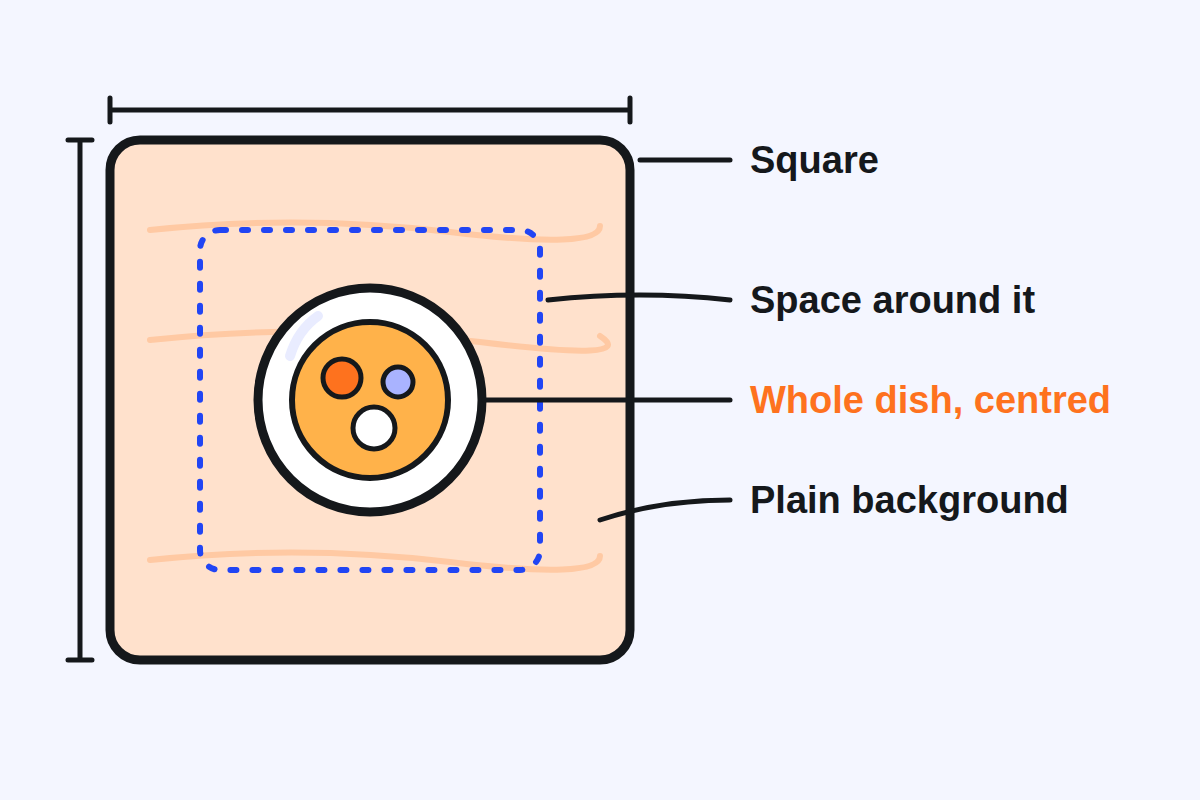
พื้นหลังควรช่วยให้อาหารเด่น Grab สิงคโปร์แนะนำพื้นหลังที่มีพื้นผิว เช่น ไม้ เซรามิก ผ้าในครัว หรือหินอ่อน22 Grab เวียดนามชอบพื้นหลังขาวสว่างที่ไม่มีลวดลายมาก23 Grab ฟิลิปปินส์เสริมว่าเมนูไม่ควรกลืนไปกับพื้นหลัง: ใช้สีที่ตัดกัน24
หนึ่งเมนูต่อหนึ่งรูป Grab เวียดนามขอให้ถ่ายแต่ละเมนูแยกกัน ไม่ถ่ายหลายเมนูในรูปเดียว25 Grab มาเลเซียระบุสิ่งที่ควรเลี่ยง: ถ่ายใกล้เกิน เมนูมากเกิน พื้นหลังรก ส่วนของร่างกาย รูปมืด ภาพคอลลาจ และรูปเบลอ26 Grab สิงคโปร์ยังไม่รับมือในรูปและการจัดวางที่เน้นศิลปะเกินไป27
อย่าให้มีตัวหนังสือบนจาน Grab สิงคโปร์ขอให้รูปไม่มีข้อความ อีโมติคอน หรือลายน้ำ28 ตรงที่อนุญาตให้มีข้อความ แต่ละตลาดกำหนดเพดาน: ในไทย ข้อความหรือรูปอื่นต้องไม่เกิน 30% ของพื้นที่รูป และควรเลี่ยงรูปแบบตาราง29 ในมาเลเซีย คำ ป้าย โลโก้ และกราฟิกต้องไม่เกิน 25%30 อินโดนีเซียกำหนด 25% เท่ากันสำหรับข้อความ ป้าย หรือโลโก้31 Grab ประเทศไทยให้เหตุผล: ลูกค้าสนใจรูปอาหารมากกว่าโลโก้32
ควรใช้มุมไหนกับแต่ละเมนู?
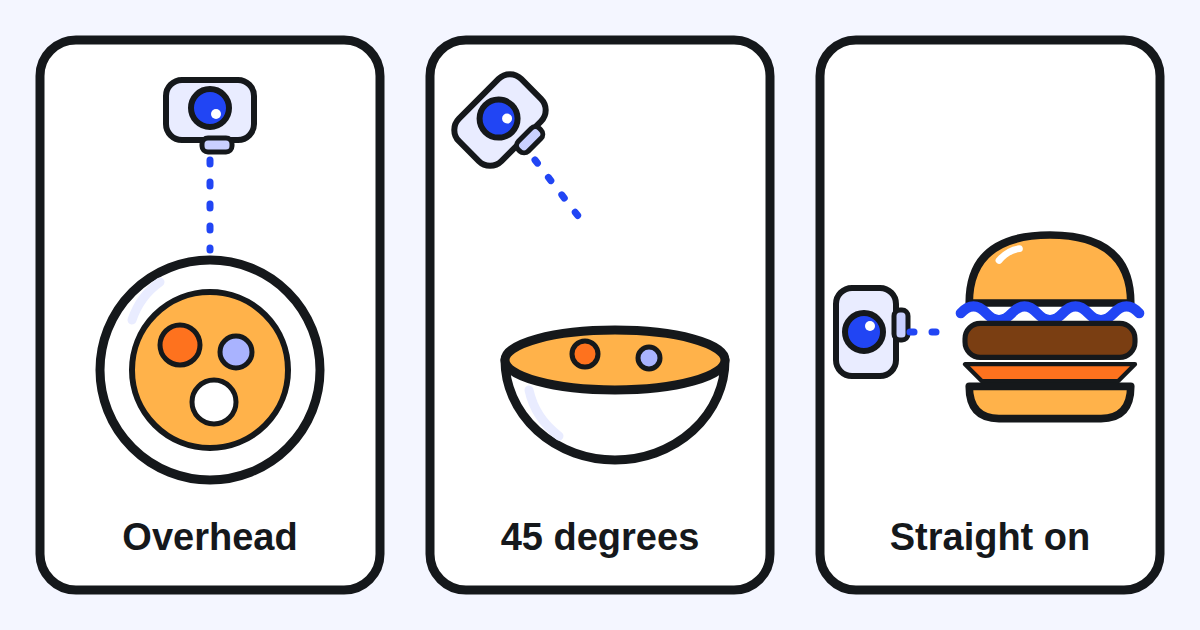
Grab ระบุสามมุม มุมบนตรง (flat lay) คือมุมมองจากด้านบนโดยมีอาหารอยู่กลางกรอบ33 มุม 45 องศาวางเมนูหลักไว้ด้านหน้าโดยพื้นหลังเบลอเพื่อให้มีมิติ34 มุมตรงจากด้านข้างเหมาะกับรายการที่มีชั้น เช่น เบอร์เกอร์ แซนด์วิช หรือเค้ก เพราะเห็นวัตถุดิบ35
ช่างภาพของ Grab ให้กฎเบื้องหลังการเลือก: เลือกมุมที่ทำให้เห็นรายละเอียดของเมนู36 สำหรับเมนูที่เสิร์ฟพร้อมน้ำจิ้มแยก เช่น ข้าวมันไก่ เขาถ่ายเมนูก่อนราดน้ำจิ้ม37 เพื่อให้ยังเห็นวัตถุดิบชัด
ถ่ายรูปอาหารดีๆ ด้วยโทรศัพท์ได้ไหม?
ได้ Grab ฟิลิปปินส์ระบุว่าผู้ขายหลายรายบน Grab ประสบความสำเร็จอย่างมากกับการถ่ายสินค้าด้วยสมาร์ตโฟนธรรมดา38 ในคู่มือลงวันที่ 6 กรกฎาคม 202239 ขาตั้งกล้องช่วยให้คุณรักษาทิศทางเดียวกันในทุกรูป40 ซึ่งทำให้เมนูดูเป็นระเบียบเดียวกัน
สามนิสัยสำคัญกว่ากล้อง:
- ถ่ายตอนเมนูยังสด จัดจานให้ดีและถ่ายทันทีที่ทำเสร็จ ก่อนที่ส่วนประกอบจะเหี่ยวหรือแฉะ41
- จัดจานให้เรียบร้อย จานสะอาด ไม่มีคราบหกที่ขอบ42
- ใช้แสงดี สว่างพอ ไม่มืดเกินและไม่สว่างเกิน19
ข้อควรระวังหนึ่งข้อ ช่างภาพของ Grab แนะนำภาพแอ็กชันที่มีมือของคุณในกรอบ แต่เคล็ดลับของเขาครอบคลุมทั้งเมนูและโซเชียลมีเดีย43 เก็บเคล็ดลับเรื่องมือ44 ไว้สำหรับโซเชียลมีเดีย สำหรับเมนู GrabFood ของคุณ ทำตามศูนย์ช่วยเหลือ: ไม่มีมือในรูป27
รูปควรแสดงเมนูตามที่คุณเสิร์ฟจริงไหม?
ใช่ Grab เวียดนามขอให้ใช้รูปเมนูของร้านคุณเอง45 และ Grab สิงคโปร์ขอให้ใช้เฉพาะรูปที่คุณมีสิทธิ์ตามกฎหมาย46 งานวิจัยเรื่องเมนูออนไลน์เพิ่มมุมของลูกค้า: รูปควรมาจากอาหารของร้านเอง และอาหารที่เสิร์ฟควรตรงกับรูปให้มากที่สุด47
รูปที่สัญญาเกินกว่าที่กล่องให้ สร้างความคาดหวังที่ออเดอร์ตอบไม่ได้ ถ่ายปริมาณที่คุณเสิร์ฟจริง พร้อมเครื่องเคียงที่มาด้วยจริง
อัปโหลดรูปอย่างไร และใช้เวลานานแค่ไหน?
คุณเพิ่มรูปตอนสร้างหรือแก้ไขรายการในแอปหรือพอร์ทัล GrabMerchant สูงสุดสี่รูปต่อรายการ6 หากต้องการเปลี่ยนหลายเมนูพร้อมกัน เทมเพลต Bulk Update รับสูงสุดสี่รูปต่อชื่อรายการ48
รูปถูกตรวจก่อนขึ้นจริง Grab ประเทศไทยบอกว่าคำขออัปเดตเมนูทั้งหมดต้องผ่านการตรวจและอนุมัติภายในโดย Grab49 และ Grab มาเลเซียบอกว่าคำขออัปเดตรูปทั้งหมดอยู่ภายใต้การตรวจภายใน50 วางแผนรูปใหม่ล่วงหน้าสองสามวันก่อนจะใช้ ไม่ใช่คืนก่อนแคมเปญ
รู้ได้อย่างไรว่ารูปใหม่ได้ผล?
อ่านยอดขายของเมนูก่อนและหลัง ในไทย Menu Insights แสดงจำนวนที่ขาย ยอดขาย และส่วนแบ่งยอดขายของแต่ละรายการ ย้อนหลังได้สูงสุด 90 วัน51 Grab เวียดนามอธิบายฟีเจอร์เดียวกันและแนะนำให้ใช้เพื่อเปลี่ยนรูป คำอธิบาย หรือตำแหน่งของเมนู52 ในโพสต์วันที่ 22 กรกฎาคม 202053
เปลี่ยนทีละเมนูและจดวันที่ หลังจากสองหรือสามสัปดาห์ เทียบจำนวนที่ขายกับจำนวนสัปดาห์เท่ากันก่อนหน้า เริ่มจากเมนูที่ขายน้อยที่สุด: เมนูที่ไม่มีรูป หรือรูปไม่ดี มีโอกาสได้มากที่สุด
สัปดาห์นี้ควรตรวจอะไรในเมนูของคุณ?
- ทุกเมนูมีรูป สี่เหลี่ยมจัตุรัส ตามขนาดของตลาดคุณ
- แต่ละรูปแสดงทั้งจาน อยู่ตรงกลาง มีพื้นที่รอบๆ
- พื้นหลังเรียบและตัดกับอาหาร
- หนึ่งเมนูต่อหนึ่งรูป: ไม่มีคอลลาจ ไม่มีตาราง ไม่มีมือ
- ไม่มีข้อความ โลโก้ หรือลายน้ำเกินกว่าที่ตลาดคุณอนุญาต
- รูปแสดงปริมาณและเครื่องเคียงที่คุณเสิร์ฟจริง
- เมนูขายดีของคุณมีรูปที่สองหรือสาม จากอีกมุม
- คุณจดวันที่ของรูปใหม่แต่ละรูปไว้ เพื่ออ่านผลในยอดขายรายการภายหลัง
Kontimo ช่วยให้คนทำร้านอาหารบน Grab อ่านเมนูของตัวเองได้ทุกเดือน อธิบายด้วยภาษาง่ายๆ เพื่อให้รูปถัดไปไปอยู่ที่เมนูที่ต้องการมันที่สุด
แหล่งข้อมูล 53 เอกสาร ตัวเลขทุกตัวตรวจย้อนกลับได้
- Getting the best photos for my store (Grab merchant help centre, Singapore), text of the article (อ่านเมื่อ 2026-10-21)
Menu/catalogue photo 1:1 aspect ratio Resolution of at least 750x750 File name should match the menu item name
- I want to update my menu or pricing, with the guidelines and requirements for menu photos (Grab merchant help centre, Thailand, article 360027910451), text of the article (อ่านเมื่อ 2026-10-21)
Menu/Catalogue photo This will appear as your menu/catalogue item photo. 1:1 aspect ratio Minimum Resolution: 750x750 File Name: Use the menu/catalogue item name.
- Updating the cover photo and menu item photos, tips for better photos (Grab merchant help centre, the Philippines, article 360027910411), text of the article (อ่านเมื่อ 2026-10-21)
750x750 for list and item photos
- Cập nhật thực đơn món ăn, with the requirements for dish photos (Grab merchant help centre, Vietnam, article 360027910451), text of the article (อ่านเมื่อ 2026-10-21)
Độ phân giải 750x750 cho ảnh món ăn.
- Updating menu item, list and banner photos, with the standard photo guidelines (Grab merchant help centre, Malaysia, article 360027910411), text of the article (อ่านเมื่อ 2026-10-21)
Ensure the photo size for logo, list and item photos are in square mode 1:1 aspect ratio with a pixel resolution of 500×500 - 700x700 and a size range of 100kb - 200kb.
- Manage items and categories in your menu (Grab merchant help centre, Thailand), text of the article (อ่านเมื่อ 2026-10-21)
Photos: Add photos to your menu item to improve sales conversion. Customers are more likely to choose dishes that are visually appealing. You can upload up to 4 photos for each menu item.
- ต้องการแก้ไขชื่อเมนู รูป หรือราคาอาหาร (Grab merchant help centre, Thailand, in Thai, article 360027910451), text of the article (อ่านเมื่อ 2026-10-21)
อัตราส่วน 1:1 ความละเอียดขั้นต่ำ: 750x750
- I want to update my menu or pricing, with the guidelines and requirements for menu photos (Grab merchant help centre, Thailand, article 360027910451), text of the article (อ่านเมื่อ 2026-10-21)
Save the photo in JPG format with a resolution of 750x750 pixels. Ensure the file size does not exceed 5MB.
- Using Bulk Update to manage multiple items on GrabFood menu (Grab merchant help centre, Thailand), text of the article (อ่านเมื่อ 2026-10-21)
1:1 width and height ratio is optimal
- Using Bulk Update to manage multiple items on GrabFood menu (Grab merchant help centre, Thailand), text of the article (อ่านเมื่อ 2026-10-21)
Max file size limit of <=2MB per image file
- Ganti foto banner/list (Grab merchant help centre, Indonesia), text of the article (อ่านเมื่อ 2026-10-21)
List (rasio 1:1) Muncul di halaman depan atau pencarian GrabFood/GrabMart sebagai foto utama toko Anda. Ukuran file: 500x500px
- Panduan Membuat Menu (Item, Kategori, dan Foto) di Aplikasi GrabMerchant (GrabMerchant guide, Indonesia), text of the page (อ่านเมื่อ 2026-10-21)
Pastikan setiap hidangan dilengkapi dengan deskripsi dan foto yang jelas
- Cập nhật thực đơn món ăn, with the requirements for dish photos (Grab merchant help centre, Vietnam, article 360027910451), text of the article (อ่านเมื่อ 2026-10-21)
Lưu ý: Đối tác có thể tải lên tối đa 4 ảnh cho mỗi món ăn.
- Take better food photos: Tips from our in-house photographer (Inside Grab, 18 May 2023), text of the page (อ่านเมื่อ 2026-10-21)
This is even more important for food delivery where consumers don’t get to smell the food or see people queuing up for it. The first impression comes from the photo,
- Take better food photos: Tips from our in-house photographer (Inside Grab, 18 May 2023), text of the page (อ่านเมื่อ 2026-10-21)
May 18, 2023
- Cập nhật thực đơn món ăn, with the requirements for dish photos (Grab merchant help centre, Vietnam, article 360027910451), text of the article (อ่านเมื่อ 2026-10-21)
chúng tôi khuyến khích Đối tác thêm hình ảnh cho món ăn vì người dùng có xu hướng lựa chọn món ăn có hình ảnh hấp dẫn
- Feast Your Eyes: How Image Features Serves Up Sales on UberEats (อ่านเมื่อ 2026-09-02)
Our findings reveal that texture difference and Saturation positively influence sales
- Feast Your Eyes: How Image Features Serves Up Sales on UberEats (อ่านเมื่อ 2026-09-02)
Conversely, excessive Brightness Contrast has a negative impact
- Updating the cover photo and menu item photos, tips for better photos (Grab merchant help centre, the Philippines, article 360027910411), text of the article (อ่านเมื่อ 2026-10-21)
Use proper lighting to enhance appetite appeal. Avoid overexposed, underexposed, or overly saturated shots.
- Updating the cover photo and menu item photos, tips for better photos (Grab merchant help centre, the Philippines, article 360027910411), text of the article (อ่านเมื่อ 2026-10-21)
Show the full dish in the frame; avoid cropping.
- Updating the cover photo and menu item photos, tips for better photos (Grab merchant help centre, the Philippines, article 360027910411), text of the article (อ่านเมื่อ 2026-10-21)
Avoid close-up shots; leave ample space around the dish.
- Getting the best photos for my store (Grab merchant help centre, Singapore), text of the article (อ่านเมื่อ 2026-10-21)
Textured backgrounds are recommended. For example: wood, ceramic, kitchen linen, marble texture etc.
- Cập nhật thực đơn món ăn, with the requirements for dish photos (Grab merchant help centre, Vietnam, article 360027910451), text of the article (อ่านเมื่อ 2026-10-21)
Phông nền nên là màu trắng sáng và không có nhiều hoạ tiết.
- Updating the cover photo and menu item photos, tips for better photos (Grab merchant help centre, the Philippines, article 360027910411), text of the article (อ่านเมื่อ 2026-10-21)
Ensure the dish doesn’t blend into the background; use contrasting colours.
- Cập nhật thực đơn món ăn, with the requirements for dish photos (Grab merchant help centre, Vietnam, article 360027910451), text of the article (อ่านเมื่อ 2026-10-21)
Chụp từng món riêng biệt, không chụp chung nhiều món ăn trong cùng một hình.
- Updating menu item, list and banner photos, with the standard photo guidelines (Grab merchant help centre, Malaysia, article 360027910411), text of the article (อ่านเมื่อ 2026-10-21)
Avoid close up, too many dishes, messy backgrounds, the appearance of body parts, dark, collage photos, and blurred shots.
- Getting the best photos for my store (Grab merchant help centre, Singapore), text of the article (อ่านเมื่อ 2026-10-21)
Don’t: Avoid close-ups, messy backgrounds, hands in the shot, or overly artsy presentations.
- Getting the best photos for my store (Grab merchant help centre, Singapore), text of the article (อ่านเมื่อ 2026-10-21)
Ensure images don’t contain text, emoticons, or watermarks.
- I want to update my menu or pricing, with the guidelines and requirements for menu photos (Grab merchant help centre, Thailand, article 360027910451), text of the article (อ่านเมื่อ 2026-10-21)
If text or other images are included, they should not occupy more than 30% of the photo area. Avoid grid format photos.
- Updating menu item, list and banner photos, with the standard photo guidelines (Grab merchant help centre, Malaysia, article 360027910411), text of the article (อ่านเมื่อ 2026-10-21)
Words, label, logo, graphic, must not take up more than 25% of the entire photo.
- Ganti foto banner/list (Grab merchant help centre, Indonesia), text of the article (อ่านเมื่อ 2026-10-21)
Maksimal pakai 25% dari luas gambar untuk teks, label, atau logo.
- I want to update my menu or pricing, with the guidelines and requirements for menu photos (Grab merchant help centre, Thailand, article 360027910451), text of the article (อ่านเมื่อ 2026-10-21)
Use food-related photos only, as consumers focus more on food images than logos.
- Getting the best photos for my store (Grab merchant help centre, Singapore), text of the article (อ่านเมื่อ 2026-10-21)
Overhead flat lay shot: Capture a top-down view with the food centred in the frame.
- Getting the best photos for my store (Grab merchant help centre, Singapore), text of the article (อ่านเมื่อ 2026-10-21)
45-degree shot: Place the main dish in the foreground with a blurred background for depth.
- Getting the best photos for my store (Grab merchant help centre, Singapore), text of the article (อ่านเมื่อ 2026-10-21)
Straight-on shot (side view): Ideal for layered items like burgers, sandwiches, or cakes to showcase ingredients.
- Take better food photos: Tips from our in-house photographer (Inside Grab, 18 May 2023), text of the page (อ่านเมื่อ 2026-10-21)
When it comes to deciding the best angle, it boils down to making sure you can see details of the dish, said Ravin.
- Take better food photos: Tips from our in-house photographer (Inside Grab, 18 May 2023), text of the page (อ่านเมื่อ 2026-10-21)
for dishes such as chicken rice that come with sauce on the side, he recommended taking photos of the dish before adding the sauce.
- Photos That Sell: A Guide to Taking Good Product Photos (Grab Philippines merchant community, 6 July 2022), text of the page (อ่านเมื่อ 2026-10-21)
many online sellers right on the Grab platform have found plenty of success shooting their products with a simple smartphone.
- Photos That Sell: A Guide to Taking Good Product Photos (Grab Philippines merchant community, 6 July 2022), text of the page (อ่านเมื่อ 2026-10-21)
Wednesday July 6th, 2022
- Photos That Sell: A Guide to Taking Good Product Photos (Grab Philippines merchant community, 6 July 2022), text of the page (อ่านเมื่อ 2026-10-21)
A tripod can help you achieve a consistent, standardized orientation across all the product photos you take
- Photos That Sell: A Guide to Taking Good Product Photos (Grab Philippines merchant community, 6 July 2022), text of the page (อ่านเมื่อ 2026-10-21)
If you’re photographing food, make sure to plate it well and to shoot immediately when the food is freshly made so that its components don’t look limp or soggy.
- Updating the cover photo and menu item photos, tips for better photos (Grab merchant help centre, the Philippines, article 360027910411), text of the article (อ่านเมื่อ 2026-10-21)
Keep plating neat and clean (e.g., no spillages on the plate edges).
- Take better food photos: Tips from our in-house photographer (Inside Grab, 18 May 2023), text of the page (อ่านเมื่อ 2026-10-21)
Whether it’s for your menu or social media channel
- Take better food photos: Tips from our in-house photographer (Inside Grab, 18 May 2023), text of the page (อ่านเมื่อ 2026-10-21)
You can do this through action shots by including your hands in the frame when you’re plating, serving or preparing to dig into a meal.
- Cập nhật thực đơn món ăn, with the requirements for dish photos (Grab merchant help centre, Vietnam, article 360027910451), text of the article (อ่านเมื่อ 2026-10-21)
Sử dụng hình ảnh chụp món ăn của chính cửa hàng của mình.
- Getting the best photos for my store (Grab merchant help centre, Singapore), text of the article (อ่านเมื่อ 2026-10-21)
Only use photos you have the legal right to use.
- The effect of online restaurant menus on consumers' purchase intentions during the COVID-19 pandemic (อ่านเมื่อ 2026-09-02)
Photos that represent the menu items should be appropriated from the restaurant’s own food, and the food served should align with the photo as equivalently as possible.
- Using Bulk Update to manage multiple items on GrabFood menu (Grab merchant help centre, Thailand), text of the article (อ่านเมื่อ 2026-10-21)
Up to a maximum of 4 photos per item name.
- I want to update my menu or pricing, with the guidelines and requirements for menu photos (Grab merchant help centre, Thailand, article 360027910451), text of the article (อ่านเมื่อ 2026-10-21)
Please understand that all menu/catalogue update requests require internal review and approval by Grab.
- Updating menu item, list and banner photos, with the standard photo guidelines (Grab merchant help centre, Malaysia, article 360027910411), text of the article (อ่านเมื่อ 2026-10-21)
All photo update requests are subjected to Grab's internal review and approval.
- Menu Insights new features explained (Thailand), text of the article (อ่านเมื่อ 2026-10-17)
Menu item performance: Get visibility into your top-performing menu items based on units sold, sales generated, and percentage sales contribution (up to 90 days).
- [GrabFood] Tính năng phân tích số liệu thực đơn sẽ giúp Đối tác tối ưu hóa kinh doanh như thế nào? (GrabFood merchant blog, Vietnam, 22 July 2020), text of the page (อ่านเมื่อ 2026-10-21)
Từ đó có thể tối ưu thực đơn bằng cách thay hình ảnh, miêu tả thậm chí vị trí của các món sao cho phù hợp với Người dùng.
- [GrabFood] Tính năng phân tích số liệu thực đơn sẽ giúp Đối tác tối ưu hóa kinh doanh như thế nào? (GrabFood merchant blog, Vietnam, 22 July 2020), text of the page (อ่านเมื่อ 2026-10-21)
Thứ Tư Tháng Bảy 22nd, 2020
ตัวเลขทุกตัวข้างต้นมาจากเอกสารเหล่านี้ ตามที่เป็นอยู่ในวันที่ระบุ ตัวเลขที่ใช้กับร้านของคุณจริงคือสัญญาและรายงานยอดของร้านคุณเอง