สิ่งที่คุณเปลี่ยนเองได้ใน GrabMerchant (แกร็บ)
ใน GrabMerchant (แกร็บ) คุณเปลี่ยนเมนู ราคา รูป เวลาเปิด และข้อมูลติดต่อได้เอง Grab ตรวจอะไรก่อน อะไรต้องส่งคำขอ และขีดจำกัดในแต่ละตลาด
ประเทศ: สิงคโปร์, มาเลเซีย, ไทย, ฟิลิปปินส์, เวียดนาม, อินโดนีเซีย เผยแพร่ โดย Kontimo

ใน GrabMerchant สิ่งที่ลูกค้าเห็นเกี่ยวกับร้านของคุณส่วนใหญ่เป็นของคุณที่จะเปลี่ยน: เมนู ราคา รูปอาหาร หมวดหมู่ เวลาเปิด และเบอร์โทรสาธารณะ จากแอป GrabMerchant หรือพอร์ทัล บางอย่างถูก Grab ตรวจก่อนแสดง เช่น ชื่อร้านใหม่หรือรูปร้านใหม่ บางอย่างผ่านแบบฟอร์มหรือทีมสนับสนุนของ Grab และบางอย่าง Grab เป็นผู้กำหนดเพียงฝ่ายเดียว ศูนย์ช่วยเหลือภาษาไทยของ Grab ขีดเส้นนั้นเอง: ก่อนอื่นระบุข้อมูลร้านที่คุณเปลี่ยนเองได้ผ่านแอป1 จากนั้นข้อมูลร้านที่คุณต้องส่งคำขอเปลี่ยนผ่านแบบฟอร์ม2 คู่มือนี้สำหรับร้านที่ขายบน GrabFood (แกร็บ) แอปส่งอาหาร
คู่มือนี้ครอบคลุมสิงคโปร์ มาเลเซีย ไทย ฟิลิปปินส์ เวียดนาม และอินโดนีเซีย เครื่องมือเหมือนกันทั้งหมด แต่ขีดจำกัดบางอย่างต่างกันตามตลาด และที่ต่างกัน คู่มือระบุชื่อตลาด
คุณเปลี่ยนอะไรเองได้ และอะไรผ่าน Grab?
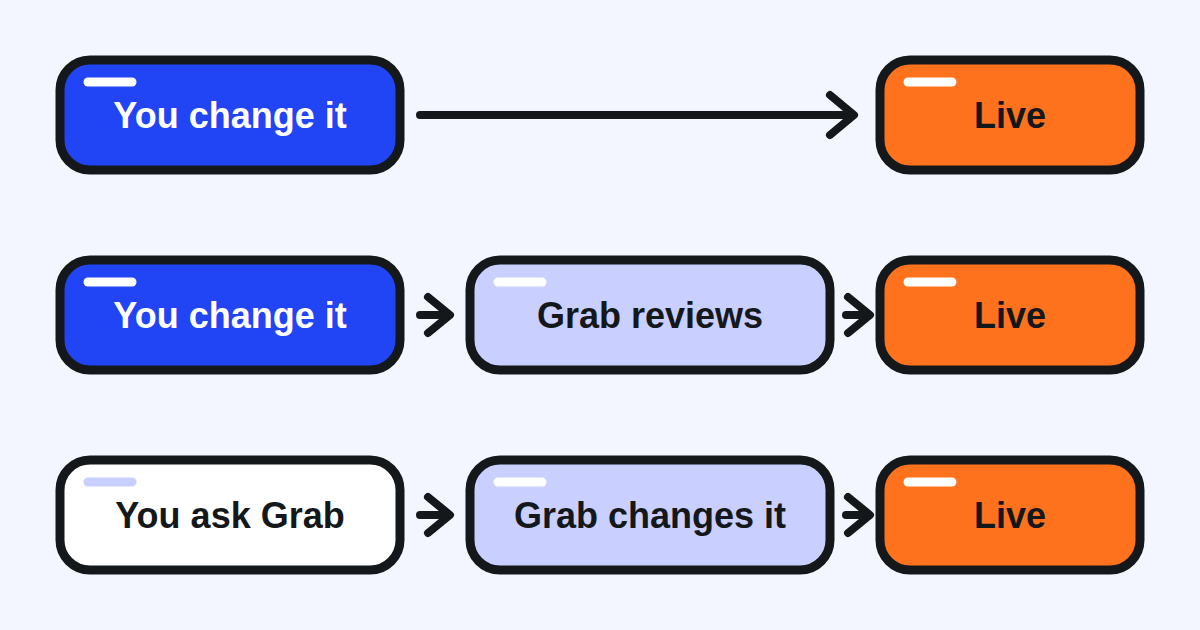
ทุกการเปลี่ยนแปลงในบัญชีของคุณอยู่ในหนึ่งในสามแบบ
- การเปลี่ยนที่มีผลเมื่อบันทึก อะไรหมด เวลาเปิดของคุณ การตั้งค่า Busy และ Pause ในช่วงเร่งด่วน เบอร์โทรสาธารณะของคุณ
- การเปลี่ยนที่คุณทำแล้ว Grab ตรวจก่อนแสดง ชื่อร้านใหม่: เพื่อป้องกันการแอบอ้างแบรนด์ Grab อนุมัติทุกการเปลี่ยนชื่อ3 รูปรายการหรือแบนเนอร์ใหม่: ระบบของ Grab ตรวจภายใน 1 ถึง 3 วันทำการ4 การแก้เมนูเป็นของคุณ: ในสิงคโปร์ Grab บอกว่าทำโดยตรงในแอปหรือพอร์ทัล และไม่ผ่านแบบฟอร์มคำขออีกต่อไป5 แต่ Grab ประเทศไทยระบุว่าคำขออัปเดตเมนูทั้งหมดต้องผ่านการตรวจและอนุมัติภายใน6 และ Grab มาเลเซียขอให้เผื่อ 2 ถึง 3 วันทำการก่อนการเปลี่ยนเมนูแสดงใน GrabFood7
- การเปลี่ยนที่ Grab ทำเท่านั้น หรือทำตามคำขอของคุณ วิธีรับออเดอร์ ตัวเลขคุณภาพที่ Grab ให้เกรดร้าน การลบคำตอบรีวิว และในบางตลาดชื่อร้าน ระบุไว้ด้านล่าง
สิ่งที่ควรทำ: ก่อนเขียนถึงฝ่ายสนับสนุน เช็กว่าการเปลี่ยนนั้นเป็นสิ่งที่คุณทำเองได้หรือไม่ ศูนย์ช่วยเหลือของ Grab ฟิลิปปินส์พูดไว้ง่ายๆ: คุณทำบางการเปลี่ยนแปลงได้โดยตรงในแอป ประหยัดเวลาของคุณ8
ข้อมูลร้านอะไรที่เปลี่ยนในแอปได้?
ข้อมูลติดต่อ ใครเปลี่ยนอะไรได้ขึ้นอยู่กับบทบาทที่คุณล็อกอิน เฉพาะผู้มีบทบาท Owner เท่านั้นที่อัปเดตข้อมูลติดต่อของเจ้าของได้9 จำไว้ว่าการเปลี่ยนสำหรับร้านหนึ่งอัปเดตทุกร้านที่ผูกกับบัญชี10 และการเปลี่ยนมีผลภายใน 24 ชั่วโมง11 เบอร์โทรของร้านเปลี่ยนได้โดยเจ้าของหรือผู้จัดการร้าน และเป็นเบอร์สาธารณะที่ลูกค้าเห็นบนหน้าร้านของคุณ12 จึงเป็นสิ่งแรกที่ควรเช็กหลังเปลี่ยนพนักงาน
ที่อยู่ ในไทยและสิงคโปร์ คุณใส่ที่อยู่ใหม่ในแอป ย้ายหมุดไปตำแหน่งทางเข้าที่แน่นอน13 และเลือกวันที่การย้ายมีผล ในไทย การเปลี่ยนมีผลเวลา 7:00 น. ของวันนั้น และการย้ายระยะไกลอาจต้องการอนุมัติด้วยมือจาก Grab14 ในสิงคโปร์ อาจต้องการเวลาล่วงหน้าหนึ่งถึงสองวัน15 และการเปลี่ยนมีผลเวลา 9am16 Grab ประเทศไทยอนุญาตให้เปลี่ยนที่อยู่สำเร็จได้ไม่เกินสองครั้งต่อเดือน17 ในเวียดนาม เมื่ออนุมัติแล้ว ที่อยู่ใหม่ใช้ตั้งแต่ 7:00 เช้าของวันที่คุณเลือก18 ในอินโดนีเซีย ไม่ต้องติดต่อ Grab Support หรือกรอกแบบฟอร์มสำหรับการย้ายน้อยกว่า 800 เมตร19 สำหรับการย้ายมากกว่า 800 เมตร เจ้าของหรือผู้จัดการกรอกแบบฟอร์มของ Grab20
ชื่อร้าน ในไทยและสิงคโปร์ คุณเปลี่ยนชื่อในแอปและ Grab อนุมัติ3 โดยเปลี่ยนชื่อสำเร็จได้ไม่เกินสองครั้งต่อเดือน21 ในไทย ชื่อต้องมีพื้นที่ร้านเสมอ22 ในรูปแบบ "ชื่อร้าน - พื้นที่ร้าน" เวียดนามต่างสามอย่าง: การอัปเดตในแอปเปิดให้เฉพาะพาร์ทเนอร์บุคคล23 และธุรกิจครัวเรือนกับบริษัทใช้แบบฟอร์มที่ลงนามแทน แต่ละร้านเปลี่ยนชื่อหรือที่อยู่ได้ไม่เกินสองครั้งต่อเดือน24 และ Grab ไม่เปลี่ยนชื่อหรือที่อยู่ของร้านใหม่ในช่วง 60 วันแรก25 ในมาเลเซีย ชื่อสาขาใหม่เป็นคำขอ: คุณส่งและ Grab เปลี่ยนให้26 ในอินโดนีเซีย การเปลี่ยนชื่อเป็นแบบฟอร์มพร้อมเอกสารที่ขึ้นอยู่กับประเภทร้านค้า27
รูปและป้าย รูปรายการและแบนเนอร์อัปโหลดจากแอป แล้วถูกตรวจ4 ป้ายประเภทอาหารและป้ายเมนูเลือกในแอป: ระบบของ Grab แนะนำแท็กประเภทอาหารและป้ายเมนูที่เกี่ยวข้องจากเมนูของคุณ28 และถ้าไม่มีอันไหนเหมาะ คุณเสนอป้ายใหม่ได้29
สิ่งที่ควรทำ: รักษาข้อมูลติดต่อของเจ้าของและเบอร์โทรสาธารณะให้เป็นปัจจุบัน ก่อนย้ายหรือเปลี่ยนชื่อ นับวันตรวจและขีดจำกัดรายเดือน และวางแผนการเปลี่ยนในวันที่เงียบ
คุณเปลี่ยนอะไรในเมนูเองได้?
ทั้งเมนู: เพิ่มรายการ แก้ ลบ ย้าย สร้างหรือเปลี่ยนชื่อหมวดหมู่ และเปลี่ยนลำดับของทั้งสอง Grab บอกไว้ในไทย30 ในสิงคโปร์5 และในมาเลเซีย ซึ่งเรียกเครื่องมือว่า Merchant Menu Editor31 ศูนย์ช่วยเหลือของอินโดนีเซียไล่ขั้นตอนเดียวกันในแอปและบนพอร์ทัล และเสริมว่าถ้าคุณไม่เขียนคำแปลเมนูเอง Grab เพิ่มให้อัตโนมัติด้วยความช่วยเหลือของปัญญาประดิษฐ์32 ศูนย์ช่วยเหลือฟิลิปปินส์ยังเก็บหน้าสำหรับการเปลี่ยนเมนูตามคำขอ ซึ่ง Grab ตอบทางอีเมลภายในสามถึงห้าวันทำการ33
กฎไม่กี่ข้อที่ควรรู้ก่อนแก้
- รูป คุณอัปโหลดได้ถึง 4 รูปต่อรายการเมนู34
- ราคา คุณตั้งราคาต่างกันสำหรับประเภทออเดอร์ต่างกันได้35 เช่น เดลิเวอรีและรับเอง Grab แนะนำอย่างยิ่งให้ราคาเมนูเท่ากับราคาในร้าน36 สองตลาดระบุกฎชัดเจน ในสิงคโปร์ การบวกราคาบนพอร์ทัลต้องไม่เกิน 20% ของราคาในร้าน37 ในฟิลิปปินส์ GrabFood ใช้นโยบายไม่บวกราคาเมนู38 หน้าช่วยเหลือที่อ่านสำหรับไทย มาเลเซีย เวียดนาม และอินโดนีเซียไม่ระบุเพดาน: ถ้าคุณตั้งราคาเดลิเวอรีต่างจากในร้าน อ่านสัญญาของคุณก่อน
- หมด ระบุเมนู "หมดสต็อกวันนี้" เพื่อให้ไม่พร้อมจำหน่ายหนึ่งวัน39 หรือ "หมดสต็อกไม่มีกำหนด" เพื่อให้ไม่พร้อมจำหน่ายจนกว่าคุณจะเพิ่มกลับ40 ทั้งสองไม่ลบเมนู
สามการแก้ที่เอากลับไม่ได้ การลบหมวดหมู่ลบทุกรายการในนั้นด้วย41 การอัปโหลดไฟล์เมนูทั้งชุดย้อนกลับไม่ได้ ซึ่งเป็นเหตุที่ Grab ขอให้คุณดาวน์โหลดเมนูไว้ก่อนเป็นสำรอง42 ในมาเลเซีย การคัดลอกเมนูของสาขาหนึ่งไปสาขาอื่นยกเลิกไม่ได้เมื่อเสร็จแล้ว43
สิ่งที่ควรทำ: ระบุเมนูว่าหมดแทนการลบ ดาวน์โหลดเมนูก่อนการเปลี่ยนทั้งชุด และเทียบราคาเดลิเวอรีกับราคาในร้านไตรมาสละครั้ง
เปลี่ยนเวลาเปิด หรือชะลอออเดอร์ในช่วงเร่งด่วนอย่างไร?
เวลาเปิดเปลี่ยนโดยผู้ใช้ที่มีบทบาท Owner หรือ Store Manager44 เวลาเปิดพิเศษ สำหรับวันหยุดหรือการปิด อยู่ข้างเวลาเปิดปกติของคุณ และแอปกลับไปตารางปกติเมื่อช่วงเวลาจบโดยไม่ต้องรีเซ็ตฝั่งคุณ45 Grab ประเทศไทยให้ตั้งล่วงหน้าได้ถึง 3 เดือน46 Grab สิงคโปร์ ล่วงหน้าได้ถึง 60 วัน47 ถ้าเมนูของคุณเปลี่ยนระหว่างวัน (เช้า กลางวัน เย็น) Grab สิงคโปร์เตือนว่าเวลาเมนูไม่ปรับเองตามเวลาเปิดที่ยาวขึ้น ซึ่งทำให้ลูกค้าสับสนได้48: เปลี่ยนทั้งสอง
ในช่วงเร่งด่วน คุณมีสองการตั้งค่า และต้นทุนไม่เท่ากัน Busy ให้ครัวของคุณมีเวลาเตรียมออเดอร์มากขึ้นขณะที่ร้านยังเปิด49 Pause หยุดรับออเดอร์ใหม่ 30 นาที 1 ชั่วโมง หรือ 1 วัน50 และร้านของคุณแสดงเป็นปิดชั่วคราวในแอป51 คำแนะนำของ Grab เองเรื่องโปรแกรมคุณภาพตรงไปตรงมา: การหยุดช่วยให้ตามออเดอร์ทัน แต่ก็เพิ่มอัตราออฟไลน์ของคุณ52 จึงควรใช้โหมด Busy เพื่อชะลอออเดอร์ใหม่53 ไม่ว่าใช้อันไหน อย่าลืมสลับกลับเป็น Normal54 เมื่อช่วงเร่งด่วนจบ
สิ่งที่ควรทำ: ตั้ง Busy ก่อนช่วงเร่งด่วนที่คุณรู้ว่ากำลังมา เก็บ Pause ไว้สำหรับตอนที่ครัวรับอีกออเดอร์ไม่ไหว และอย่ายกเลิกออเดอร์ที่รับแล้วซึ่งอีกไม่กี่นาทีจะช่วยไว้ได้
อะไรที่ Grab เท่านั้นเปลี่ยนได้?
บางการตั้งค่าเป็นของ Grab และการรู้ว่าอันไหนช่วยประหยัดคำขอที่ไม่มีทางสำเร็จ
- วิธีรับออเดอร์ Grab ประเทศไทยตั้งร้านเป็นโหมด Manual Accept เพราะมีการยกเลิก หมดเวลา หรือปฏิเสธมากกว่าที่มาตรฐานอนุญาต55 ร้านค้าเลือกเข้าเองไม่ได้56 และร้านในโหมดนี้ถูกทบทวนรายเดือน ตามนโยบายภายในของ Grab57 ทางกลับสู่การรับอัตโนมัติคือยกเลิกให้น้อยลง
- ตัวเลขคุณภาพ คะแนนความสมบูรณ์ จำนวนออเดอร์ การยกเลิกที่เลี่ยงได้ อัตราออฟไลน์ และอัตราออเดอร์ล่าช้าคำนวณจากข้อมูลธุรกรรมของร้านคุณ และไม่มีการอุทธรณ์58 คะแนนรีวิวและเหตุการณ์ ในทางกลับกัน อุทธรณ์ในแอปได้59 กลุ่มแรกทำได้แค่ปรับปรุง
- รีวิว คุณตอบรีวิวเดลิเวอรีเองและแก้คำตอบได้ภายใน 72 ชั่วโมงหลังส่งครั้งแรก60 การลบคำตอบผ่านแบบฟอร์ม และ Grab Support ลบภายใน 5 วันทำการ61 เมื่อคุณรายงานรีวิว Grab ประเมินและลบถ้าผิดกฎ62 แต่จะไม่ลบรีวิวที่ให้ความเห็นเรื่องรายการที่สั่ง63: รสชาติ ปริมาณ บรรจุภัณฑ์ หรือราคา สิ่งเหล่านั้นต้องการคำตอบ
- นิติบุคคลของคุณ ในสิงคโปร์ ถ้าเลขทะเบียนธุรกิจของคุณเปลี่ยน Grab ลงทะเบียนคุณเป็นร้านค้าใหม่64 พร้อมแบบฟอร์มเริ่มต้นและสัญญาใหม่65
- หลายร้านพร้อมกัน ในสิงคโปร์ การเปลี่ยนชื่อหรือที่อยู่หลายสาขาผ่านแบบฟอร์ม และเจ้าหน้าที่ของ Grab ทำให้66
ควรตรวจอะไรเดือนนี้?
- ข้อมูลติดต่อของเจ้าของและเบอร์โทรสาธารณะ ในแอป สำหรับทุกร้านที่คุณดูแล
- เมนูของคุณ: เมนูที่หมดระบุไว้แทนการลบ ทุกรายการมีรูป ราคาเดลิเวอรีเทียบกับราคาในร้านและกฎของตลาดคุณ
- เวลาเปิดพิเศษสำหรับวันหยุดถัดไป ใส่ก่อนถึงวัน และเวลาเมนูถ้าต่างจากเวลาเปิด
- คุณหยุดร้านบ่อยแค่ไหนเดือนก่อน และ Busy จะใช้แทนได้หรือไม่
- การเปลี่ยนใดๆ ที่ยังรอการตรวจของ Grab: ชื่อ รูป การอัปเดตเมนู
Kontimo ช่วยให้คนทำร้านอาหารบน Grab อ่านบัญชีของตัวเองทุกเดือน อธิบายด้วยภาษาง่ายๆ เพื่อให้การเปลี่ยนครั้งถัดไปคือสิ่งที่สำคัญ
แหล่งข้อมูล 66 เอกสาร ตัวเลขทุกตัวตรวจย้อนกลับได้
- Request to update store information (อ่านเมื่อ 2026-09-28)
Store information that you can self serve change via the app is as follows:
- Request to update store information (อ่านเมื่อ 2026-09-28)
Store information that you need to submit a change request via the form is as follows:
- Request to update store information (อ่านเมื่อ 2026-09-28)
To prevent brand impersonation, name changes require approval from Grab.
- Request to update store information (อ่านเมื่อ 2026-09-28)
the system will review it within 1 to 3 business days.
- Manage items and categories in your menu (Grab merchant help centre, Singapore), text of the article (อ่านเมื่อ 2026-10-21)
Menu edits based on the following use cases can be directly made using the GrabMerchant app or portal, and will no longer be supported by the request form.
- Request to update restaurant menu or pricing (อ่านเมื่อ 2026-09-28)
Please understand that all menu/catalogue update requests require internal review and approval by Grab.
- Update my menu item and price (Grab merchant help centre, Malaysia), text of the article (อ่านเมื่อ 2026-10-21)
please allow us 2-3 working days before the changes are reflected in the Grab app.
- How to update store information (Grab merchant help centre, the Philippines), text of the article (อ่านเมื่อ 2026-10-21)
You can make some changes directly in the GrabMerchant app, saving you time!
- Request to update store information (Grab merchant help centre, Singapore), text of the article (อ่านเมื่อ 2026-10-21)
Only those with the Owner role can update these details.
- Request to update store information (Grab merchant help centre, Singapore), text of the article (อ่านเมื่อ 2026-10-21)
Keep in mind that changing this for one store updates it for all stores linked to your account.
- Request to update store information (Grab merchant help centre, Singapore), text of the article (อ่านเมื่อ 2026-10-21)
Sit tight: Your changes will be updated within 24 hours.
- Request to update store information (Grab merchant help centre, Singapore), text of the article (อ่านเมื่อ 2026-10-21)
Both Owners and Store Managers can update this number. This is the public number customers see on your store page.
- Request to update store information (Grab merchant help centre, Singapore), text of the article (อ่านเมื่อ 2026-10-21)
Enter the new address, and then move the pin to the exact location of your Store Entrance.
- Request to update store information (อ่านเมื่อ 2026-09-28)
Changes take effect at 7:00 am on your scheduled date. Large distance moves may require manual approval from our team.
- Request to update store information (Grab merchant help centre, Singapore), text of the article (อ่านเมื่อ 2026-10-21)
A lead time of one to two days may be required.
- Request to update store information (Grab merchant help centre, Singapore), text of the article (อ่านเมื่อ 2026-10-21)
Changes take effect at 9am on your scheduled date.
- Request to update store information (อ่านเมื่อ 2026-09-28)
You can submit up to two successful store address updates per month.
- Cập nhật thông tin cửa hàng (Update store information) (Grab merchant help centre, Vietnam), text of the article (อ่านเมื่อ 2026-10-21)
Sau khi được duyệt, địa chỉ mới sẽ có hiệu lực từ 7:00 sáng của ngày Đối tác chọn.
- Ubah info toko di GrabMerchant (Change store information on GrabMerchant) (Grab merchant help centre, Indonesia), text of the article (อ่านเมื่อ 2026-10-21)
Tidak perlu hubungi Grab Support atau mengisi formulir untuk pindah kurang dari 800 meter.
- Ubah info toko di GrabMerchant (Change store information on GrabMerchant) (Grab merchant help centre, Indonesia), text of the article (อ่านเมื่อ 2026-10-21)
Pindah lebih dari 800 meter (Hanya untuk Pemilik atau Manajer)
- Request to update store information (อ่านเมื่อ 2026-09-28)
You can submit up to two successful store name updates per month.
- Request to update store information (อ่านเมื่อ 2026-09-28)
The store name must always include the store area
- Cập nhật thông tin cửa hàng (Update store information) (Grab merchant help centre, Vietnam), text of the article (อ่านเมื่อ 2026-10-21)
Tính năng cập nhật thông tin cửa hàng trên ứng dụng GrabMerchant hiện chỉ áp dụng cho Đối tác cá nhân.
- Cập nhật thông tin cửa hàng (Update store information) (Grab merchant help centre, Vietnam), text of the article (อ่านเมื่อ 2026-10-21)
Giới hạn số lần: Mỗi cửa hàng chỉ được thay đổi tên hoặc địa chỉ tối đa 02 lần/tháng.
- Cập nhật thông tin cửa hàng (Update store information) (Grab merchant help centre, Vietnam), text of the article (อ่านเมื่อ 2026-10-21)
Grab chưa hỗ trợ thay đổi tên và địa chỉ trong vòng 60 ngày đầu tiên kể từ khi cửa hàng được kích hoạt trên ứng dụng Grab.
- Request to update outlet information (Grab merchant help centre, Malaysia), text of the article (อ่านเมื่อ 2026-10-21)
Rebranded your store and need to update your outlet name? Send us your request, and we’ll make the changes.
- Ubah info toko di GrabMerchant (Change store information on GrabMerchant) (Grab merchant help centre, Indonesia), text of the article (อ่านเมื่อ 2026-10-21)
Untuk mengubah nama toko, isi formulir di bawah dengan lengkap dan lampirkan dokumen sesuai tipe merchant:
- How to update Halal status and store labels & Dine Out labels (อ่านเมื่อ 2026-09-28)
our system will recommend relevant cuisine tags and dish labels
- How to update Halal status and store labels & Dine Out labels (อ่านเมื่อ 2026-09-28)
you can suggest new labels
- Request to update restaurant menu or pricing (อ่านเมื่อ 2026-09-28)
As a GrabFood Merchant partner, you can easily update your menu or pricing using the GrabMerchant app. Whether you need to add, remove, or edit items, the process is straightforward.
- Update my menu item and price (Grab merchant help centre, Malaysia), text of the article (อ่านเมื่อ 2026-10-21)
Our Merchant Menu Editor (MME) self-serve tool has various functions available today on GrabMerchant app or portal that allows you to update your menu yourself.
- Kelola item & kategori untuk menu GrabFood (Manage items and categories for the GrabFood menu) (Grab merchant help centre, Indonesia), text of the article (อ่านเมื่อ 2026-10-21)
Jika Anda tidak mengisi terjemahan menu, Grab akan otomatis menambahkan terjemahan bahasa yang relevan dibantu oleh kecerdasan buatan.
- Request to edit menu/photo/price (Grab merchant help centre, the Philippines), text of the article (อ่านเมื่อ 2026-10-21)
After submitting your request, we’ll respond via email within three to five working days.
- Manage items and categories in your menu (อ่านเมื่อ 2026-09-28)
You can upload up to 4 photos for each menu item.
- Manage items and categories in your menu (อ่านเมื่อ 2026-09-28)
You can set custom prices for different order types.
- Manage items and categories in your menu (อ่านเมื่อ 2026-09-28)
We strongly recommend menu prices to be the same as in-store prices for optimal customer experience.
- Manage items and categories in your menu (Grab merchant help centre, Singapore), text of the article (อ่านเมื่อ 2026-10-21)
If you are editing the item price, please note that any markup prices must not be more than 20% of in-store prices.
- Request to edit menu/photo/price (Grab merchant help centre, the Philippines), text of the article (อ่านเมื่อ 2026-10-21)
GrabFood follows a no-markup policy on menu prices.
- How can I edit my GrabFood item availability (อ่านเมื่อ 2026-09-28)
to make the dish unavailable for one day
- How can I edit my GrabFood item availability (อ่านเมื่อ 2026-09-28)
to keep the dish unavailable until you add it again.
- Manage items and categories in your menu (อ่านเมื่อ 2026-09-28)
To proceed with permanently deleting this category and all its items, tap
- Using Bulk Update to manage multiple items on GrabFood menu (อ่านเมื่อ 2026-09-28)
You can’t reverse bulk uploads. Download your menu prior to running the upload as backup.
- Update my menu item and price (Grab merchant help centre, Malaysia), text of the article (อ่านเมื่อ 2026-10-21)
Once completed, this process cannot be undone.
- Updating store opening hours (อ่านเมื่อ 2026-09-28)
Only users with Owner or Store Manager permissions can edit store business hours.
- Updating store opening hours (อ่านเมื่อ 2026-09-28)
revert back to your regular schedule once the period ends without needing manual resets.
- Updating store opening hours (อ่านเมื่อ 2026-09-28)
You can schedule Special Hours up to 3 months in advance.
- Updating store opening hours (Grab merchant help centre, Singapore), text of the article (อ่านเมื่อ 2026-10-21)
You can schedule Special Hours up to 60 days in advance.
- Updating store opening hours (Grab merchant help centre, Singapore), text of the article (อ่านเมื่อ 2026-10-21)
Menu hours won’t automatically adjust to match extended opening hours, which could lead to confusion for customers.
- Activate Busy or Temporary Pause for my restaurant (อ่านเมื่อ 2026-09-28)
gives your kitchen more time to prepare orders while keeping your store open
- How do I pause new orders temporarily (อ่านเมื่อ 2026-09-28)
you can pause new orders for a specific duration: 30 minutes, 1 hour, or 1 day.
- How do I pause new orders temporarily (อ่านเมื่อ 2026-09-28)
your restaurant will appear as “temporarily closed” on the app.
- How to become a Quality Hero merchant (อ่านเมื่อ 2026-09-28)
pausing can help you catch up with orders but it also raises your offline Rate.
- How to become a Quality Hero merchant (อ่านเมื่อ 2026-09-28)
Use Busy Mode to slow new orders
- Activate Busy or Temporary Pause for my restaurant (อ่านเมื่อ 2026-09-28)
remember to switch back to
- Why do my orders require manual acceptance (อ่านเมื่อ 2026-09-28)
because your store has had more cancellations, expiries, or rejections than our platform standards allow.
- Why do my orders require manual acceptance (อ่านเมื่อ 2026-09-28)
Merchants cannot opt into
- Why do my orders require manual acceptance (อ่านเมื่อ 2026-09-28)
are reviewed monthly, based on our internal policies.
- How to become a Quality Hero merchant (อ่านเมื่อ 2026-09-28)
These are calculated based on your store transaction data, no appeal is available.
- How to become a Quality Hero merchant (อ่านเมื่อ 2026-09-28)
appeal in the GrabMerchant app under
- I want to learn more about ratings and reviews (อ่านเมื่อ 2026-09-28)
within 72 hours of its initial submission
- How to edit and remove my reply (อ่านเมื่อ 2026-09-28)
Our Grab Support team will review your request and remove the reply within
- I want to learn more about ratings and reviews (อ่านเมื่อ 2026-09-28)
Upon receiving the report, Grab will independently assess the review and will remove if the review is found to contain any of the following:
- I want to learn more about ratings and reviews (อ่านเมื่อ 2026-09-28)
We will not remove reviews that provide opinions on the items ordered
- Request to update store information (Grab merchant help centre, Singapore), text of the article (อ่านเมื่อ 2026-10-21)
If your business registration number changes, we’ll need to register you as a new merchant.
- Request to update store information (Grab merchant help centre, Singapore), text of the article (อ่านเมื่อ 2026-10-21)
We’ll contact you within three days to complete an onboarding form and sign a new contract.
- Request to update store information (Grab merchant help centre, Singapore), text of the article (อ่านเมื่อ 2026-10-21)
(II) Multiple Store Locations: Please submit the form below with the Store IDs and Store Names of the outlets to be updated. Our agents will assist you with your request.
ตัวเลขทุกตัวข้างต้นมาจากเอกสารเหล่านี้ ตามที่เป็นอยู่ในวันที่ระบุ ตัวเลขที่ใช้กับร้านของคุณจริงคือสัญญาและรายงานยอดของร้านคุณเอง