วารสารบทความติดอันดับและถูกค้นเจอ
เมนู GrabFood (แกร็บ): ควรวางหมวดไหนไว้บนสุด
วิธีเรียงหมวดเมนู GrabFood (แกร็บ) ของร้าน: ลำดับที่ Grab แนะนำ งานวิจัยบอกอะไรเรื่องตำแหน่งของเมนู และวิธีย้ายหมวดใน GrabMerchant
ประเทศ: สิงคโปร์, มาเลเซีย, ไทย, ฟิลิปปินส์, เวียดนาม, อินโดนีเซีย เผยแพร่ โดย Kontimo

ลำดับของหมวดในเมนู GrabFood (แกร็บ) แอปส่งอาหาร เป็นสิ่งที่คุณตั้งเองได้ และเป็นตัวตัดสินว่าลูกค้าเห็นอะไรก่อนจะเริ่มเลื่อนหน้าจอ ศูนย์ช่วยเหลือของ Grab เวียดนามให้ลำดับที่แนะนำไว้: เมนูใหม่ เมนูขายดี และเมนูที่มีโปรโมชันก่อน1 ตามด้วยอาหารจานหลัก2 แล้วจึงเป็นเครื่องเคียง ของทานเล่น และเครื่องดื่ม3 ศูนย์ช่วยเหลือของตลาดอื่นของ Grab อธิบายวิธีย้ายหมวด ไม่ได้บอกว่าควรเลือกลำดับไหน และไม่มีหน้าใดของ Grab บอกว่าลำดับเปลี่ยนยอดขายได้มากแค่ไหน แต่งานวิจัยเรื่องเมนูแสดงให้เห็นว่าตำแหน่งของเมนูเปลี่ยนความถี่ที่มันถูกเลือก ดังนั้นส่วนบนสุดของเมนูของคุณจึงควรตัดสินใจอย่างตั้งใจ
บทความนี้ครอบคลุม Grab ในสิงคโปร์ มาเลเซีย ไทย ฟิลิปปินส์ เวียดนาม และอินโดนีเซีย ขั้นตอนเหมือนกันทุกที่ ต่างกันเพียงชื่อปุ่มบางปุ่มจากศูนย์ช่วยเหลือของตลาดหนึ่งไปอีกตลาดหนึ่ง
หมวดในเมนู GrabFood คืออะไร?
หมวดคือหัวข้อที่จัดกลุ่มเมนู ศูนย์ช่วยเหลือของ Grab สิงคโปร์อธิบายว่าเป็นกลุ่มของรายการ เช่น อาหารจานหลัก เครื่องเคียง ของหวาน หรือเครื่องดื่ม ซึ่ง "มีประโยชน์ในการจัดระเบียบรายการเมนู เพื่อให้ผู้บริโภคหาสิ่งที่ต้องการได้ง่าย"4 ศูนย์ช่วยเหลือของมาเลเซียใช้คำเกือบเหมือนกัน5 ของไทยเพิ่มคำแนะนำ: จัดรายการเข้าหมวดที่เหมาะสม เช่น อาหารจานหลัก เครื่องดื่ม และของหวาน6 คู่มือของอินโดนีเซียเรียกหมวดว่าฟีเจอร์ที่จัดกลุ่มอาหารประเภทเดียวกัน เพื่อให้จัดเมนูได้ง่ายขึ้น7
รายละเอียดสองอย่างเปลี่ยนวิธีที่คุณใช้หมวด หมวดหนึ่งมีเวลาของตัวเองได้: เมื่อสร้างหมวด คุณเลือกเวลาที่หมวดนั้นจะปรากฏในเมนู8 ดังนั้นหมวดอาหารเช้าไม่จำเป็นต้องอยู่บนสุดของเมนูทั้งวัน และหมวดจะพาเมนูในนั้นไปด้วย: ขั้นตอนของ Grab เตือนว่าการยืนยันการลบจะลบหมวดและรายการทั้งหมดในนั้นอย่างถาวร9 ย้ายเมนูที่อยากเก็บไว้ก่อนลบหมวด
สิ่งที่ควรทำ: จดชื่อหมวดของคุณตามที่ลูกค้าจะเรียก (ข้าว เส้น เครื่องดื่ม) ไม่ใช่ตามชื่อสถานีในครัว
หมวดควรเรียงลำดับอย่างไร?
Grab เวียดนามตอบข้อนี้โดยตรง ในบทความศูนย์ช่วยเหลือเรื่องการตั้งค่าเมนู Grab บอกให้ร้านเรียงหมวดในลำดับที่ดึงลูกค้าเข้ามา10:
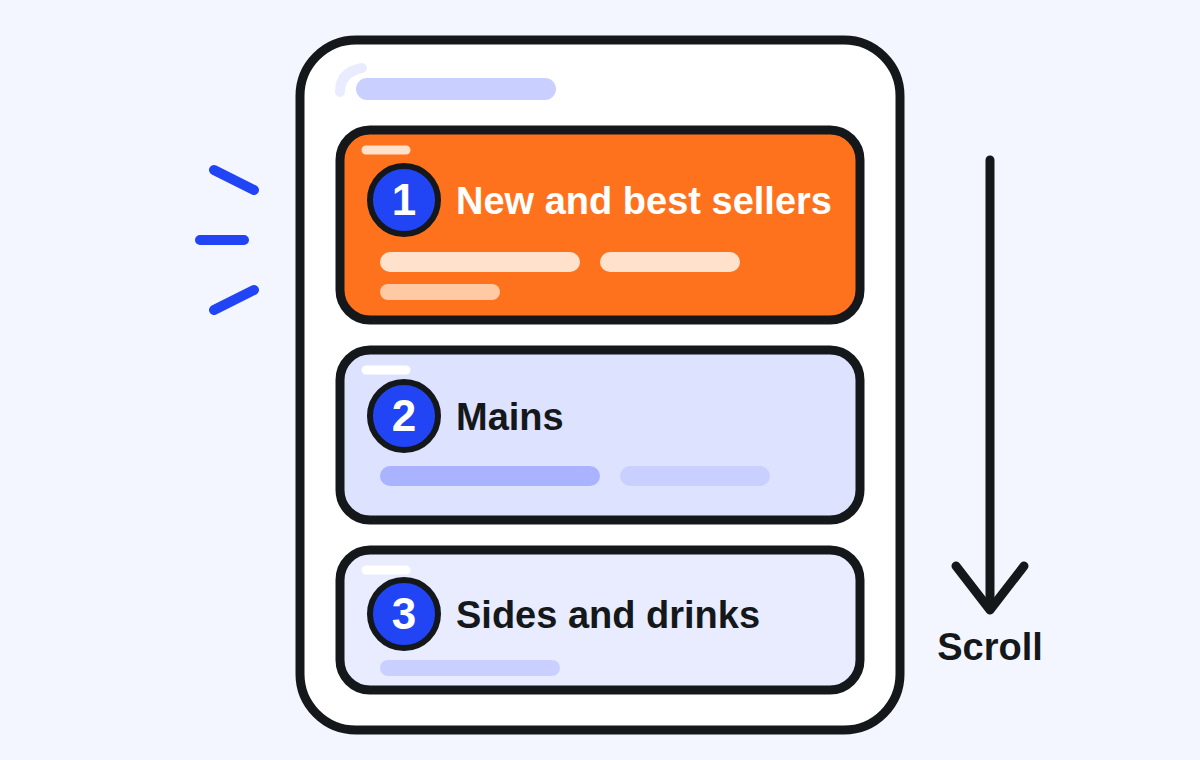
Grab เผยแพร่คำแนะนำนี้เป็นภาษาเวียดนาม ในรูปภาพในศูนย์ช่วยเหลือ ศูนย์ช่วยเหลือของอีกห้าตลาดแสดงวิธีย้ายหมวดและปล่อยให้ลำดับเป็นเรื่องของคุณ เหตุผลนี้ใช้ได้ทุกที่ เพราะลูกค้าดูร้านของคุณเป็นรายการเดียวจากบนลงล่าง: หมวดแรกคือหมวดที่ผู้เข้าชมทุกคนเห็น ส่วนหมวดสุดท้ายมีเพียงคนที่เลื่อนลงไปถึงเท่านั้นที่เห็น
สิ่งที่ควรทำ: ทำให้หมวดแรกของคุณสั้น มีเมนูที่คุณอยากขายที่สุด ไม่ว่าจะขายดีอยู่แล้ว เป็นเมนูใหม่ หรือมีข้อเสนอ จากนั้นวางอาหารจานหลักไว้ก่อนทุกอย่างที่กินคู่กัน
ทำไมตำแหน่งของเมนูจึงเปลี่ยนสิ่งที่ลูกค้าสั่ง?
งานวิจัยพูดถึงเมนูภายในหมวด ไม่ใช่ทั้งหมวด และชี้ไปทางเดียวกัน
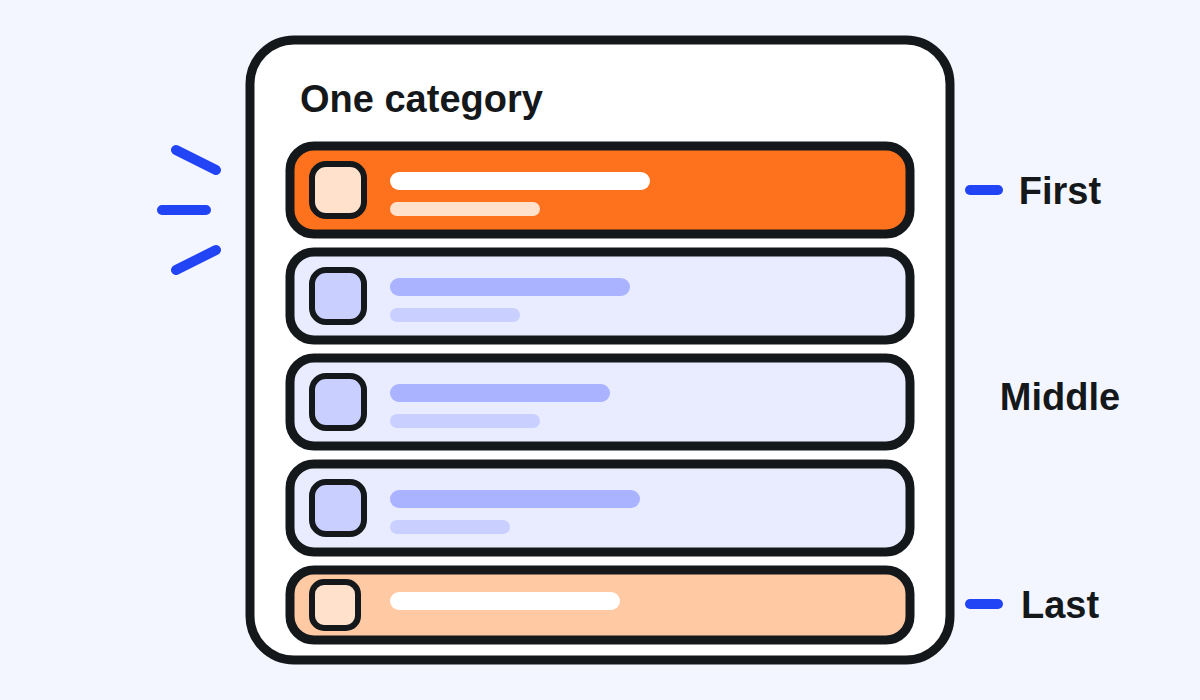
ในการศึกษาตำแหน่งเมนูสองชิ้นที่ตีพิมพ์เดือนมิถุนายน 201111 ชิ้นหนึ่งในห้องทดลองและอีกชิ้นกับลูกค้าจริงในคาเฟ่แห่งหนึ่งในเทลอาวีฟ12 รายการที่วางไว้ต้นหรือท้ายรายการตัวเลือกของหมวดได้รับความนิยมมากถึงสองเท่าเมื่อเทียบกับตอนที่วางไว้กลางรายการ13 จากทั้งสองการศึกษา ผู้วิจัยพบว่าการวางรายการไว้ต้นหรือท้ายหมวดเพิ่มความนิยมประมาณ 20%14
การทดสอบที่ใกล้เคียงแอปเดลิเวอรีมากขึ้นมาในปี 2023 ในสหราชอาณาจักร ผู้ใหญ่ 9,003 คนที่ใช้แพลตฟอร์มเดลิเวอรีเลือกมื้ออาหารบนแพลตฟอร์มจำลอง15 ในการศึกษาที่ตีพิมพ์เมื่อวันที่ 19 พฤษภาคม 202316 การย้ายเมนูขึ้นหรือลงภายในหมวดเปลี่ยนสิ่งที่เข้าตะกร้า: การเรียงเมนูพลังงานต่ำไว้ก่อนในแต่ละหมวดลดพลังงานของตะกร้าลง 88 กิโลแคลอรีเมื่อเทียบกับการเรียงแบบสุ่ม17 เป้าหมายของพวกเขาคือทางเลือกที่ดีต่อสุขภาพ แต่ข้อค้นพบสำหรับร้านอาหารเหมือนกัน: ลำดับภายในหมวดเปลี่ยนสิ่งที่ถูกเลือก
สิ่งที่ไม่มีการศึกษาใดที่เราพบทดสอบ คือลำดับของทั้งหมวด การทดลองเดียวกันบอกไว้เอง: เมนูถูกเรียงใหม่ภายในหมวด แต่ลำดับของหมวดเองไม่ได้เปลี่ยน ของว่างก่อน แล้วจานหลัก18 ผู้วิจัยยังตั้งข้อสังเกตว่าลูกค้าอาจปรับตัวและเรียนรู้ที่จะเลื่อนลงไปหาเมนูที่ชอบ19 การทบทวนงานวิจัยในวงกว้างเรื่องตำแหน่งการวางอาหารพบว่าการเปลี่ยนแปลงได้ผลในสิบหกจากสิบแปดการศึกษา20
สิ่งที่ควรทำ: ภายในแต่ละหมวด วางเมนูที่คุณอยากขายที่สุดไว้ก่อน เก็บตำแหน่งสุดท้ายไว้ให้เมนูดีด้วย ไม่ใช่เมนูที่คุณอยากให้ไม่มีใครสังเกต
เลือกอะไรไว้บนสุดอย่างไร?
ใช้ตัวเลขของคุณเองแทนการเดา ในสิงคโปร์ Insights ของ Grab แสดงยอดขายรวม จำนวนออเดอร์ทั้งหมด และรายการขายดี21 ในไทย Menu Insights จัดอันดับรายการที่ทำผลงานดีที่สุดตามจำนวนที่ขาย ยอดขาย และส่วนแบ่งยอดขาย ย้อนหลังได้สูงสุด 90 วัน22 และแนะนำชุดรายการที่ถูกสั่งคู่กันบ่อยซึ่งคุณนำไปทำเป็นคอมโบได้23 Grab เวียดนามประกาศระบบวิเคราะห์เมนูเมื่อวันที่ 22 กรกฎาคม 202024 และบอกว่ามีไว้เพื่ออะไร: ปรับปรุงเมนูด้วยการเปลี่ยนรูป คำอธิบาย และแม้แต่ตำแหน่งของเมนูให้เหมาะกับลูกค้า25
ดูสองรายการก่อนตัดสินใจ: เมนูที่ขายมากที่สุด และเมนูที่เหลือให้คุณมากที่สุดต่อออเดอร์ เมนูที่อยู่ในทั้งสองรายการควรอยู่บนสุด เมนูใหม่หรือเมนูที่มีโปรโมชันเข้าไปอยู่ตรงนั้นได้ตราบที่ยังใหม่หรือยังมีข้อเสนอ ตามที่ Grab เวียดนามแนะนำ1
จากนั้นเปลี่ยนทีละอย่าง ย้ายหมวดหนึ่ง ปล่อยไว้สองสามสัปดาห์ แล้วเทียบรายงานเดียวกันก่อนและหลัง ถ้าเปลี่ยนหลายอย่างพร้อมกัน คุณจะไม่รู้ว่าอะไรได้ผล
ย้ายหมวดในแอป GrabMerchant อย่างไร?
ศูนย์ช่วยเหลือของ Grab สิงคโปร์ให้ขั้นตอนในแอป GrabMerchant ไว้ แตะแถบ Menu แตะจุดสามจุดที่มุมขวาบนของหน้าจอ26 แล้วแตะ Reorder catalogue27 แตะค้างที่ไอคอนสามขีดข้างหมวดที่ต้องการย้ายแล้วเลื่อนไปยังตำแหน่งใหม่28 จากนั้นแตะ Done เพื่อยืนยันการเรียงใหม่29 บนพอร์ทัล GrabMerchant ไปที่ Menu แล้ว Menu Overview และคลิกจุดสามจุดข้าง Categories30 หากต้องการย้ายเมนูภายในหมวดบนพอร์ทัล คลิกจุดสามจุดบนหมวดนั้นแล้วเลือก Rearrange items31
ตลาดอื่นอธิบายเครื่องมือเดียวกัน ศูนย์ช่วยเหลือของมาเลเซียเข้าถึงผ่านปุ่ม (+) และขั้นตอนชื่อ Rearrange32 ฉบับฟิลิปปินส์เขียนว่า: แตะจุดสามจุด เลือก Reorder catalogue แล้วลากรายการหรือหมวด33 ฉบับอินโดนีเซียเรียกขั้นตอนนี้ว่า Susun ulang katalog34 คือเรียงแค็ตตาล็อกใหม่ ศูนย์ช่วยเหลือของฟิลิปปินส์เพิ่มคำเตือนที่ควรทำตามทุกที่: รีเฟรชแอปเพื่อดูการเปลี่ยนแปลง35 จากนั้นเปิดร้านของคุณใน GrabFood เหมือนลูกค้า แล้วตรวจลำดับตรงนั้น
เมนู GrabFood ควรมีกี่หมวด?
ไม่มีหน้าใดของ Grab ในแหล่งข้อมูลที่บทความนี้อ้างอิงกำหนดตัวเลขไว้ และงานวิจัยที่เราพบไม่ได้ให้เกณฑ์สำหรับเมนูเดลิเวอรี สิ่งที่ Grab บอกคือหมวดมีไว้เพื่ออะไร: เพื่อให้ลูกค้าหาสิ่งที่ต้องการได้ง่าย4 นั่นคือเกณฑ์ที่ควรใช้
- หมวดที่มีเมนูเดียวมักควรรวมเข้ากับหมวดข้างๆ
- หมวดที่ยาวจนเมนูท้ายๆ อยู่ลึกลงไปในหน้าจอแยกออกได้ เช่น เมนูข้าวกับเมนูเส้น แทนที่จะเป็นรายการจานหลักเดียวยาวๆ
- หมวดที่ใช้แค่บางช่วงเวลา เช่น อาหารเช้า ให้มีเวลาของตัวเองได้8 แทนที่จะกินพื้นที่ทั้งวัน
สัปดาห์นี้ควรตรวจอะไรบ้าง?
- หมวดแรกของคุณ: มีเมนูขายดี เมนูใหม่ หรือเมนูที่มีข้อเสนออยู่ไหม
- ลำดับถัดจากนั้น: จานหลักก่อนเครื่องเคียง ของทานเล่น และเครื่องดื่ม
- เมนูแรกของแต่ละหมวด: ใช่เมนูที่คุณอยากขายที่สุดไหม
- เมนูสุดท้ายของแต่ละหมวด: เมนูดี ไม่ใช่เมนูที่ถูกลืม
- Insights ของคุณ: เมนูไหนขายมากที่สุด และเมนูไหนไม่มีใครสั่ง
- ร้านของคุณในแอปฝั่งลูกค้า หลังรีเฟรช เพื่อดูสิ่งที่ลูกค้าเห็น
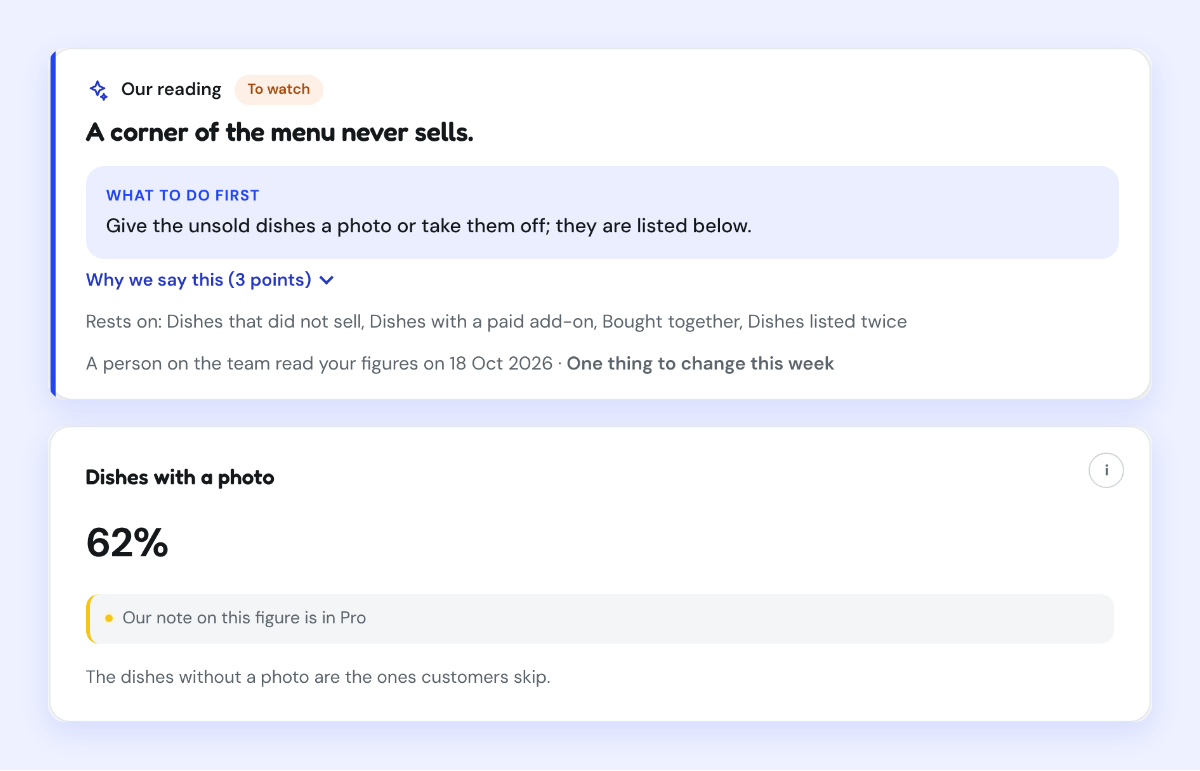
Kontimo ช่วยให้คนทำร้านอาหารบน Grab อ่านเมนูของตัวเองได้ทุกเดือน อธิบายด้วยภาษาง่ายๆ: เมนูไหนขาย เมนูไหนไม่เคยขาย และควรเปลี่ยนอะไรก่อน
แหล่งข้อมูล 35 เอกสาร ตัวเลขทุกตัวตรวจย้อนกลับได้
- Image of help article 29538004651545 (vi-vn): 1.2 Hướng dẫn thiết lập thực đơn hiệu quả, I. Cách sắp xếp danh mục thực đơn (how to order the menu's categories), text read off the image (อ่านเมื่อ 2026-10-21)
1. “Món mới”/ “Món Bán chạy” (Best Seller)/ món có “Khuyến mãi”
- Image of help article 29538004651545 (vi-vn): 1.2 Hướng dẫn thiết lập thực đơn hiệu quả, I. Cách sắp xếp danh mục thực đơn (how to order the menu's categories), text read off the image (อ่านเมื่อ 2026-10-21)
2. Các danh mục “Món chính”
- Image of help article 29538004651545 (vi-vn): 1.2 Hướng dẫn thiết lập thực đơn hiệu quả, I. Cách sắp xếp danh mục thực đơn (how to order the menu's categories), text read off the image (อ่านเมื่อ 2026-10-21)
3. Các danh mục “Món phụ”/“Món ăn kèm”/“Thức uống”
- Manage items and categories in your menu (Grab merchant help centre, Singapore), text of the article (อ่านเมื่อ 2026-10-21)
A group of items (e.g. main dish, side dish, dessert or beverages) useful for organising your menu items, so consumers can easily find what they want.
- Manage items and categories in your menu (Grab merchant help centre, Malaysia), text of the article (อ่านเมื่อ 2026-10-21)
so customers can easily find what they want
- Manage items and categories in your menu (อ่านเมื่อ 2026-09-28)
Organize items into appropriate categories, such as main courses, beverages, and desserts
- Panduan Membuat Menu (Item, Kategori, dan Foto) di Aplikasi GrabMerchant (อ่านเมื่อ 2026-09-02)
Fitur yang mengelompokan makanan yang sama jenisnya sehingga dapat mempermudah saat penyusunan menu
- Manage items and categories in your menu (Grab merchant help centre, Singapore), text of the article (อ่านเมื่อ 2026-10-21)
Select the time this category will be made available on your menu.
- Manage items and categories in your menu (Grab merchant help centre, Singapore), text of the article (อ่านเมื่อ 2026-10-21)
To proceed with permanently deleting this category and all its items, tap Delete.
- Image of help article 29538004651545 (vi-vn): 1.2 Hướng dẫn thiết lập thực đơn hiệu quả, I. Cách sắp xếp danh mục thực đơn (how to order the menu's categories), text read off the image (อ่านเมื่อ 2026-10-21)
Để có thực đơn bắt mắt, Đối tác nên bố trí danh mục thực đơn theo thứ tự
- Nudge to nobesity II: Menu positions influence food orders (อ่านเมื่อ 2026-09-02)
June 2011
- Nudge to nobesity II: Menu positions influence food orders (อ่านเมื่อ 2026-09-02)
real customers in a Tel Aviv café
- Nudge to nobesity II: Menu positions influence food orders (อ่านเมื่อ 2026-09-02)
Items placed at the beginning or the end of the list of their category options were up to twice as popular as when they were placed in the center of the list.
- Nudge to nobesity II: Menu positions influence food orders (อ่านเมื่อ 2026-09-02)
placing menu items at the beginning or end of their category increases their popularity by about 20%
- The impact of altering restaurant and menu option position on food selected from an experimental food delivery platform (Bianchi et al., 2023), text of the article (อ่านเมื่อ 2026-10-21)
UK adult food delivery platform users (N = 9,003) selected a meal in a simulated platform.
- The impact of altering restaurant and menu option position on food selected from an experimental food delivery platform (Bianchi et al., 2023), text of the article (อ่านเมื่อ 2026-10-21)
Published: 19 May 2023
- The impact of altering restaurant and menu option position on food selected from an experimental food delivery platform (Bianchi et al., 2023), text of the article (อ่านเมื่อ 2026-10-21)
repositioning foods based on their energy content (-88kcals; 95% CI: -130, -45)
- The impact of altering restaurant and menu option position on food selected from an experimental food delivery platform (Bianchi et al., 2023), text of the article (อ่านเมื่อ 2026-10-21)
Food items were randomly ordered within food categories, but the order in which food categories appear was not randomised (e.g. starters presented first, followed by mains, etc.).
- The impact of altering restaurant and menu option position on food selected from an experimental food delivery platform (Bianchi et al., 2023), text of the article (อ่านเมื่อ 2026-10-21)
it is possible that individuals will adapt to changes in their food environment, and learn to scroll further through the list to find favoured items.
- Nudging consumers towards healthier choices: a systematic review of positional influences on food choice (อ่านเมื่อ 2026-09-02)
sixteen of the eighteen studies concluded that positional changes had a positive influence on food choice
- Quick guide to GrabMerchant Insights (Grab merchant help centre, Singapore), text of the article (อ่านเมื่อ 2026-10-21)
You can view gross sales, total orders, and best-seller items.
- Menu Insights new features explained (อ่านเมื่อ 2026-09-28)
Get visibility into your top-performing menu items based on units sold, sales generated, and percentage sales contribution (up to 90 days).
- Menu Insights new features explained (อ่านเมื่อ 2026-09-28)
Discover popular menu item combinations to create combo pairings that appeal to your customers.
- [GrabFood] Tính năng phân tích số liệu thực đơn (Grab Vietnam merchant blog, 22 July 2020), text of the page (อ่านเมื่อ 2026-10-21)
Thứ Tư Tháng Bảy 22nd, 2020
- [GrabFood] Tính năng phân tích số liệu thực đơn (Grab Vietnam merchant blog, 22 July 2020), text of the page (อ่านเมื่อ 2026-10-21)
Từ đó có thể tối ưu thực đơn bằng cách thay hình ảnh, miêu tả thậm chí vị trí của các món sao cho phù hợp với Người dùng.
- Manage items and categories in your menu (Grab merchant help centre, Singapore), text of the article (อ่านเมื่อ 2026-10-21)
Tap the three dots at the top right corner of your screen.
- Manage items and categories in your menu (Grab merchant help centre, Singapore), text of the article (อ่านเมื่อ 2026-10-21)
Tap Reorder catalogue.
- Manage items and categories in your menu (Grab merchant help centre, Singapore), text of the article (อ่านเมื่อ 2026-10-21)
Tap and hold the three lines icon beside the category you want to rearrange and shift accordingly.
- Manage items and categories in your menu (Grab merchant help centre, Singapore), text of the article (อ่านเมื่อ 2026-10-21)
Tap Done to confirm the reorder.
- Manage items and categories in your menu (Grab merchant help centre, Singapore), text of the article (อ่านเมื่อ 2026-10-21)
go to Menu > Menu Overview > click on the three dots beside Categories.
- Manage items and categories in your menu (Grab merchant help centre, Singapore), text of the article (อ่านเมื่อ 2026-10-21)
Under the category with the item you want to rearrange, click on the three dots > Rearrange items.
- Manage items and categories in your menu (Grab merchant help centre, Malaysia), text of the article (อ่านเมื่อ 2026-10-21)
Tap Rearrange.
- Manage items and categories in your menu (Grab merchant help centre, the Philippines), text of the article (อ่านเมื่อ 2026-10-21)
Tap the three dots, select Reorder catalogue, and drag items/categories.
- Kelola item & kategori untuk menu GrabFood (Grab merchant help centre, Indonesia), text of the article (อ่านเมื่อ 2026-10-21)
Pilih Susun ulang katalog
- Manage items and categories in your menu (Grab merchant help centre, the Philippines), text of the article (อ่านเมื่อ 2026-10-21)
Don’t forget to refresh your app to see the changes!

ตัวเลขทุกตัวข้างต้นมาจากเอกสารเหล่านี้ ตามที่เป็นอยู่ในวันที่ระบุ ตัวเลขที่ใช้กับร้านของคุณจริงคือสัญญาและรายงานยอดของร้านคุณเอง