วารสารบทความติดอันดับและถูกค้นเจอ
ขนาดรูปปก GrabFood แต่ละประเทศ
ขนาดรูปปกและรูปในรายการของ GrabFood (แกร็บ) ในแต่ละประเทศ ทำไมรูปปก 9:5 ขนาด 1,350x750 ใช้ได้ทุกที่ รูปควรแสดงอะไร และเปลี่ยนรูปใน GrabMerchant อย่างไร
ประเทศ: สิงคโปร์, มาเลเซีย, ไทย, ฟิลิปปินส์, เวียดนาม, อินโดนีเซีย เผยแพร่ โดย Kontimo

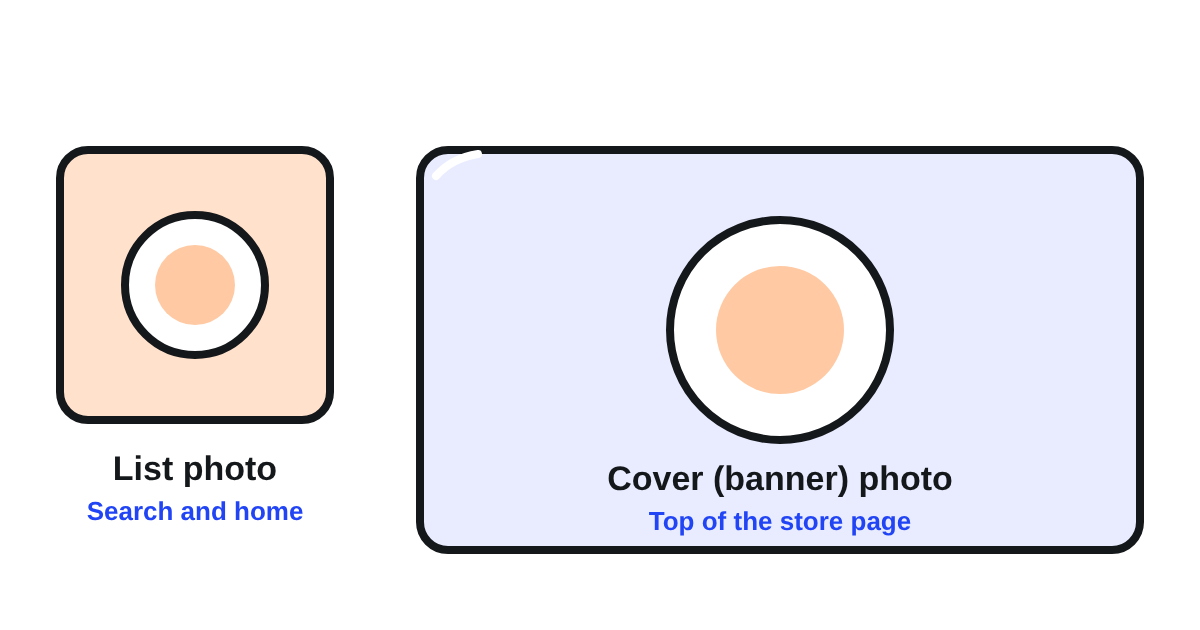
ขนาดรูปปก GrabFood (แกร็บ) แอปส่งอาหาร คือภาพแนวกว้างสัดส่วน 9:5 และ Grab ขอรูปของร้านสองรูป ไม่ใช่รูปเดียว รูปในรายการ (list photo) คือภาพสี่เหลี่ยมจัตุรัสที่ลูกค้าเห็นในผลการค้นหาและหน้าแรก Grab ประเทศไทยเรียกว่ารูปหลักของร้านในหน้าแรกของ GrabFood สัดส่วน 1:1 อย่างน้อย 750x7501 ส่วนรูปปกหรือแบนเนอร์ คือภาพแนวกว้างด้านบนของหน้าร้านเมื่อลูกค้ากดเข้ามา สัดส่วน 9:5 อย่างน้อย 1350x7502 สองภาพนี้คือสิ่งที่ลูกค้าเห็นจากร้านคุณก่อนจะอ่านเมนู บทความนี้บอกขนาดของแต่ละประเทศ อธิบายว่าทำไมไฟล์เดียวที่ 1,350x750 ใช้ได้ทุกที่ และบอกว่ารูปควรแสดงอะไร และเปลี่ยนรูปใน GrabMerchant อย่างไร
รูปของร้านบน GrabFood มีสองรูปอะไรบ้าง?
- รูปในรายการ: สี่เหลี่ยมจัตุรัส 1:1 แสดงทุกที่ที่ร้านของคุณอยู่ในรายการ ทั้งหน้าแรกและผลการค้นหา112 เป็นภาพที่ลูกค้าเห็นก่อนตัดสินใจกดเข้าร้าน
- รูปปก (แบนเนอร์): แนวกว้าง 9:5 แสดงด้านบนของหน้าร้านเมื่อลูกค้ากดเข้ามาแล้ว211 เป็นภาพที่ยืนยันว่าลูกค้าจะเจออาหารแบบไหน
รูปเมนูแต่ละจานแยกออกไปและมีขนาดของตัวเอง ซึ่งบทความของเราเรื่องรูปอาหารอธิบายไว้แล้ว
แต่ละประเทศขอขนาดเท่าไร?
ทุกประเทศขอรูปปก 9:5 และรูปในรายการแบบจัตุรัส ที่ต่างกันคือขนาดขั้นต่ำ:
| ประเทศ | รูปปก (แบนเนอร์) | รูปในรายการ |
|---|---|---|
| สิงคโปร์ | 9:5 อย่างน้อย 1,350x7504 | 1:1 อย่างน้อย 750x7503 |
| ไทย | 9:5 อย่างน้อย 1350x7502 | 1:1 อย่างน้อย 750x7501 |
| มาเลเซีย | 9:5 ขนาด 900x500 หรือเทียบเท่า5 | 1:1 ขนาด 500x500 ถึง 700x7006 |
| ฟิลิปปินส์ | 9:5 ขนาด 1,350x7508 หรือ 540x3009 | 1:17 |
| เวียดนาม | 540x30010 | 750x75010 |
| อินโดนีเซีย | 9:5 ขนาด 540x30011 | 1:1 ขนาด 500x50012 |
มีสองจุดที่ควรรู้ ฟิลิปปินส์ระบุขนาดรูปปกไว้สองแบบในสองบทความ: บทความคำขอเปลี่ยนรูปขออย่างน้อย 1,350x7508 ส่วนคู่มือรูปภาพบอก 540x3009 และบทความของสิงคโปร์เรื่องการปรับเมนูพูดถึงรูปปก 16:913 ขณะที่คู่มือรูปภาพบอก 9:54
สิ่งที่ควรทำ: ทำรูปปกเป็น 9:5 ขนาด 1,350x750 เป็นขนาดขั้นต่ำที่ใหญ่ที่สุดที่ประเทศไหนก็ระบุ จึงผ่านทุกประเทศ และ 540x300 กับ 900x500 ก็เป็นสัดส่วน 9:5 เหมือนกันในขนาดที่เล็กกว่า ให้ไฟล์เบาไว้: ไทยจำกัดไฟล์ JPG ไม่เกิน 5MB14 และมาเลเซียขอ 120kb ถึง 200kb5 ถ้าระบบไม่รับไฟล์ ให้เช็กน้ำหนักไฟล์ก่อน แล้วค่อยเช็กสัดส่วน
รูปปกควรแสดงอะไร?
อาหาร และเป็นอาหารที่ร้านขึ้นชื่อ Grab ประเทศไทยขอให้ใช้รูปที่เกี่ยวกับอาหาร เพราะลูกค้าดูรูปอาหารมากกว่าโลโก้15 สิงคโปร์ขอรูปที่สะท้อนธีมและอาหารของร้าน18 และฟิลิปปินส์เสริมว่าลูกค้าควรดูออกว่าร้านขายอาหารประเภทไหน19 ลูกค้าที่เห็นก๋วยเตี๋ยวในรูปปก ก็คาดว่าจะเจอก๋วยเตี๋ยวในเมนู
สิ่งที่ Grab บอกให้หลีกเลี่ยง:
- ตัวอักษรให้น้อยหรือไม่มีเลย ตัวอักษรและภาพอื่นใช้พื้นที่ได้ไม่เกิน 30% ของรูปในไทย16 และ 25% ในมาเลเซีย17
- ไม่ใช้รูปแบบตาราง ที่รวมหลายรูปไว้ในรูปเดียว28
- ไม่มีโลโก้หรือชื่อของแบรนด์อื่น ตามที่เวียดนามระบุ20
- เว้นพื้นที่รอบจาน ฟิลิปปินส์ขอให้หลีกเลี่ยงภาพระยะใกล้และเว้นพื้นที่รอบจาน21 บนพื้นเรียบหรือพื้นผิวอย่างไม้ เซรามิก หรือหินอ่อน22
เปลี่ยนรูปของร้านได้อย่างไร?
ในแอป GrabMerchant บทความของมาเลเซียบอกขั้นตอน: จากแท็บ More เลือก View and edit store profile23 แล้วเลือกรูปที่จะเปลี่ยน ในเวียดนาม เฉพาะเจ้าของร้านหรือผู้จัดการเท่านั้นที่เปลี่ยนรูปของร้านได้26
ทุกการเปลี่ยนแปลงต้องผ่านการตรวจของ Grab ก่อนจะแสดง เวียดนามบอกว่าใช้เวลา 2 ถึง 3 วันทำการ24 ฟิลิปปินส์ตอบทางอีเมลภายในสามถึงห้าวันทำการ25 ควรเปลี่ยนรูปก่อนช่วงที่ร้านยุ่ง ไม่ใช่ในวันนั้น
ในอินโดนีเซีย แบนเนอร์ยังแสดงข้อมูลโปรโมชันที่ร้านกำลังจัดอยู่ด้วย27 ถ้าคุณมีโปรโมชัน ให้เช็กว่าแบนเนอร์อ่านออกมาเป็นอย่างไร
สัปดาห์นี้ควรเช็กอะไรบ้าง?
- รูปในรายการ: จัตุรัส คมชัด และเป็นจานเด่นของร้าน ไม่ใช่โลโก้
- รูปปก: 9:5 อย่างน้อย 1,350x750 ไม่เกินน้ำหนักไฟล์ที่ประเทศของคุณกำหนด
- ตัวอักษรบนรูปทั้งสอง: ไม่เกิน 30% หรือ 25% ในมาเลเซีย
- รูปปกบอกลูกค้าใหม่ได้ในพริบตาหรือไม่ว่าร้านขายอาหารแบบไหน
- ถ้าจะเปลี่ยนรูป: ส่งคำขอก่อนวันที่ร้านยุ่ง
Kontimo อ่านร้านของคุณบน GrabFood ทุกเดือน ตั้งแต่รูปของร้านไปจนถึงเมนู และบอกด้วยภาษาที่เข้าใจง่ายว่าควรเปลี่ยนอะไรก่อน เพื่อให้ลูกค้าที่เห็นร้านของคุณกดเข้ามามากขึ้น
แหล่งข้อมูล 28 เอกสาร ตัวเลขทุกตัวตรวจย้อนกลับได้
- I want to update my menu or pricing, with the guidelines and requirements for menu photos (Grab merchant help centre, Thailand, article 360027910451), text of the article (อ่านเมื่อ 2026-10-21)
List photo The listing picture will appear as the main store photo on the GrabFood or Mart homepage. 1:1 aspect ratio Minimum Resolution: 750x750
- I want to update my menu or pricing, with the guidelines and requirements for menu photos (Grab merchant help centre, Thailand, article 360027910451), text of the article (อ่านเมื่อ 2026-10-21)
Store photo This is the banner photo, which appears at the top of the screen once consumers click into your store. 9:5 aspect ratio Resolution of at least 1350x750
- Getting the best photos for my store (Grab merchant help centre, Singapore), text of the article (อ่านเมื่อ 2026-10-21)
List photo 1:1 aspect ratio Resolution of at least 750x750
- Getting the best photos for my store (Grab merchant help centre, Singapore), text of the article (อ่านเมื่อ 2026-10-21)
Store photo 9:5 aspect ratio Resolution of at least 1,350x750
- Updating menu item, list and banner photos, with the standard photo guidelines (Grab merchant help centre, Malaysia, article 360027910411), text of the article (อ่านเมื่อ 2026-10-21)
Banner photos are to be in a 9:5 aspect ratio with a pixel resolution of 900x500 or the equivalent, and a size range of 120kb-200kb.
- Updating menu item, list and banner photos, with the standard photo guidelines (Grab merchant help centre, Malaysia, article 360027910411), text of the article (อ่านเมื่อ 2026-10-21)
Ensure the photo size for logo, list and item photos are in square mode 1:1 aspect ratio with a pixel resolution of 500×500 - 700x700
- Request to update cover photo (Grab merchant help centre, the Philippines), text of the article (อ่านเมื่อ 2026-11-13)
Upload two cover photos: one in 1:1 aspect ratio and another in 9:5 aspect ratio.
- Request to update cover photo (Grab merchant help centre, the Philippines), text of the article (อ่านเมื่อ 2026-11-13)
Ensure the photo dimensions are at least 750x750 and 1,350x750.
- Updating the cover photo and menu item photos, tips for better photos (Grab merchant help centre, the Philippines, article 360027910411), text of the article (อ่านเมื่อ 2026-10-21)
540x300 for store cover photos
- Tôi muốn thay đổi hình ảnh đại diện hoặc ảnh bìa cửa hàng (Grab merchant help centre, Vietnam), text of the article (อ่านเมื่อ 2026-11-13)
Độ phân giải 750x750 cho ảnh đại diện và 540x300 cho ảnh bìa của Cửa hàng.
- Ganti foto banner/list (Grab merchant help centre, Indonesia), text of the article (อ่านเมื่อ 2026-10-21)
Banner (rasio 9:5) Muncul saat konsumen klik profil toko Anda di aplikasi. Ukuran file: 540x300px
- Ganti foto banner/list (Grab merchant help centre, Indonesia), text of the article (อ่านเมื่อ 2026-10-21)
List (rasio 1:1) Muncul di halaman depan atau pencarian GrabFood/GrabMart sebagai foto utama toko Anda. Ukuran file: 500x500px
- Setting up pricing & menu optimisation (Grab merchant help centre, Singapore), text of the article (อ่านเมื่อ 2026-11-04)
Cover photos need both 16:9 and 1:1 aspect ratios.
- I want to update my menu or pricing, with the guidelines and requirements for menu photos (Grab merchant help centre, Thailand, article 360027910451), text of the article (อ่านเมื่อ 2026-10-21)
Save the photo in JPG format with a resolution of 1350x750 pixels. Ensure the file size does not exceed 5MB.
- I want to update my menu or pricing, with the guidelines and requirements for menu photos (Grab merchant help centre, Thailand, article 360027910451), text of the article (อ่านเมื่อ 2026-10-21)
Use food-related photos only, as consumers focus more on food images than logos.
- I want to update my menu or pricing, with the guidelines and requirements for menu photos (Grab merchant help centre, Thailand, article 360027910451), text of the article (อ่านเมื่อ 2026-10-21)
If text or other images are included, they should not occupy more than 30% of the photo area.
- Updating menu item, list and banner photos, with the standard photo guidelines (Grab merchant help centre, Malaysia, article 360027910411), text of the article (อ่านเมื่อ 2026-10-21)
Words, label, logo, graphic, must not take up more than 25% of the entire photo.
- Getting the best photos for my store (Grab merchant help centre, Singapore), text of the article (อ่านเมื่อ 2026-10-21)
Choose a photo that reflects your restaurant’s theme and food offerings.
- Request to update cover photo (Grab merchant help centre, the Philippines), text of the article (อ่านเมื่อ 2026-11-13)
Ensure customers can identify the type of food you serve.
- Tôi muốn thay đổi hình ảnh đại diện hoặc ảnh bìa cửa hàng (Grab merchant help centre, Vietnam), text of the article (อ่านเมื่อ 2026-11-13)
Hình ảnh không chứa logo hoặc tên của thương hiệu/cửa hàng khác.
- Request to update cover photo (Grab merchant help centre, the Philippines), text of the article (อ่านเมื่อ 2026-11-13)
Avoid close-up shots; leave ample space around the dish.
- Request to update cover photo (Grab merchant help centre, the Philippines), text of the article (อ่านเมื่อ 2026-11-13)
Textured backgrounds like wood, ceramic, or marble are recommended.
- Updating menu item, list and banner photos, with the standard photo guidelines (Grab merchant help centre, Malaysia, article 360027910411), text of the article (อ่านเมื่อ 2026-10-21)
From the bottom of the Merchant App page, go to 'More' and select 'View and edit store profile'.
- Tôi muốn thay đổi hình ảnh đại diện hoặc ảnh bìa cửa hàng (Grab merchant help centre, Vietnam), text of the article (อ่านเมื่อ 2026-11-13)
Grab sẽ tiến hành kiểm tra và cập nhật hình ảnh đại diện của cửa hàng trong vòng 2 - 3 ngày làm việc.
- Request to update cover photo (Grab merchant help centre, the Philippines), text of the article (อ่านเมื่อ 2026-11-13)
We’ll get back to you via email within three to five working days.
- Tôi muốn thay đổi hình ảnh đại diện hoặc ảnh bìa cửa hàng (Grab merchant help centre, Vietnam), text of the article (อ่านเมื่อ 2026-11-13)
Đối tác cần đăng nhập với chức vụ Chủ cửa hàng hoặc Quản lý để thực hiện thay đổi ảnh đại diện/ảnh bìa Cửa hàng.
- Cara perbarui informasi banner (Grab merchant help centre, Indonesia), text of the article (อ่านเมื่อ 2026-11-13)
Informasi pada banner terkait dengan promo yang sedang berjalan di toko Anda.
- I want to update my menu or pricing, with the guidelines and requirements for menu photos (Grab merchant help centre, Thailand, article 360027910451), text of the article (อ่านเมื่อ 2026-10-21)
Avoid grid format photos.
ตัวเลขทุกตัวข้างต้นมาจากเอกสารเหล่านี้ ตามที่เป็นอยู่ในวันที่ระบุ ตัวเลขที่ใช้กับร้านของคุณจริงคือสัญญาและรายงานยอดของร้านคุณเอง