JournalArticlesRank & Get Found
GrabFood cover photo size, market by market
The GrabFood cover photo size and list photo size in each market, why a 9:5 cover at 1,350x750 suits them all, what the photo should show and how to change it.
Singapore, Malaysia, Thailand, Philippines, Vietnam, Indonesia. Published , by Kontimo

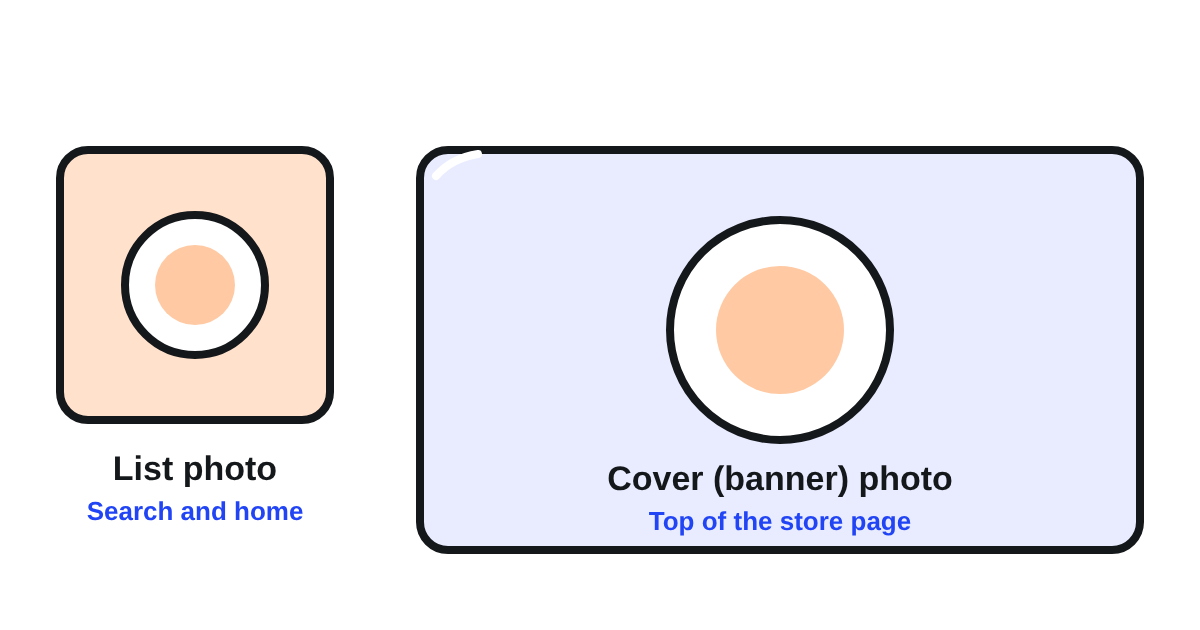
The GrabFood cover photo size is a wide 9:5 picture, and Grab asks for two store photos, not one. The list photo is the square picture customers see in search and on the home page: Grab Thailand calls it the main store photo on the GrabFood homepage, at 1:1 and at least 750x7501. The cover, or banner, photo is the wide picture at the top of your store page once a customer taps in, at 9:5 and at least 1350x7502. These two pictures are what customers see of your store before they read your menu. This article gives each market's sizes, explains why one export at 1,350x750 covers them all, and says what the photos should show and how to change them in GrabMerchant.
What are the two store photos on GrabFood?
- The list photo: square, 1:1, shown wherever your store appears in a list: the home page and the search results112. It is what a customer sees before deciding to tap in.
- The cover (banner) photo: wide, 9:5, shown at the top of your store page once a customer has tapped in211. It confirms what kind of food the customer will find.
Your dish photos are separate, with their own size; our article on dish photos covers them.
What size does each market ask for?
Every market asks for a 9:5 cover and a square list photo. The minimum size is where they differ:
| Market | Cover (banner) photo | List photo |
|---|---|---|
| Singapore | 9:5, at least 1,350x7504 | 1:1, at least 750x7503 |
| Thailand | 9:5, at least 1350x7502 | 1:1, at least 750x7501 |
| Malaysia | 9:5, 900x500 or equivalent5 | 1:1, 500x500 to 700x7006 |
| Philippines | 9:5, 1,350x7508 or 540x3009 | 1:17 |
| Vietnam | 540x30010 | 750x75010 |
| Indonesia | 9:5, 540x30011 | 1:1, 500x50012 |
Two oddities are worth knowing. The Philippines states two cover sizes in two articles: its update request asks for at least 1,350x7508, its photo guide says 540x3009. And a Singapore article on menu optimisation speaks of a 16:9 cover13, while its photo guide says 9:54.
What to do: export your cover at 9:5 and 1,350x750. It is the largest minimum any market states, so it meets every one of them, and 540x300 and 900x500 are the same 9:5 shape at a smaller size. Keep the file light: Thailand caps it at 5MB in JPG14, and Malaysia asks for 120kb to 200kb5. If your market refuses the file, check its weight first, then the ratio.
What should the cover photo show?
Food, and the food you are known for. Grab Thailand asks for food-related photos, noting that customers look at food more than at logos15. Singapore asks for a photo that reflects your restaurant's theme and food offerings18, and the Philippines adds that customers should be able to identify the type of food you serve19. A customer who sees noodles in your cover expects noodles on your menu.
Grab's rules on what to avoid:
- Little or no text. Text and other images may take no more than 30% of the photo in Thailand16, and 25% in Malaysia17.
- No grid of several photos28.
- No other brand's logo or name, as Vietnam states20.
- Room around the dish: the Philippines asks to avoid close-ups and leave space around it21, on a plain or textured background such as wood, ceramic or marble22.
How do you change your store photos?
In the GrabMerchant app. Malaysia's article gives the path: from the More tab, select View and edit store profile23, then choose the photo to replace. Only an owner or a manager can change the store's photos in Vietnam26.
Every change is reviewed by Grab before it shows. Vietnam says the update takes 2 to 3 working days24; the Philippines answers by email within three to five working days25. Change your photos before a busy period, not on the day.
In Indonesia, the banner also carries information about the promotion running in your store27: if you run one, check how your banner reads with it.
What should you check this week?
- Your list photo: square, sharp, and showing your best dish, not your logo.
- Your cover: 9:5, at least 1,350x750, under your market's weight limit.
- Text on either photo: under 30%, or 25% in Malaysia.
- Whether the cover tells a new customer, in one glance, what kind of food you serve.
- If you change them: the request sent before your busy days.
Kontimo reads your GrabFood store each month, from its photos to its menu, and says in plain language what to change first so more customers who see your store tap in.
Sources 28 documents, every figure traceable to one
- I want to update my menu or pricing, with the guidelines and requirements for menu photos (Grab merchant help centre, Thailand, article 360027910451), text of the article (read on 2026-10-21)
List photo The listing picture will appear as the main store photo on the GrabFood or Mart homepage. 1:1 aspect ratio Minimum Resolution: 750x750
- I want to update my menu or pricing, with the guidelines and requirements for menu photos (Grab merchant help centre, Thailand, article 360027910451), text of the article (read on 2026-10-21)
Store photo This is the banner photo, which appears at the top of the screen once consumers click into your store. 9:5 aspect ratio Resolution of at least 1350x750
- Getting the best photos for my store (Grab merchant help centre, Singapore), text of the article (read on 2026-10-21)
List photo 1:1 aspect ratio Resolution of at least 750x750
- Getting the best photos for my store (Grab merchant help centre, Singapore), text of the article (read on 2026-10-21)
Store photo 9:5 aspect ratio Resolution of at least 1,350x750
- Updating menu item, list and banner photos, with the standard photo guidelines (Grab merchant help centre, Malaysia, article 360027910411), text of the article (read on 2026-10-21)
Banner photos are to be in a 9:5 aspect ratio with a pixel resolution of 900x500 or the equivalent, and a size range of 120kb-200kb.
- Updating menu item, list and banner photos, with the standard photo guidelines (Grab merchant help centre, Malaysia, article 360027910411), text of the article (read on 2026-10-21)
Ensure the photo size for logo, list and item photos are in square mode 1:1 aspect ratio with a pixel resolution of 500×500 - 700x700
- Request to update cover photo (Grab merchant help centre, the Philippines), text of the article (read on 2026-11-13)
Upload two cover photos: one in 1:1 aspect ratio and another in 9:5 aspect ratio.
- Request to update cover photo (Grab merchant help centre, the Philippines), text of the article (read on 2026-11-13)
Ensure the photo dimensions are at least 750x750 and 1,350x750.
- Updating the cover photo and menu item photos, tips for better photos (Grab merchant help centre, the Philippines, article 360027910411), text of the article (read on 2026-10-21)
540x300 for store cover photos
- Tôi muốn thay đổi hình ảnh đại diện hoặc ảnh bìa cửa hàng (Grab merchant help centre, Vietnam), text of the article (read on 2026-11-13)
Độ phân giải 750x750 cho ảnh đại diện và 540x300 cho ảnh bìa của Cửa hàng.
- Ganti foto banner/list (Grab merchant help centre, Indonesia), text of the article (read on 2026-10-21)
Banner (rasio 9:5) Muncul saat konsumen klik profil toko Anda di aplikasi. Ukuran file: 540x300px
- Ganti foto banner/list (Grab merchant help centre, Indonesia), text of the article (read on 2026-10-21)
List (rasio 1:1) Muncul di halaman depan atau pencarian GrabFood/GrabMart sebagai foto utama toko Anda. Ukuran file: 500x500px
- Setting up pricing & menu optimisation (Grab merchant help centre, Singapore), text of the article (read on 2026-11-04)
Cover photos need both 16:9 and 1:1 aspect ratios.
- I want to update my menu or pricing, with the guidelines and requirements for menu photos (Grab merchant help centre, Thailand, article 360027910451), text of the article (read on 2026-10-21)
Save the photo in JPG format with a resolution of 1350x750 pixels. Ensure the file size does not exceed 5MB.
- I want to update my menu or pricing, with the guidelines and requirements for menu photos (Grab merchant help centre, Thailand, article 360027910451), text of the article (read on 2026-10-21)
Use food-related photos only, as consumers focus more on food images than logos.
- I want to update my menu or pricing, with the guidelines and requirements for menu photos (Grab merchant help centre, Thailand, article 360027910451), text of the article (read on 2026-10-21)
If text or other images are included, they should not occupy more than 30% of the photo area.
- Updating menu item, list and banner photos, with the standard photo guidelines (Grab merchant help centre, Malaysia, article 360027910411), text of the article (read on 2026-10-21)
Words, label, logo, graphic, must not take up more than 25% of the entire photo.
- Getting the best photos for my store (Grab merchant help centre, Singapore), text of the article (read on 2026-10-21)
Choose a photo that reflects your restaurant’s theme and food offerings.
- Request to update cover photo (Grab merchant help centre, the Philippines), text of the article (read on 2026-11-13)
Ensure customers can identify the type of food you serve.
- Tôi muốn thay đổi hình ảnh đại diện hoặc ảnh bìa cửa hàng (Grab merchant help centre, Vietnam), text of the article (read on 2026-11-13)
Hình ảnh không chứa logo hoặc tên của thương hiệu/cửa hàng khác.
- Request to update cover photo (Grab merchant help centre, the Philippines), text of the article (read on 2026-11-13)
Avoid close-up shots; leave ample space around the dish.
- Request to update cover photo (Grab merchant help centre, the Philippines), text of the article (read on 2026-11-13)
Textured backgrounds like wood, ceramic, or marble are recommended.
- Updating menu item, list and banner photos, with the standard photo guidelines (Grab merchant help centre, Malaysia, article 360027910411), text of the article (read on 2026-10-21)
From the bottom of the Merchant App page, go to 'More' and select 'View and edit store profile'.
- Tôi muốn thay đổi hình ảnh đại diện hoặc ảnh bìa cửa hàng (Grab merchant help centre, Vietnam), text of the article (read on 2026-11-13)
Grab sẽ tiến hành kiểm tra và cập nhật hình ảnh đại diện của cửa hàng trong vòng 2 - 3 ngày làm việc.
- Request to update cover photo (Grab merchant help centre, the Philippines), text of the article (read on 2026-11-13)
We’ll get back to you via email within three to five working days.
- Tôi muốn thay đổi hình ảnh đại diện hoặc ảnh bìa cửa hàng (Grab merchant help centre, Vietnam), text of the article (read on 2026-11-13)
Đối tác cần đăng nhập với chức vụ Chủ cửa hàng hoặc Quản lý để thực hiện thay đổi ảnh đại diện/ảnh bìa Cửa hàng.
- Cara perbarui informasi banner (Grab merchant help centre, Indonesia), text of the article (read on 2026-11-13)
Informasi pada banner terkait dengan promo yang sedang berjalan di toko Anda.
- I want to update my menu or pricing, with the guidelines and requirements for menu photos (Grab merchant help centre, Thailand, article 360027910451), text of the article (read on 2026-10-21)
Avoid grid format photos.
Every figure above comes from one of these documents, as it stood on the date given. Your own contract and statements are the figures that count for your restaurant.