ติดต่อฝ่ายบริการร้านค้า GrabFood อย่างไร
วิธีติดต่อฝ่ายบริการร้านค้า GrabFood (แกร็บ) จาก GrabMerchant: เส้นทางติดต่อ Grab รหัส PIN ที่ยืนยันร้าน เวลาแชทสด และสิ่งที่ควรเตรียมก่อนโทร
ประเทศ: สิงคโปร์, มาเลเซีย, ไทย, ฟิลิปปินส์, เวียดนาม, อินโดนีเซีย เผยแพร่ โดย Kontimo

การติดต่อฝ่ายบริการร้านค้า GrabFood (แกร็บ) แอปส่งอาหาร เริ่มจากแอป GrabMerchant เพราะ Grab ให้ร้านค้าติดต่อทีมช่วยเหลือผ่านแอปและศูนย์ช่วยเหลือ1 เปิดแท็บเพิ่มเติม เลือกช่วยเหลือและสนับสนุน แล้วเลือกติดต่อ Grab23 จากนั้นกดโทรหาเรา แอปจะแสดงรหัส PIN ที่ยืนยันร้านของคุณ และใส่รหัสนี้ให้ในการโทรเอง45 ในมาเลเซียมีแชทสดตอบทุกวันตั้งแต่ 10:00 AM ถึง 10:00 PM13 บทความนี้บอกเส้นทาง สิ่งที่ควรเตรียม และสิ่งหนึ่งที่ฝ่ายช่วยเหลือจะไม่ขอจากคุณเลย
ฝ่ายบริการลูกค้าอยู่ตรงไหนใน GrabMerchant?
หน้าช่วยเหลือของ Grab ไม่ได้ให้เบอร์โทรสำหรับร้านค้า แต่ให้ติดต่อผ่านแอป ในประเทศไทยและสิงคโปร์ใช้เส้นทางเดียวกัน คือเข้าสู่ระบบ เปิดแท็บเพิ่มเติมที่หน้าแรก เลือกช่วยเหลือและสนับสนุน แล้วเลือกติดต่อ Grab23 เลือกบริการของคุณ ซึ่งร้านอาหารคือ GrabFood แล้วกดโทรหาเรา4
สิงคโปร์มีอีกเส้นทางหนึ่ง คือเพิ่มเติม ช่วยเหลือและสนับสนุน ศูนย์ช่วยเหลือ แล้วเลือก GrabMerchant Matters และกดโทรหาเราที่ด้านล่างของหน้านั้น10
ในประเทศอื่น หน้าของ Grab ก็ชี้ไปทางเดียวกัน อินโดนีเซียให้ร้านค้าติดต่อทีมช่วยเหลือผ่านแอป GrabMerchant16 ฟิลิปปินส์ให้ติดต่อผ่านแอป GrabMerchant หรือศูนย์ช่วยเหลือ17
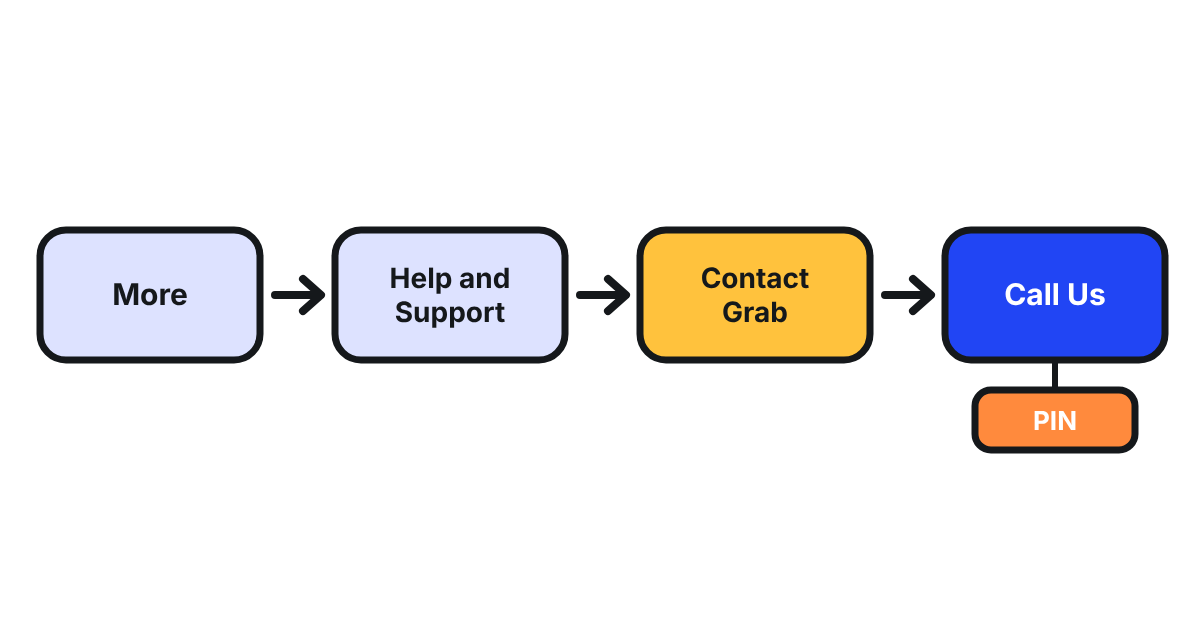
รหัส PIN คืออะไร และสำคัญอย่างไร?
เมื่อกดโทรหาเรา แอปจะสร้างรหัส PIN เฉพาะและแสดงบนหน้าจอ4 และรหัสจะถูกใส่ต่อท้ายเบอร์เมื่อโทร5 รหัสนี้บอกเจ้าหน้าที่ว่าร้านไหนกำลังโทรมา คุณจึงไม่ต้องเสียเวลาช่วงแรกยืนยันตัวตน และยังช่วยป้องกัน คือรหัส PIN มีไว้กันไม่ให้คนอื่นโทรมาแอบอ้างเป็นร้านของคุณเพื่อเข้าถึงข้อมูล9
มีสามเรื่องที่ควรรู้
- หมดอายุเร็ว รหัส PIN ใช้ได้ 5 นาที6 และในสิงคโปร์ใช้ซ้ำไม่ได้11 ควรโทรทันทีหลังเห็นรหัส
- ใช้โทรศัพท์เครื่องไหนก็ได้ ไม่จำเป็นต้องโทรจากเครื่องที่เข้าสู่ระบบอยู่7 และไม่ต้องใช้เบอร์ที่ลงทะเบียนกับ Grab8
- สำหรับร้าน GrabFood ในสิงคโปร์ รหัส PIN สร้างให้พาร์ทเนอร์ GrabFood และ GrabMart ไม่ใช่พาร์ทเนอร์ GrabPay12
มีแชทสดไหม?
ในมาเลเซียมี เมื่อเข้าสู่ระบบแล้ว คุณเข้าแชทสดได้ทุกวันตั้งแต่ 10:00 AM ถึง 10:00 PM วันจันทร์ถึงวันอาทิตย์ และส่งคำขอนอกเวลาได้13 หน้าเดียวกันยังรวมคำขอที่ร้านค้าใช้บ่อย เช่น ขอเปลี่ยนข้อมูลบัญชีธนาคาร14 ซึ่งแต่ละเรื่องมีแบบฟอร์มของตัวเอง ถ้ามีแบบฟอร์มให้ใช้แบบฟอร์ม เพราะมีข้อมูลที่ Grab ต้องการครบ และไม่ต้องติดต่อซ้ำ
หน้าของ Grab สำหรับประเทศอื่นไม่ได้บอกเวลาแชท ถ้าแอปของคุณไม่มีแชทหรือการโทร ให้ใช้แบบฟอร์มในศูนย์ช่วยเหลือสำหรับเรื่องนั้น
ใครในทีมขอได้บ้าง?
คำขอที่เปลี่ยนข้อมูลร้านต้องส่งจากบทบาทเจ้าของร้านหรือผู้จัดการ ทั้งมาเลเซีย15 และสิงคโปร์19 ระบุไว้ บัญชีแคชเชียร์ใช้ไม่ได้ ถ้ามีหลายคนดูแลบัญชี ให้ตกลงก่อนว่าใครถือบัญชีเจ้าของร้านหรือผู้จัดการ ก่อนจะต้องใช้ในคืนที่ยุ่ง
ก่อนโทรควรเตรียมอะไร?
- หมายเลขออเดอร์ สำหรับเรื่องเกี่ยวกับออเดอร์ การคืนเงิน หรือการยกเลิก
- วันที่และยอดเงิน สำหรับเรื่องเงินที่ได้รับ
- รูปหรือภาพหน้าจอ ของสิ่งที่ผิดพลาด
- ชื่อร้านและสาขา ถ้ามีมากกว่าหนึ่งร้าน
การโทรที่เริ่มด้วยข้อมูลเหล่านี้จะจบเร็วกว่า และการโทรที่จบด้วยหมายเลขคำขอจะมีหลักฐานไว้อ้างในครั้งต่อไป
ฝ่ายช่วยเหลือของ Grab จะไม่ขออะไรจากคุณ?
รหัสผ่าน รหัส PIN ของธนาคาร หรือรหัสใช้ครั้งเดียว ศูนย์ช่วยเหลือของ Grab ฟิลิปปินส์เตือนร้านค้าว่าห้ามให้รหัสผ่านบัญชี รหัส PIN ธนาคาร หรือ OTP กับใครเลย18 คนที่โทรมาขอสิ่งเหล่านี้ไม่ใช่ Grab ไม่ว่าเบอร์จะแสดงอะไร และนั่นคือเหตุผลของรหัส PIN คือคุณเป็นคนโทรหา Grab จากแอป และแอปเป็นตัวยืนยันว่าคุณคือใคร9
สัปดาห์นี้ควรเช็กอะไรบ้าง?
- เปิดเพิ่มเติม ช่วยเหลือและสนับสนุน ติดต่อ Grab ในแอปเวอร์ชันที่คุณใช้ได้
- ใครในทีมถือบัญชีเจ้าของร้านหรือผู้จัดการ
- ทีมของคุณรู้ว่า Grab ไม่เคยขอรหัสผ่านหรือรหัสใด ๆ
Kontimo อ่านบัญชี GrabFood ของคุณทุกเดือน และบอกเป็นภาษาง่าย ๆ ว่าอะไรแก้เองได้ และอะไรที่ควรโทรหา Grab เพื่อให้ทุกครั้งที่โทรขอในสิ่งที่ถูกต้อง
แหล่งข้อมูล 19 เอกสาร ตัวเลขทุกตัวตรวจย้อนกลับได้
- How to contact Grab Support via Help Centre (Grab merchant help centre, Thailand), text of the article (อ่านเมื่อ 2026-11-27)
We’ve made it easier for merchants to contact Grab Support through the GrabMerchant app and Help Centre.
- How to contact Grab Support via Help Centre (Grab merchant help centre, Thailand), text of the article (อ่านเมื่อ 2026-11-27)
Log into the GrabMerchant app and navigate to the 'More' tab located on the app's homepage.
- How to contact Grab Support via Help Centre (Grab merchant help centre, Thailand), text of the article (อ่านเมื่อ 2026-11-27)
Select 'Help and Support' and select 'Contact Grab' .
- How to contact Grab Support via Help Centre (Grab merchant help centre, Thailand), text of the article (อ่านเมื่อ 2026-11-27)
Tap on 'Call Us'. A unique PIN code will be generated and displayed on your screen.
- How to contact Grab Support via Help Centre (Grab merchant help centre, Thailand), text of the article (อ่านเมื่อ 2026-11-27)
The PIN code will automatically be appended to contact number.
- How to contact Grab Support via Help Centre (Grab merchant help centre, Thailand), text of the article (อ่านเมื่อ 2026-11-27)
Please note that the PIN code remains valid for 5 minutes.
- How to contact Grab Support via Help Centre (Grab merchant help centre, Thailand), text of the article (อ่านเมื่อ 2026-11-27)
It is not mandatory to use the same phone as the one logged into the GrabMerchant app.
- How to contact Grab Support via Help Centre (Grab merchant help centre, Thailand), text of the article (อ่านเมื่อ 2026-11-27)
You are not obligated to use a phone number registered with Grab.
- How to contact Grab Support via Help Centre (Grab merchant help centre, Thailand), text of the article (อ่านเมื่อ 2026-11-27)
Enhanced Security: PIN verification acts as a deterrent to potential fraudsters or unauthorized individuals attempting to impersonate merchants and gain access to sensitive store information.
- How to generate a PIN number to contact Grab (Grab merchant help centre, Singapore), text of the article (อ่านเมื่อ 2026-11-27)
Select ‘GrabMerchant Matters’
- How to generate a PIN number to contact Grab (Grab merchant help centre, Singapore), text of the article (อ่านเมื่อ 2026-11-27)
Note: The PIN code has a validity of 5 minutes and cannot be reused.
- How to generate a PIN number to contact Grab (Grab merchant help centre, Singapore), text of the article (อ่านเมื่อ 2026-11-27)
Please note that PIN Codes are only generated for GrabFood/GrabMart partners, not GrabPay partners.
- Report other issues as a merchant (Grab merchant help centre, Malaysia), text of the article (อ่านเมื่อ 2026-11-27)
Still can't find a solution to your request? Log in to join us on Live Chat for quick assistance. We’re online every day from 10:00 AM to 10:00 PM, Monday to Sunday. Alternatively, you may also reach out to us after hours by submitting a request below!
- Report other issues as a merchant (Grab merchant help centre, Malaysia), text of the article (อ่านเมื่อ 2026-11-27)
Request to update banking details
- Report other issues as a merchant (Grab merchant help centre, Malaysia), text of the article (อ่านเมื่อ 2026-11-27)
Please log in using the Owner or Manager role to submit a request.
- Proses pembayaran GrabFood (Indonesia), text of the article (อ่านเมื่อ 2026-10-09)
jangan ragu untuk menghubungi tim dukungan kami melalui aplikasi GrabMerchant
- GrabFood merchant chargeback for refunds (Grab merchant help centre, the Philippines), text of the article (อ่านเมื่อ 2026-11-18)
If you need further assistance, feel free to reach out to us through the GrabMerchant app or Help Center.
- How to handle missing or incomplete orders (Grab merchant help centre, the Philippines), text of the article (อ่านเมื่อ 2026-10-21)
Be cautious of scammers. Never share sensitive business information like account passwords, bank PINs, or OTPs with anyone.
- I want to appeal against an incident (Grab merchant help centre, Singapore), text of the article (อ่านเมื่อ 2026-11-04)
Important: Please log into the Owner or Manager role to submit a request.
ตัวเลขทุกตัวข้างต้นมาจากเอกสารเหล่านี้ ตามที่เป็นอยู่ในวันที่ระบุ ตัวเลขที่ใช้กับร้านของคุณจริงคือสัญญาและรายงานยอดของร้านคุณเอง