ปิดโฆษณา GrabFood: หยุดชั่วคราว จบ หรือแก้แคมเปญ
วิธีปิดโฆษณา GrabFood (แกร็บ) ใน GrabMerchant: หยุดชั่วคราวแล้วเริ่มใหม่ จบแคมเปญ แก้อะไรได้บ้าง และทำไม Grab หยุดโฆษณาของคุณเองเมื่อมียอดค่าโฆษณาค้างจ่าย
ประเทศ: สิงคโปร์, มาเลเซีย, ไทย, ฟิลิปปินส์, เวียดนาม, อินโดนีเซีย เผยแพร่ โดย Kontimo

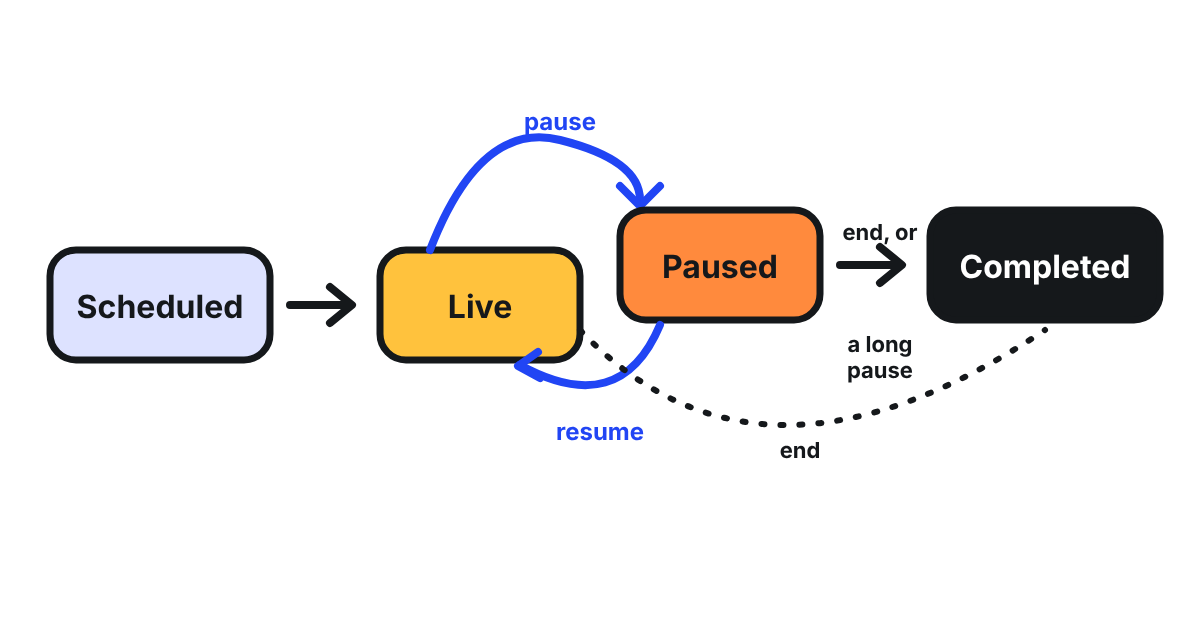
ถ้าต้องการปิดโฆษณา GrabFood (แกร็บ) แอปส่งอาหาร ให้เปิดแคมเปญใน GrabMerchant แล้วเลือกหยุดชั่วคราวหรือจบแคมเปญ คุณดู แก้ หยุดชั่วคราว หรือหยุดแคมเปญได้จากแอปโดยตรง1 แคมเปญที่หยุดชั่วคราวเริ่มใหม่ได้5 ส่วนแคมเปญที่จบแล้วเริ่มใหม่ไม่ได้ และแคมเปญที่หยุดชั่วคราวนานกว่า 60 วันจะถูกปิดถาวร7 ถ้าโฆษณาหยุดเองโดยที่คุณไม่ได้กดอะไร สาเหตุที่พบบ่อยคือมียอดค่าโฆษณาค้างจ่ายในกระเป๋าเงินของร้าน17 และโฆษณาจะกลับมาเมื่อชำระยอดนั้นแล้ว19 บทความนี้บอกว่าควรกดปุ่มไหน และแต่ละปุ่มมีผลอย่างไร
ปิดโฆษณา GrabFood ได้ที่ไหน?
ในแอป GrabMerchant กดเมนูการตลาดที่หน้าแรก2 แล้วไปที่แท็บจัดการ ซึ่งแสดงแคมเปญทั้งหมดของคุณ3 แคมเปญจะแบ่งเป็นกำลังทำงาน หยุดชั่วคราว ตั้งเวลาไว้ และเสร็จสิ้น515 เปิดแคมเปญที่ต้องการ กดรายละเอียดแคมเปญ แล้วเลื่อนลงไปด้านล่างสุด
หยุดชั่วคราวหรือจบแคมเปญ ควรเลือกแบบไหน?
- หยุดชั่วคราว เมื่อต้องการพัก เช่น สัปดาห์ที่ยุ่ง ครัวคนไม่พอ หรือจานหมด กดปุ่มสีแดงหยุดแคมเปญชั่วคราว4 แคมเปญจะย้ายไปอยู่ในส่วนหยุดชั่วคราว และกลับมาเริ่มใหม่ได้ด้วยขั้นตอนเดียวกัน5
- จบแคมเปญ เมื่อแคมเปญนั้นจบสำหรับคุณแล้ว กดปุ่มสีแดงจบแคมเปญ6 แคมเปญจะย้ายไปอยู่ในส่วนเสร็จสิ้น และเริ่มใหม่ไม่ได้
- ลบ แคมเปญที่ยังไม่เริ่ม แคมเปญที่ตั้งเวลาไว้ทำได้แค่ลบ9
การหยุดชั่วคราวไม่ใช่ตลอดไป ในสิงคโปร์และมาเลเซีย แคมเปญที่หยุดชั่วคราวนานกว่า 60 วันจะถูกเปลี่ยนเป็นเสร็จสิ้นและเริ่มใหม่ไม่ได้อีก78 ถ้าหยุดช่วงโลว์ซีซั่น ให้จดวันที่ไว้ เพราะถ้าเกิน 60 วัน คุณก็ต้องสร้างแคมเปญใหม่อยู่ดี
แคมเปญที่จบแล้วไม่ได้หายไป รายงาน ข้อมูลเชิงลึก และชิ้นงานโฆษณายังดูได้1516 ควรอ่านก่อนสร้างแคมเปญถัดไป
แก้แคมเปญแทนการหยุดได้ไหม?
ส่วนใหญ่ได้ และเป็นทางที่ดีกว่าเมื่อแคมเปญเกือบถูกแล้ว แคมเปญที่กำลังทำงานหรือตั้งเวลาไว้ แก้ได้ทั้งโฆษณาภาพ คีย์เวิร์ดค้นหา วันสิ้นสุด ค่าใช้จ่ายต่อออเดอร์ และงบประมาณ แต่งบประมาณเพิ่มได้อย่างเดียว10 เมื่อแคมเปญเริ่มแล้วจะเปลี่ยนวันเริ่มไม่ได้11 สำหรับโฆษณาภาพและโฆษณาค้นหา ยังเปลี่ยนกลุ่มเป้าหมายได้ด้วย12
ถ้าโฆษณาแพงเกินไป ลองใช้คีย์เวิร์ดน้อยลงหรือดีขึ้น กลุ่มเป้าหมายแคบลง หรือวันสิ้นสุดที่เร็วขึ้น ก่อนจะจบแคมเปญ ถ้าปัญหาคืองบประมาณ ทางเดียวที่จะลดได้คือจบแคมเปญแล้วสร้างใหม่ด้วยงบที่ต้องการ
แล้วโปรโมชันและแคมเปญของ Grab ล่ะ?
ใช้กฎต่างกัน โปรโมชัน GrabFood ที่กำลังใช้อยู่หยุดได้แต่เริ่มต่อไม่ได้ ต้องสร้างใหม่13 แคมเปญ Spotlight ซึ่งเป็นแคมเปญของ Grab เอง หยุดได้ด้วยการออกจากแคมเปญ และจะกลับเข้าร่วมได้หรือไม่ขึ้นกับแคมเปญนั้น14
ทำไมโฆษณาของคุณหยุดเอง?
ส่วนใหญ่เพราะกระเป๋าเงินของร้านมียอดค่าโฆษณาค้างจ่าย17 โฆษณาจะไม่แสดงต่อลูกค้าจนกว่าจะชำระยอดนั้น18 มีสองวิธี
- ให้รายได้ของร้านจ่าย เป็นค่าเริ่มต้นในสิงคโปร์ รายได้ของร้านจะหักชำระยอดค้าง ระหว่างนั้นอาจถอนเงินยอดขายไม่ได้ และโฆษณาจะกลับมาหนึ่งวันหลังชำระครบ19 ในอินโดนีเซีย22 และเวียดนาม24 โฆษณาจะกลับมาภายใน 24 ชั่วโมงหลังการหักครั้งสุดท้าย
- โอนเงินผ่านธนาคาร ในสิงคโปร์ โฆษณาจะกลับมาเมื่อการชำระเงินได้รับการดำเนินการ ซึ่งอาจใช้เวลาถึงหนึ่งสัปดาห์20 ในมาเลเซีย ให้ขอรายละเอียดการโอนจากทีมช่วยเหลือของ Grab21 ในอินโดนีเซีย ถ้ายอดค้างนานกว่า 60 วัน โฆษณาจะกลับมาภายใน 10 วันหลังโอนเงิน23
เครดิตถูกใช้ก่อน ถ้าคุณมีเครดิตโฆษณาฟรี ค่าโฆษณาจะถูกหักจากเครดิตก่อน25 ส่วนที่เหลือหักจากรายได้รายวันของร้าน26 เครดิตมีวันหมดอายุ ควรใช้ก่อนถึงวันนั้น27
สัปดาห์นี้ควรเช็กอะไรบ้าง?
- แท็บจัดการ: แคมเปญที่กำลังทำงานทุกแคมเปญยังคุ้มที่จะทำต่อหรือไม่ และแคมเปญที่หยุดชั่วคราวพร้อมวันที่หยุด
- แคมเปญที่หยุดชั่วคราวใกล้ 60 วัน: เริ่มใหม่หรือปล่อยให้ปิด โดยตั้งใจ
- กระเป๋าเงินของร้าน: ไม่มียอดค่าโฆษณาค้างที่อาจทำให้โฆษณาหยุดในวันที่ขายดี
- เครดิตโฆษณาและวันหมดอายุ
Kontimo อ่านโฆษณา GrabFood ของคุณทุกเดือน และบอกเป็นภาษาง่าย ๆ ว่าแคมเปญไหนควรเก็บไว้ แคมเปญไหนควรแก้ และแคมเปญไหนควรจบ
แหล่งข้อมูล 27 เอกสาร ตัวเลขทุกตัวตรวจย้อนกลับได้
- How to manage published campaigns (Grab merchant help centre, Singapore), text of the article (อ่านเมื่อ 2026-11-23)
You can view, edit, pause, or stop campaigns directly from the GrabMerchant app.
- How to manage published campaigns (Grab merchant help centre, Singapore), text of the article (อ่านเมื่อ 2026-11-23)
Tap the Marketing tile on your GrabMerchant app home screen.
- How to manage published campaigns (Grab merchant help centre, Singapore), text of the article (อ่านเมื่อ 2026-11-23)
Go to the Manage tab to view all campaigns.
- How to manage published campaigns (Grab merchant help centre, Singapore), text of the article (อ่านเมื่อ 2026-11-23)
Scroll to the bottom and click the red Pause Campaign button.
- How to manage published campaigns (Grab merchant help centre, Singapore), text of the article (อ่านเมื่อ 2026-11-23)
The campaign will move to the Paused section, where you can resume it later using the same steps.
- How to manage published campaigns (Grab merchant help centre, Singapore), text of the article (อ่านเมื่อ 2026-11-23)
Scroll to the bottom and click the red End Campaign button.
- How to manage published campaigns (Grab merchant help centre, Singapore), text of the article (อ่านเมื่อ 2026-11-23)
All campaigns paused for over 60 days will be automatically marked as "Completed" to streamline campaign management. The campaign will move to the Completed section, and it can’t be resumed anymore.
- How to manage published campaigns (Grab merchant help centre, Malaysia), text of the article (อ่านเมื่อ 2026-11-23)
All campaigns paused for over 60 days will be automatically marked as "Completed"
- How to manage published campaigns (Grab merchant help centre, Singapore), text of the article (อ่านเมื่อ 2026-11-23)
Scheduled Delete campaign NA
- How to manage published campaigns (Grab merchant help centre, Singapore), text of the article (อ่านเมื่อ 2026-11-23)
Budget (Note: Budget can only be increased)
- How to manage published campaigns (Grab merchant help centre, the Philippines), text of the article (อ่านเมื่อ 2026-11-23)
However, the start date and budget cannot be changed.
- How to manage published campaigns (Grab merchant help centre, Singapore), text of the article (อ่านเมื่อ 2026-11-23)
Note: For Image or Search ad campaigns, you can also edit your targeted audience.
- How to manage published campaigns (Grab merchant help centre, Singapore), text of the article (อ่านเมื่อ 2026-11-23)
Ongoing campaigns: Can be stopped but not resumed. You’ll need to set up a new campaign.
- How to manage published campaigns (Grab merchant help centre, Singapore), text of the article (อ่านเมื่อ 2026-11-23)
Ongoing campaigns: Can be stopped by leaving the campaign. Rejoining depends on the campaign design.
- How to manage published campaigns (Grab merchant help centre, Singapore), text of the article (อ่านเมื่อ 2026-11-23)
Completed: Campaigns that have finished
- How to manage published campaigns (Grab merchant help centre, Singapore), text of the article (อ่านเมื่อ 2026-11-23)
Reports, insights, and creative assets remain accessible.
- Why is my ad activity paused (Grab merchant help centre, Singapore), text of the article (อ่านเมื่อ 2026-11-23)
This usually happens when your store wallet has unpaid ad spend.
- Why is my ad activity paused (Grab merchant help centre, the Philippines), text of the article (อ่านเมื่อ 2026-11-23)
This means your ads won’t reach customers until the balance is cleared.
- Why is my ad activity paused (Grab merchant help centre, Singapore), text of the article (อ่านเมื่อ 2026-11-23)
Auto Deduction (Default): Your store earnings will automatically cover the outstanding balance. During this time, you may not be able to cash out on sales. Ad delivery should resume one day after the balance is fully cleared.
- Why is my ad activity paused (Grab merchant help centre, Singapore), text of the article (อ่านเมื่อ 2026-11-23)
Manual Bank Transfer (Recommended): You can pay the outstanding balance via bank transfer. Ad delivery will resume once the payment is processed, which may take up to one week.
- Why is my ad activity paused (Grab merchant help centre, Malaysia), text of the article (อ่านเมื่อ 2026-11-23)
Bank Transfer: If auto deduction isn't an option, contact Grab Support for bank transfer instructions.
- Aktivitas iklan dijeda (Grab merchant help centre, Indonesia), text of the article (อ่านเมื่อ 2026-11-23)
Campaign iklan Anda akan kembali aktif dalam 24 jam setelah sistem memotong semua biaya pembelanjaan iklan yang perlu dilunasi.
- Aktivitas iklan dijeda (Grab merchant help centre, Indonesia), text of the article (อ่านเมื่อ 2026-11-23)
Jika biaya pembelanjaan iklan yang perlu dilunasi sudah lebih dari 60 hari, campaign iklan akan kembali aktif dalam 10 hari setelah Anda melakukan pembayaran melalui transfer bank.
- Tại sao hoạt động quảng cáo của tôi bị tạm dừng (Grab merchant help centre, Vietnam), text of the article (อ่านเมื่อ 2026-11-23)
Chiến dịch Quảng cáo sẽ được hoạt động trở lại trong vòng 24 giờ kể từ khi hệ thống cấn trừ hết số tiền nợ quảng cáo cần thanh toán.
- Using credits on Marketing Manager (Grab merchant help centre, Singapore), text of the article (อ่านเมื่อ 2026-11-23)
Your ad spend will first be deducted from your available ad credits.
- Using credits on Marketing Manager (Grab merchant help centre, Singapore), text of the article (อ่านเมื่อ 2026-11-23)
Any remaining ad spend will be charged from your daily store earnings.
- Using credits on Marketing Manager (Grab merchant help centre, Singapore), text of the article (อ่านเมื่อ 2026-11-23)
Expired credits cannot be used, so make sure to utilise them before their expiration date.
ตัวเลขทุกตัวข้างต้นมาจากเอกสารเหล่านี้ ตามที่เป็นอยู่ในวันที่ระบุ ตัวเลขที่ใช้กับร้านของคุณจริงคือสัญญาและรายงานยอดของร้านคุณเอง